LibreTranslate with Docker: Your Own Translation API, No Google Needed (Linux, Windows, Mac)
Before you start
- 21 min read
- Updated November 2026
Boxes marked Run in terminal are what you type; plain text explains why. Check what you need first
What you get in one minute#
LibreTranslate is a free translation web page and API that you run yourself: you send it text, it sends back a translation, and no Google or Azure service does the translating.

Logo: the official LibreTranslate project (the picture listed in its trademark guidelines, github.com/LibreTranslate)
An API is a web address that programs can call. Call it from a script or any app that speaks the LibreTranslate API, or paste text into its web page. It can translate HTML without breaking tags, translate batches, and keep your word choices with a glossary.
| What | Value (official sources, read November 2026) |
|---|---|
| Current version | LibreTranslate v1.10.0, released 24 November 2026 (previous: v1.9.6, May 2026) |
| Image to pin | libretranslate/libretranslate:v1.10.0 (Docker Hub; amd64 and arm64) |
| Time needed | About 20 minutes plus the first model download (our estimate, not measured) |
| RAM and disk | No official minimum. A 2021 forum reply says 4 GB RAM or more. English and Spanish models are 355 MB; all models are about 8.3 GB (docs table) |
| Port | TCP 5000 (web page and API) |
| Licence | AGPL v3. No paid self-hosted edition found; the paid service is the hosted libretranslate.com |
| Official docs | docs.libretranslate.com and the README at v1.10.0 |
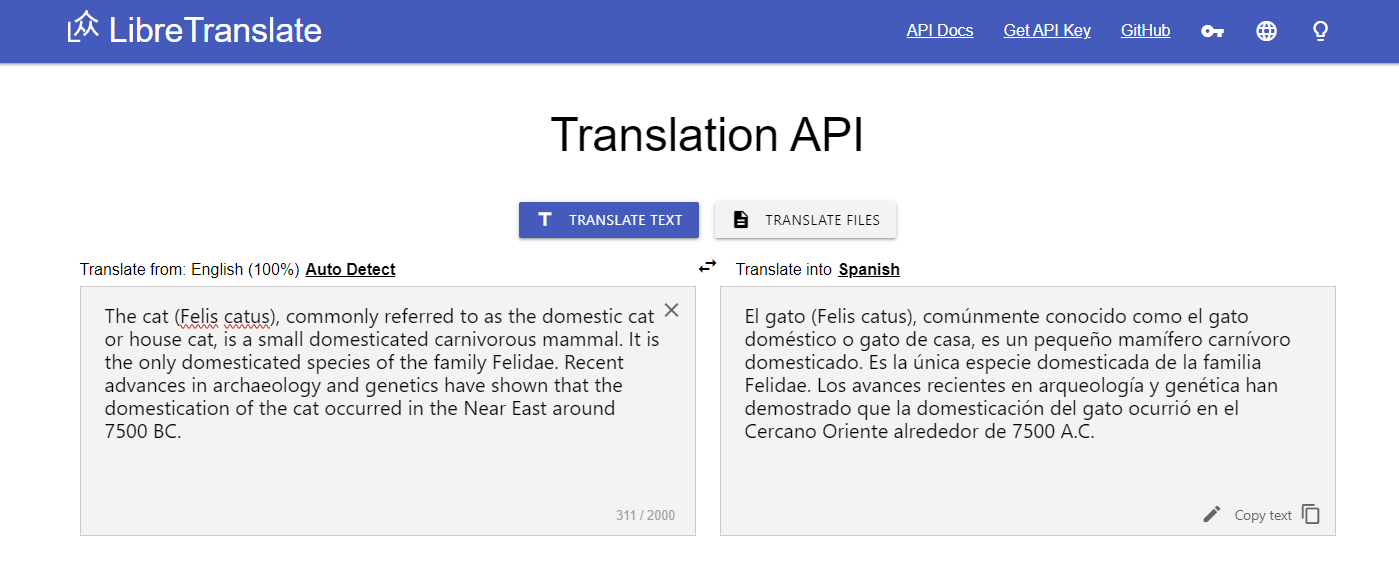
Image: the official LibreTranslate project (README at v1.10.0, "Translation" screenshot)
At a glance:
- What it is: one Python program in one container. Argos Translate, an open source library with one small model per language pair, does the translating.
- Languages: 98 directions and 49 language codes in the docs. You choose which to download.
- Privacy: your text stays on your machine; models come from the internet on first start and updates.
- Licence in plain words (not legal advice): private use adds no duty. If you change the code and let others use it over a network, you must offer them your source.
Which version. v1.10.0 is one day old as we write; we found no report of trouble with it. Against v1.9.6 the Compose file, Dockerfile and health check are identical. Only the start script changed: it sets OMP_NUM_THREADS=1 (a fix for freezes under parallel load, issue 1008) and reads a new LT_TIMEOUT. The fallback tag is v1.9.6.
How it fits together#
Your browser or script sends text to port 5000, LibreTranslate hands it to Argos Translate, and Argos reads its language models from a folder on your disk.

Drawn for this guide from the official Dockerfile, start script and docs at v1.10.0. Dashed parts are optional or happen only sometimes.
Before you start#
You need Docker with Compose, a text editor and an internet connection for the first start.
| System | What to have |
|---|---|
| Linux | Docker Engine and the Compose plugin; x86-64 or arm64 (64-bit Raspberry Pi OS works; no 32-bit image) |
| Windows | Docker Desktop in Linux-container mode (WSL 2 backend), PowerShell |
| Mac | Docker Desktop, Intel or Apple Silicon |
docker --version
docker compose version
Checklist:
- [ ] Docker and Compose print versions
- [ ] Port 5000 is free (we publish it on
127.0.0.1only) - [ ] Docker can reach Docker Hub and
raw.githubusercontent.com - [ ] About 2 GB free for the image and two languages
- [ ] For the HTTPS section only: a domain with a DNS record, and ports 80 and 443 free
Tested by DIY Lab Hub: not yet. Commands and files come from the official files at tag v1.10.0 and the official docs, read in November 2026. We did not run them.
Step 1: Create the folders#
LibreTranslate needs models for the language models, cache for the sentence-splitting models and db for the optional API key file. Backups go to backups. The container runs as user 1032, not root (the official Dockerfile creates it), so on Linux you must hand the folders over.
Linux#
mkdir -p ~/docker_volumes/libretranslate/{models,cache,db,backups}
cd ~/docker_volumes/libretranslate
sudo chown -R 1032:1032 models cache db
ls -ln
Windows (PowerShell)#
New-Item -ItemType Directory -Force "$HOME\docker_volumes\libretranslate\models", "$HOME\docker_volumes\libretranslate\cache", "$HOME\docker_volumes\libretranslate\db", "$HOME\docker_volumes\libretranslate\backups" | Out-Null
Set-Location "$HOME\docker_volumes\libretranslate"
Get-ChildItem
We did not test folder permissions on Docker Desktop. If the log shows PermissionError: [Errno 13] Permission denied, use named volumes (see Troubleshooting), as the maintainer advised in a forum thread.
Mac (Terminal)#
mkdir -p ~/docker_volumes/libretranslate/{models,cache,db,backups}
cd ~/docker_volumes/libretranslate
ls -la
No chown here. Docker Desktop for Mac permissions are untested too; the same fallback applies.
Check it worked. On Linux, ls -ln shows 1032 1032 as owner of models, cache and db. On Windows and Mac you see four empty folders.
Tip: The
cachemount matters: the sentence-splitting models (MiniSBD) go to~/.cache/minisbd, which is outside the official.localmount (we read the MiniSBD 0.9.5 source). Without it they download again after the container is recreated, which breaks offline use (issue 952 was such a bug). Keepmodelson a disk with space: one full install showed 9.4 GB.
Step 2: Write the Compose file and start LibreTranslate#
This is the official docker-compose.yml (identical at v1.9.6 and v1.10.0) with changes: a pinned tag, the port on 127.0.0.1 only (the official 5000:5000 listens on every interface), three data folders, English and Spanish only, and a telemetry switch explained in the Security section. LT_LOAD_ONLY: "en,es" downloads only the packages whose two languages are both in the list, instead of about 8.3 GB.
Linux#
cd ~/docker_volumes/libretranslate
cat > docker-compose.yml << 'EOF'
services:
  libretranslate:
    image: libretranslate/libretranslate:v1.10.0
    container_name: libretranslate
    restart: unless-stopped
    ports:
      - "127.0.0.1:5000:5000"
    environment:
      LT_LOAD_ONLY: "en,es"
      ORT_DISABLE_TELEMETRY: "1"
    volumes:
      - ./models:/home/libretranslate/.local
      - ./cache:/home/libretranslate/.cache
      - ./db:/app/db
    healthcheck:
      test: ["CMD-SHELL", "./venv/bin/python scripts/healthcheck.py"]
      interval: 10s
      timeout: 4s
      retries: 4
      start_period: 5s
EOF
docker compose up -d
docker compose logs -f libretranslate
Press Ctrl+C to stop reading the log; the container keeps running.
Windows (PowerShell)#
Set-Location "$HOME\docker_volumes\libretranslate"
@'
services:
  libretranslate:
    image: libretranslate/libretranslate:v1.10.0
    container_name: libretranslate
    restart: unless-stopped
    ports:
      - "127.0.0.1:5000:5000"
    environment:
      LT_LOAD_ONLY: "en,es"
      ORT_DISABLE_TELEMETRY: "1"
    volumes:
      - ./models:/home/libretranslate/.local
      - ./cache:/home/libretranslate/.cache
      - ./db:/app/db
    healthcheck:
      test: ["CMD-SHELL", "./venv/bin/python scripts/healthcheck.py"]
      interval: 10s
      timeout: 4s
      retries: 4
      start_period: 5s
'@ | Set-Content -Encoding ascii docker-compose.yml
docker compose up -d
docker compose logs -f libretranslate
Mac (Terminal)#
Same commands as Linux (Docker Desktop must be running).
Check it worked. The first start downloads models, so wait. The log shows a banner with v1.10.0 and Booting.... From the source code, expect Updating language models, Found N models, Keep 2 models, Downloading ..., Downloading MiniSBD models, Power cycling... once, then gunicorn (the web server) starting. These texts come from the source files, not a captured run.
Tip: In
127.0.0.1:5000:5000the first 5000 is the host port. If it is taken, use127.0.0.1:5001:5000and 5001 in the URLs.
Tip:
docker compose pscan sayhealthywhile models still download. The health check succeeds at once while the flag file/tmp/booting.flagexists. Port 5000 opens only after the download ends, so read the log before you test.
Step 3: Translate your first text#
At first no API key is needed. Use the web page, or curl (a command-line tool that calls web addresses).
Linux#
curl -s http://127.0.0.1:5000/health
echo
curl -s http://127.0.0.1:5000/languages
echo
curl -s -X POST http://127.0.0.1:5000/translate -d q="Hello" -d source=en -d target=es
echo
Windows (PowerShell)#
In PowerShell curl is an alias for another command. Type curl.exe, or use Invoke-RestMethod:
curl.exe -s http://127.0.0.1:5000/health
curl.exe -s http://127.0.0.1:5000/languages
Invoke-RestMethod -Method Post -Uri "http://127.0.0.1:5000/translate" -Body @{ q = "Hello"; source = "en"; target = "es" }
Mac (Terminal)#
Same commands as Linux.
Check it worked. /health answers {"status":"ok"} (from the source). /languages lists en and es. The docs' own example for Hello from en to es is below (the docs' example, not a captured run):
{"translatedText":"Hola"}
Open http://127.0.0.1:5000 for the web page and http://127.0.0.1:5000/docs for the built-in API manual.
Tip: If
/translatesays a language "is not supported", it is not installed. Check/languages, then see Step 5.
Step 4: Call it from scripts and apps#
Any tool that can send an HTTP POST can use it, such as workflows in our n8n guide. Send JSON or form fields (official API docs): q is the text or a list of texts; source is a code or auto (the reply adds detectedLanguage); target; format is text or html (keeps tags); alternatives; glossary (new in v1.10.0, up to 200 pairs); api_key (after Step 6).
Linux#
curl -s -X POST http://127.0.0.1:5000/translate \
  -H "Content-Type: application/json" \
  -d '{"q": "<p>Hello from CloudBox!</p>", "source": "auto", "target": "es", "format": "html", "glossary": {"CloudBox": "CajaNube"}}'
echo
curl -s -X POST http://127.0.0.1:5000/translate \
  -H "Content-Type: application/json" \
  -d '{"q": ["Hello", "Thank you"], "source": "en", "target": "es"}'
echo
Windows (PowerShell)#
$body = @{ q = "<p>Hello from CloudBox!</p>"; source = "auto"; target = "es"; format = "html"; glossary = @{ CloudBox = "CajaNube" } } | ConvertTo-Json -Depth 4
Invoke-RestMethod -Method Post -Uri "http://127.0.0.1:5000/translate" -ContentType "application/json" -Body $body
$batch = @{ q = @("Hello", "Thank you"); source = "en"; target = "es" } | ConvertTo-Json
Invoke-RestMethod -Method Post -Uri "http://127.0.0.1:5000/translate" -ContentType "application/json" -Body $batch
Mac (Terminal)#
Same commands as Linux.
Check it worked. The first answer keeps the <p> tags and adds detectedLanguage. The second holds two translations in order. We did not run these calls.
The docs list client libraries for many programming languages.
Step 5: Add more languages#
LT_LOAD_ONLY only decides what is downloaded; the server offers whatever is installed. Once two or more packages exist, the start script does not fetch more by itself (we read init.py at v1.10.0). So add French and German by hand. Docs-table download sizes: en+es 355 MB, en+fr 126 MB, en+de 166 MB, en+ja 227 MB, en+es+fr+de 647 MB (6 packages), plus small sentence-splitting models. Argos pivots through English at some quality cost, so keep en in the list.
Linux#
cd ~/docker_volumes/libretranslate
docker compose exec libretranslate ./venv/bin/python scripts/install_models.py --load_only_lang_codes en,es,fr,de
docker compose restart libretranslate
Then set LT_LOAD_ONLY in docker-compose.yml to "en,es,fr,de", so a fresh start downloads the same set.
Windows (PowerShell)#
Set-Location "$HOME\docker_volumes\libretranslate"
docker compose exec libretranslate ./venv/bin/python scripts/install_models.py --load_only_lang_codes en,es,fr,de
docker compose restart libretranslate
notepad docker-compose.yml
Mac (Terminal)#
Same commands as Linux.
Check it worked. The script prints Keep 6 models and Downloading .... After the restart /languages lists en, es, fr and de. A wrong code gives Unavailable language codes: xx.
Tip: The docs FAQ shows
install_models.py --updatewith no language list. In the source that also installs every package you do not have yet, about 8.3 GB. Keep your list:install_models.py --update --load_only_lang_codes en,es,fr,de. We read this in the code; we did not run it.
Step 6: Require an API key#
By default anyone who can reach port 5000 can translate. The docs tip: set --req-limit to 0 and turn API keys on, and requests without a proper key are rejected. We also switch off file translation (see Security). Add three lines under environment::
      LT_API_KEYS: "true"
      LT_REQ_LIMIT: "0"
      LT_DISABLE_FILES_TRANSLATION: "true"
Linux#
cd ~/docker_volumes/libretranslate
nano docker-compose.yml
docker compose up -d
docker compose exec libretranslate ltmanage keys add 120
ltmanage manages keys; add 120 makes a key allowed 120 requests per minute and prints it. If it prints No such database: db/api_keys.db, the server has not finished starting with keys on; wait and retry. Test three cases:
MY_KEY="<your-key>"
curl -s -X POST http://127.0.0.1:5000/translate -d q="Hello" -d source=en -d target=es
curl -s -X POST http://127.0.0.1:5000/translate -d q="Hello" -d source=en -d target=es -d api_key="wrong"
curl -s -X POST http://127.0.0.1:5000/translate -d q="Hello" -d source=en -d target=es -d api_key="$MY_KEY"
Windows (PowerShell)#
Set-Location "$HOME\docker_volumes\libretranslate"
notepad docker-compose.yml
docker compose up -d
docker compose exec libretranslate ltmanage keys add 120
$MY_KEY = "<your-key>"
curl.exe -s -X POST http://127.0.0.1:5000/translate -d "q=Hello" -d "source=en" -d "target=es"
curl.exe -s -X POST http://127.0.0.1:5000/translate -d "q=Hello" -d "source=en" -d "target=es" -d "api_key=wrong"
curl.exe -s -X POST http://127.0.0.1:5000/translate -d "q=Hello" -d "source=en" -d "target=es" -d "api_key=$MY_KEY"
Mac (Terminal)#
Same commands as Linux.
Check it worked. No key: a JSON error and no translation (the docs give no exact text). Wrong key: {"error":"Invalid API key"} (from the source). Your key: the translation. db/api_keys.db now exists in db. The web page header gets a key icon ("Set API Key"); click it and paste your key, or the page cannot translate. More commands: ltmanage keys lists, ltmanage keys remove <api-key> deletes, ltmanage keys add 120 --char-limit 5000 also caps characters per request.
Tip: The key travels in the field
api_key, not in anAuthorization: Bearerheader (Bearer is only for/metrics). Send keys over HTTPS once they leave your machine.
Step 7: Optional GPU (CUDA, Linux and NVIDIA only)#
Skip this on a normal home setup. The CUDA image is libretranslate/libretranslate:v1.10.0-cuda (1.92 GB, amd64 only). The docs say it needs CUDA 12.4.1 and nvidia-docker. The official docker-compose.cuda.yml uses latest-cuda, runs as root and sets LT_DEBUG=True. We found no VRAM figure and did not test it.
Linux#
Copy the official docker-compose.cuda.yml and change the tag to v1.10.0-cuda, LT_DEBUG to "false" and the port to 127.0.0.1:5000:5000.
Windows (PowerShell)#
Not covered by the official docs. Keep the CPU setup.
Mac (Terminal)#
No CUDA on a Mac. Keep the CPU setup.
Check it worked. We did not run it, so we cannot show a result.
Put it behind HTTPS (with or without Traefik)#
Skip this if you only use it on your own computer. For https://translate.<your-domain> you need a domain pointing at the server and ports 80 and 443 reachable.
Use translate.<your-domain>, never libretranslate.<your-domain>. The trademark guidelines forbid the name in a domain, and the page shows "This website might be in violation of our trademark guidelines" for such hosts (issue 1026).
Behind a proxy every visitor looks like the proxy. New in v1.10.0, LT_TRUST_FORWARDED_FOR: "true" counts the first address in X-Forwarded-For as the client for rate limits. Set it only if the proxy is the only way in, because anyone who reaches the container directly can fake that header. Both routes use a shared proxy network; create it once:
docker network create proxy
With Traefik#
On a server that already runs Traefik v3 with the Docker provider, add labels and drop the ports: block. No official page covers Traefik; these labels are our adaptation.
services:
  libretranslate:
    image: libretranslate/libretranslate:v1.10.0
    container_name: libretranslate
    restart: unless-stopped
    environment:
      LT_LOAD_ONLY: "en,es,fr,de"
      ORT_DISABLE_TELEMETRY: "1"
      LT_API_KEYS: "true"
      LT_REQ_LIMIT: "0"
      LT_DISABLE_FILES_TRANSLATION: "true"
      LT_TRUST_FORWARDED_FOR: "true"
    volumes:
      - ./models:/home/libretranslate/.local
      - ./cache:/home/libretranslate/.cache
      - ./db:/app/db
    healthcheck:
      test: ["CMD-SHELL", "./venv/bin/python scripts/healthcheck.py"]
      interval: 10s
      timeout: 4s
      retries: 4
      start_period: 5s
    networks:
      - proxy
    labels:
      - "traefik.enable=true"
      - "traefik.docker.network=proxy"
      - "traefik.http.routers.libretranslate.rule=Host(`translate.<your-domain>`)"
      - "traefik.http.routers.libretranslate.entrypoints=https"
      - "traefik.http.routers.libretranslate.tls=true"
      - "traefik.http.routers.libretranslate.tls.certresolver=le"
      - "traefik.http.services.libretranslate.loadbalancer.server.port=5000"

networks:
  proxy:
    external: true
Names https and le match our Traefik guide; use yours. Run docker compose up -d. Check it worked. curl -I https://translate.<your-domain>/health returns an HTTP status line over HTTPS with a valid certificate (on Windows use curl.exe).
Without Traefik: Caddy#
Choose this if you have no Traefik. Caddy gets and renews its own certificates. The official FAQ shows reverse_proxy localhost:5000. Inside Docker localhost is the Caddy container, so we use the container name. Use the file above without the labels: block, and keep the host port out of it (Caddy reaches the container over the network). Then add Caddy:
mkdir -p ~/docker_volumes/caddy/{conf,data,config}
cd ~/docker_volumes/caddy
cat > docker-compose.yml << 'EOF'
services:
  caddy:
    image: caddy:2.11.9
    container_name: caddy
    restart: unless-stopped
    ports:
      - "80:80/tcp"
      - "443:443/tcp"
      - "443:443/udp"
    volumes:
      - ./conf:/etc/caddy:ro
      - ./data:/data
      - ./config:/config
    networks:
      - proxy

networks:
  proxy:
    external: true
EOF
Save ~/docker_volumes/caddy/conf/Caddyfile for a public domain:
translate.example.com {
    reverse_proxy libretranslate:5000
}
For a home-only name use tls internal:
translate.home.arpa {
    tls internal
    reverse_proxy libretranslate:5000
}
Start both stacks with docker compose up -d in each folder (the Docker commands work unchanged in PowerShell or Terminal). For tls internal, each device must trust Caddy's root once; our Caddy guide has the steps for Linux, Windows and Mac.
Check it worked. curl -I https://translate.example.com/health shows an HTTP status line over HTTPS. A home name shows a padlock only after the root is trusted.
Tip: The docs name no WebSocket need. For NGINX, copy the
proxy_set_headerlines from the FAQ.
Security and testing#
| Control | How |
|---|---|
| Where it listens | Keep 127.0.0.1:5000 or a proxy network. The official 5000:5000 is open to your whole LAN |
| Login | There is no user login. Use API keys with LT_REQ_LIMIT: "0"; add a VPN or proxy login if the page must be private. Do not trust --require-api-key-secret: a script can get past it (issue 1034) |
| File translation | Keep LT_DISABLE_FILES_TRANSLATION: "true". In the v1.10.0 code /download_file/ has no key check (issue 1012), and file links are built as http:// behind HTTPS (issue 979) |
| Metrics | Leave LT_METRICS off, or set LT_METRICS_AUTH_TOKEN. The labels hold API keys and the page is open without a token (issue 1033) |
| Docker socket, debug | The official Compose file has none; never add docker.sock or privileged mode. Keep LT_DEBUG off |
What leaves the machine. Translation runs locally. The first start and each model update fetch the package index (from raw.githubusercontent.com/argosopentech/argospm-index), the models and the MiniSBD models (from the MiniSBD releases on GitHub). We found no setting that stops this.
Issue 1035 reports that onnxruntime 1.29 or later (a library in the image) sends telemetry to mobile.events.data.microsoft.com on port 443, and that ORT_DISABLE_TELEMETRY=1 stops it. LibreTranslate does not pin onnxruntime, so v1.10.0 may contain it. We did not run the image or watch its traffic, which is why our file sets the variable.
Quick tests after each change:
cd ~/docker_volumes/libretranslate
docker compose ps
docker compose logs --tail=100 libretranslate
curl -s http://127.0.0.1:5000/health
On Windows use curl.exe. docker compose ps should show 127.0.0.1:5000->5000/tcp.
LibreTranslate, an AI model, or Google?#
LibreTranslate uses one small model per language pair (62 to 272 MB each in the docs table) and translates sentence by sentence. The Argos maintainer calls the result "very literal". We found no official score against DeepL or Google, so we claim nothing about them.
One community report (a 14 November 2026 forum post relaying a third-party test) ran LibreTranslate 1.9.6 on four CPU cores with 100 sentences per direction from WMT test sets, scored with chrF (higher is better). English to German: LibreTranslate 60.5, a 27B local AI model 64.0, a 3B model 53.2. English to French: 62.0, 63.1 and 57.5. 100 sentences took 34 s (CPU), 97 s (27B on GPU) and 403 s (3B on CPU). Plain-text mode passed 5 of 9 Markdown checks, the AI models 9 of 9; format: "html" kept the structure. It is one report, not a promise.
| Option | What it is | Choose it when |
|---|---|---|
| LibreTranslate | Small models, CPU-friendly, web page and API, AGPL v3 | You want a small private service with predictable speed |
| LTEngine | Same project: a compatible API using a local AI model via llama.cpp. README (approximate): gemma3-4b about 4 GB RAM, gemma3-27b about 16 GB RAM and 18 GB GPU. "In active development" | You have the RAM or GPU and want AI-style output. See our Ollama guide |
| Lingva Translate | A front end that scrapes Google Translate | You want a privacy wrapper and accept that Google still does the work |
| Argos Translate | The library inside LibreTranslate, no web server | You only need translation in a Python script |
Chat tools such as our Open WebUI guide can also translate with an AI model. LibreTranslate has no Ollama or OpenAI setting.
Common mistakes#
These come from real GitHub issues, the project forum and what AI assistants often write. We read all of them in November 2026.
| Mistake | Why it happens | Do this instead |
|---|---|---|
| Models download again after the container is removed | No volume on /home/libretranslate/.local (thread 855) | Mount ./models as in Step 2 |
PermissionError: [Errno 13] Permission denied: '/home/libretranslate/.local' | The container user is 1032; the host folder is yours (issue 332). PUID and PGID did not help in issue 1025 | sudo chown -R 1032:1032 models cache db, or a named volume. Not chmod 777 |
Connection refused or Connection timed out while downloading | Firewall or network: "not a bug" per the maintainer (issue 332) | Test outbound access; limit languages |
| The container grows every day | LT_UPDATE_MODELS=true left on, plus code 139 crashes (issue 1036) | Do not leave it on |
Changing LT_LOAD_ONLY adds no languages | With two or more packages installed the start downloads nothing (source, init.py) | Run install_models.py (Step 5) |
| Freeze under parallel jobs | Reported on v1.9.6; OMP_NUM_THREADS=1 stopped it (issue 1008) | Use v1.10.0. LT_MAX_REQUESTS is ignored |
| File link blocked on an HTTPS site | Built as http:// (issue 979, open) | Disable file translation |
| Rate limit hit while typing in the web page | It translates as you type (issue 1027, open) | Paste the whole text, or raise LT_REQ_LIMIT |
AI assistants: latest tag, LT_OFFLINE_MODE, LT_BASE_URL, PUBLIC_URL | Invented or copied from other tools | Pin v1.10.0. The real prefix setting is LT_URL_PREFIX |
AI assistants: Ollama or OpenAI variables, Authorization: Bearer, LT_DISABLE_WEB_UI=true to "turn on" the page, ports 3000 or 8080, "100+ languages" | Mixed up with AI chat tools | No LLM setting exists. Keys go in api_key. That flag hides the page. Port 5000. 49 language codes |
Tip: Start with two languages. All 98 packages are about 8.3 GB, and any network problem becomes a long wait.
Tip: Read
docker compose logsafter every change.healthyshows early, while models still download.
Tip: Roll back models together with the image. In an old report an older program refused newer models with
Unsupported model binary version(issue 524, 2023).
Troubleshooting#
| Problem | Solution |
|---|---|
| Port 5000 refuses the connection right after start | Models are still downloading; wait for gunicorn lines in the log |
/translate says a language is not supported | Not installed. Check /languages; run install_models.py (Step 5) |
ltmanage says no database | Start the container once with LT_API_KEYS: "true", then retry |
| Permission errors on Docker Desktop or a NAS | Named volumes: replace ./models, ./cache and ./db with lt_models, lt_cache and lt_db, and add a top-level volumes: block listing the three names |
Exact error texts#
PermissionError: [Errno 13] Permission denied: '/home/libretranslate/.local/share': the models folder is not writable for user 1032.No such database: db/api_keys.db: start the server withLT_API_KEYS: "true"first.(URLError(ConnectionRefusedError(111, 'Connection refused')),)and(URLError(TimeoutError(110, 'Connection timed out')),): network or firewall while downloading models.ImportError: DLL load failed while importing onnxruntime_pybind11_state: Failed to execute the initialization routine for a dynamic link library (DLL).: native Windows install; the maintainer suggestedpip install -U onnxruntime==1.14.0. Docker is not affected.
Known bugs (open, November 2026)#
- Issue 979: file links use
http://behind HTTPS; no fix in the v1.10.0 notes. - Issue 1035: onnxruntime telemetry; workaround
ORT_DISABLE_TELEMETRY=1. - Issue 1036: growing container with
LT_UPDATE_MODELS=true. - Issue 1025: permission errors on a NAS.
Diagnose with docker compose ps, docker compose logs --tail=100 libretranslate and docker inspect libretranslate.
Updates and backups#
Update. Read the release notes, back up, change the tag, then:
cd ~/docker_volumes/libretranslate
docker compose pull
docker compose up -d
docker compose logs --tail=100 libretranslate
We found no migration notice from v1.9.6 to v1.10.0. Models do not update with the program; run install_models.py --update --load_only_lang_codes en,es,fr,de (Step 5 tip).
Back up the Compose file, models, cache and db. Stop the container first so the SQLite key file is quiet. db holds your API keys, so keep the archive private:
cd ~/docker_volumes/libretranslate
docker compose stop
tar -czf "backups/libretranslate-$(date +%F).tar.gz" docker-compose.yml models cache db
chmod 600 backups/libretranslate-*.tar.gz
docker compose start
Schedule it at 03:00 with crontab -e (Linux, Mac). Copy archives off the machine, or use our restic guide.
Windows (PowerShell)#
Set-Location "$HOME\docker_volumes\libretranslate"
docker compose stop
tar -czf "backups\libretranslate-$(Get-Date -Format yyyy-MM-dd).tar.gz" docker-compose.yml models cache db
docker compose start
tar.exe ships with Windows 10 and 11. Run it nightly with Task Scheduler.
Restore test. Unpack an archive into a new empty folder, never over the live one:
mkdir -p /tmp/restore-test && tar -xzf backups/libretranslate-<date>.tar.gz -C /tmp/restore-test
ls /tmp/restore-test/models
The listing should show a share folder, where the models live. Never run docker compose down -v without reading what it deletes; it removes named volumes.
Performance and resources#
There is no official benchmark, so we give no RAM figure. Measure with docker stats libretranslate. The container runs four worker processes by default (LT_THREADS, despite its name); each may hold models in memory.
| Setting | Default | What it does |
|---|---|---|
LT_THREADS | 4 | Gunicorn worker processes. Fewer saves RAM and handles fewer parallel requests |
LT_CHAR_LIMIT | no limit | Longest text per request |
LT_REQ_LIMIT | no limit | Requests per minute per client; 0 plus keys requires keys |
LT_TIMEOUT | 2400 | Seconds before gunicorn stops a stuck worker (new in v1.10.0) |
The community report above took 34 seconds for 100 sentences on four cores: one test, not a guarantee.
FAQ#
Is LibreTranslate free? Yes. The FAQ says "You can always run LibreTranslate for free on your own server." Only the hosted libretranslate.com is paid.
Does it work offline? After the models are installed, translation needs no cloud translator. First start and model updates need the internet. Test your language pairs with the network blocked first (issue 952 was an offline bug).
Is it as good as DeepL or Google? We found no official comparison. For contracts or medical letters, have someone who reads the language check the result.
Why do my models download again? The models folder is not mounted (Step 2).
Sources#
- Release v1.10.0 and files at that tag: README, LICENSE, TRADEMARK.md, docker-compose.yml, Dockerfile, entrypoint.sh, healthcheck.py, default_values.py, init.py, app.py, install_models.py and docker-compose.cuda.yml - read 25 November 2026
- Docker Hub libretranslate/libretranslate (
v1.10.0andv1.10.0-cudachecked) - November 2026 - Official docs: home, installation, API usage, API keys, FAQ, build from sources and supported languages - read 25 November 2026
- READMEs of Argos Translate, LTEngine and Lingva Translate; Caddy docs and caddy image (
2.11.9, as checked for our Gatus guide); MiniSBD 0.9.5 source on PyPI - November 2026 - Forum: models download again, LLMs vs LibreTranslate, system requirements (2021)
- GitHub issues #297, #332, #524, #893, #952, #960, #979, #1008, #1012, #1025, #1026, #1027, #1029, #1033, #1034, #1035, #1036 and #1039, each at
github.com/LibreTranslate/LibreTranslate/issues/<number>(linked in the text) - read 25 November 2026
Checked against the official docs on 2026-11-25.