kotaemon with Docker and Ollama: chat with your PDFs, privately (Linux, Windows, Mac)
Before you start
- 20 min read
Boxes marked Run in terminal are what you type; plain text explains why. Check what you need first
What you get in one minute#
kotaemon is a free, open-source web app where you upload PDFs and ask questions in plain language. Each answer comes with citations, and the cited passage is highlighted in an in-browser PDF viewer.

Logo: the app icon from the official kotaemon project (github.com/Cinnamon/kotaemon, favicon.svg at tag v0.12.0)
It suits a home lab where you want to check an answer against its source page. Two honest notes first. The latest release, v0.12.0, is from May 2026, and the repository has had no commit since. Two security reports are open and unfixed. So this is a private evaluation: the app stays on your computer and the models stay local.
| What | Value (official sources, read November 2026) |
|---|---|
| Current version | v0.12.0, released 31 May 2026. Before it: v0.11.3, March 2026 |
| Image we pin | ghcr.io/cinnamon/kotaemon:main-lite@sha256:29cffbc1... (the v0.12.0 build, see Step 1) |
| Time needed | About 30 to 45 minutes, mostly downloads (our estimate) |
| Size | App image about 5.2 GB; chat model 4.7 GB; embedding model 274 MB |
| Ports | TCP 7860 (web page). Ollama uses 11434 inside Docker only |
| Licence | Apache-2.0 (LICENSE.txt at the release tag). No paid edition found |
| Official docs | User guide and the README at v0.12.0 |
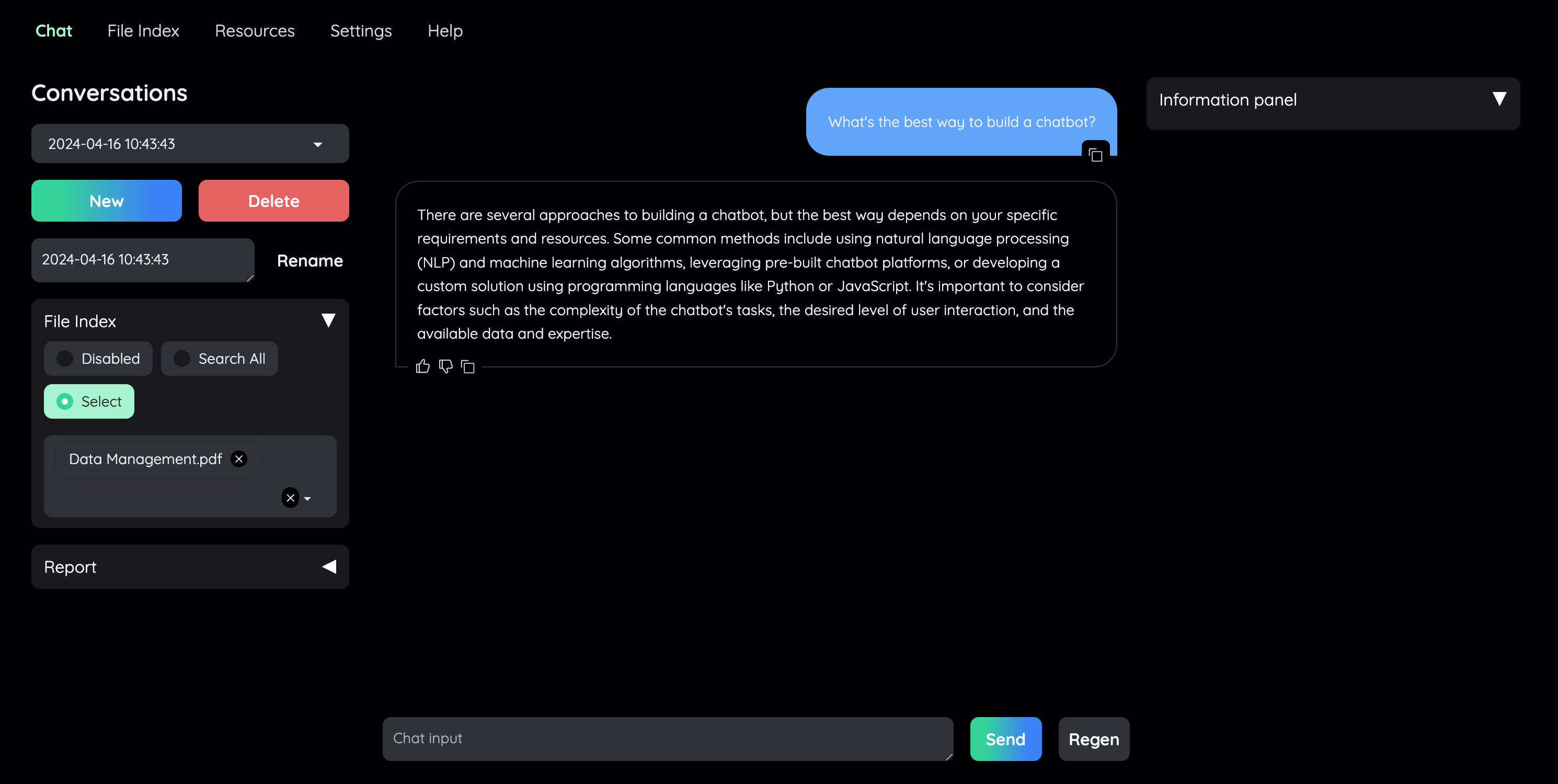
Image: the official kotaemon project (docs image at v0.12.0, "Chat tab" screenshot). It is an older screenshot, dated April 2024; the current screen has more options.

At a glance:
- What it is: one Python app (built with Gradio, a toolkit for web pages) plus a model server you choose.
- Not private by default: the stock defaults point at cloud services. Step 3 changes that.
- Status: not archived, not renamed, but quiet, with two open security reports.
- Image: no
0.12.0tag exists, so we pin by digest.
How it fits together#
You open the page in a browser. kotaemon stores files and indexes in one folder and asks Ollama (a program that runs AI models) for embeddings and answers.

Drawn for this guide from the official README, Dockerfile and flowsettings.py at v0.12.0. The dashed boxes are optional.
The data folder /app/ktem_app_data holds user_data/sql.db (users, settings, the model list), user_data/files (your PDFs), user_data/docstore (LanceDB, for text search) and user_data/vectorstore (Chroma, for meaning search).
Before you start#
The project gives no RAM or CPU minimum. Its README says to pick a model smaller than your free memory and leave about 2 GB. Our 4.7 GB chat model therefore needs about 7 GB free, plus the app (our arithmetic).
Linux: amd64 or arm64 with a current Docker Engine and the Compose plugin.
docker --version
docker compose version
uname -m
df -h ~
Windows: Windows 10 or 11 with Docker Desktop (WSL 2 backend). Use Linux containers.
docker --version
docker compose version
Get-PSDrive C
Mac: Intel or Apple Silicon with Docker Desktop. The README says Docker images are tested on linux/amd64 and linux/arm64 ("for newer Mac").
docker --version
docker compose version
df -h ~
Our stack runs the models on the CPU. For a GPU, run Ollama natively on your computer and point kotaemon at it (see Performance).
- [ ] Docker and Compose print version numbers
- [ ] About 20 GB free disk (our estimate: images plus two models)
- [ ] Port 7860 free (
ss -ltnon Linux,netstat -anoon Windows) - [ ] A short, text-based test PDF with nothing secret in it
Tested by DIY Lab Hub: not yet. The commands come from the official README, Dockerfile, flowsettings.py and docs at tag v0.12.0, and from the container registry. We did not run them.
Step 1: Create the folders and the Compose file#
kotaemon has no official Compose file, so we translate the README's docker run command. The README uses a moving tag, so we need a safer pin.
What we found in the registry: there is no 0.12.0 tag, and latest and latest-lite still point at v0.11.0 from July 2025. The tag main-lite was built from the v0.12.0 release commit (9ad3e4e). So we pin its digest, a fingerprint that never changes. We use the lite image because the README says it "should work well in most cases".
Linux#
First replace <choose-a-long-password> with your own password (no $ sign), then paste:
mkdir -p ~/docker_volumes/kotaemon/{data,ollama,backups}
cd ~/docker_volumes/kotaemon
cat > .env << 'EOF'
KOTAEMON_ADMIN_PASSWORD=<choose-a-long-password>
EOF
chmod 600 .env
cat > docker-compose.yml << 'EOF'
services:
  kotaemon:
    image: ghcr.io/cinnamon/kotaemon:main-lite@sha256:29cffbc182dda9631b8f54f382c5711eac405ca2a2f1e8958c1da64f9f144208
    container_name: kotaemon
    restart: unless-stopped
    ports:
      - "127.0.0.1:7860:7860"
    volumes:
      - ./data:/app/ktem_app_data
    environment:
      GRADIO_SERVER_NAME: "0.0.0.0"
      GRADIO_SERVER_PORT: "7860"
      KH_OLLAMA_URL: "http://ollama:11434/v1/"
      KH_GRADIO_SHARE: "false"
      GRADIO_ANALYTICS_ENABLED: "False"
      ANONYMIZED_TELEMETRY: "FALSE"
      KH_FEATURE_USER_MANAGEMENT_PASSWORD: "${KOTAEMON_ADMIN_PASSWORD:?set a password in .env}"
    depends_on:
      - ollama
  ollama:
    image: ollama/ollama:0.40.18
    container_name: ollama
    restart: unless-stopped
    volumes:
      - ./ollama:/root/.ollama
EOF
docker compose config -q
KH_FEATURE_USER_MANAGEMENT_PASSWORD is the first admin password in the official flowsettings.py. We did not verify that it changes an existing admin, so Step 3 also sets it in the page.
Windows (PowerShell)#
Same password rule, then paste:
New-Item -ItemType Directory -Force "$HOME\docker_volumes\kotaemon\data","$HOME\docker_volumes\kotaemon\ollama","$HOME\docker_volumes\kotaemon\backups" | Out-Null
Set-Location "$HOME\docker_volumes\kotaemon"
Set-Content -Encoding ascii .env "KOTAEMON_ADMIN_PASSWORD=<choose-a-long-password>"
@'
services:
  kotaemon:
    image: ghcr.io/cinnamon/kotaemon:main-lite@sha256:29cffbc182dda9631b8f54f382c5711eac405ca2a2f1e8958c1da64f9f144208
    container_name: kotaemon
    restart: unless-stopped
    ports:
      - "127.0.0.1:7860:7860"
    volumes:
      - ./data:/app/ktem_app_data
    environment:
      GRADIO_SERVER_NAME: "0.0.0.0"
      GRADIO_SERVER_PORT: "7860"
      KH_OLLAMA_URL: "http://ollama:11434/v1/"
      KH_GRADIO_SHARE: "false"
      GRADIO_ANALYTICS_ENABLED: "False"
      ANONYMIZED_TELEMETRY: "FALSE"
      KH_FEATURE_USER_MANAGEMENT_PASSWORD: "${KOTAEMON_ADMIN_PASSWORD:?set a password in .env}"
    depends_on:
      - ollama
  ollama:
    image: ollama/ollama:0.40.18
    container_name: ollama
    restart: unless-stopped
    volumes:
      - ./ollama:/root/.ollama
'@ | Set-Content -Encoding ascii docker-compose.yml
docker compose config -q
Mac (Terminal)#
Same commands as Linux.
Check it worked. docker compose config -q prints nothing. The folder holds .env, docker-compose.yml, data, ollama and backups. If .env is empty, Compose stops with set a password in .env.
Tip:
main-liteis a moving tag. Withtag@sha256:...Docker uses the digest and ignores the tag, so a later push to the repository cannot change your image.
Step 2: Start the stack and pull two models#
You need two models. A chat model (an LLM) writes the answers. An embedding model turns text into searchable numbers. We use qwen2.5:7b (4.7 GB, the default in the official .env.example) and nomic-embed-text (274 MB).
Linux#
cd ~/docker_volumes/kotaemon
docker compose pull
docker compose up -d
docker compose exec ollama ollama pull qwen2.5:7b
docker compose exec ollama ollama pull nomic-embed-text
docker compose exec ollama ollama list
docker compose logs kotaemon --tail 30
Windows (PowerShell)#
Set-Location "$HOME\docker_volumes\kotaemon"
docker compose pull
docker compose up -d
docker compose exec ollama ollama pull qwen2.5:7b
docker compose exec ollama ollama pull nomic-embed-text
docker compose exec ollama ollama list
docker compose logs kotaemon --tail 30
Mac (Terminal)#
Same commands as Linux.
Check it worked. ollama list shows both models. The kotaemon log ends with lines like these (taken from a user report in issue 787):
User "admin" created successfully
Setting up quick upload event
Running on local URL:  http://0.0.0.0:7860
Near the top you will see /app/launch.sh: 20: ollama: not found. Ignore it. The start script always runs ollama serve &, and the lite image has no Ollama program.
Tip: The 5 GB image download looks like a hang. Run
docker compose pullon its own first and wait for it to finish.
Step 3: Sign in, set a password, and make the defaults local#
The page is at http://127.0.0.1:7860. Sign in as admin with the password from .env. If that fails, the account may already have existed, so try the documented default admin / admin.
The first-setup wizard only appears when the data folder did not exist at start (or with KH_FIRST_SETUP=true). We created data, so there is none. The image ships a .env with LOCAL_MODEL=qwen2.5:7b, so kotaemon already lists an ollama chat entry and an ollama embedding entry that point at KH_OLLAMA_URL.
Do not skip this: the stock defaults are cloud services. The default reranker (a model that re-sorts search hits) is Cohere. Without an OpenAI key, the default chat and embedding models are Google's. Until you change them, the setup is not local.
Linux#
- Open Settings, then User settings. Set a new admin password. It needs 8 or more characters with upper case, lower case, a digit and a special character.
- Open Resources, then LLMs. Click the
ollamarow. Check that the spec readsbase_url: http://ollama:11434/v1/andmodel: qwen2.5:7b. Tick Set default and save. - Open Resources, then Embeddings. Select
ollama(modelnomic-embed-text). Tick Set default and save. - Open Resources, then Index Collections, and set the File Collection's embedding model to
ollama. - Open Settings, then Retrieval settings. Untick Use reranking (this is the Cohere cloud reranker). Untick Use LLM relevant scoring, or choose
ollamafor it.
Windows (PowerShell)#
Same clicks in your browser. Nothing to type in PowerShell.
Mac (Terminal)#
Same clicks in your browser.
Check it worked. In Resources, the ollama rows show default: true for LLMs and Embeddings. In Retrieval settings, reranking is off and relevance scoring is off or set to ollama. If a test shows Connection error., see Troubleshooting.
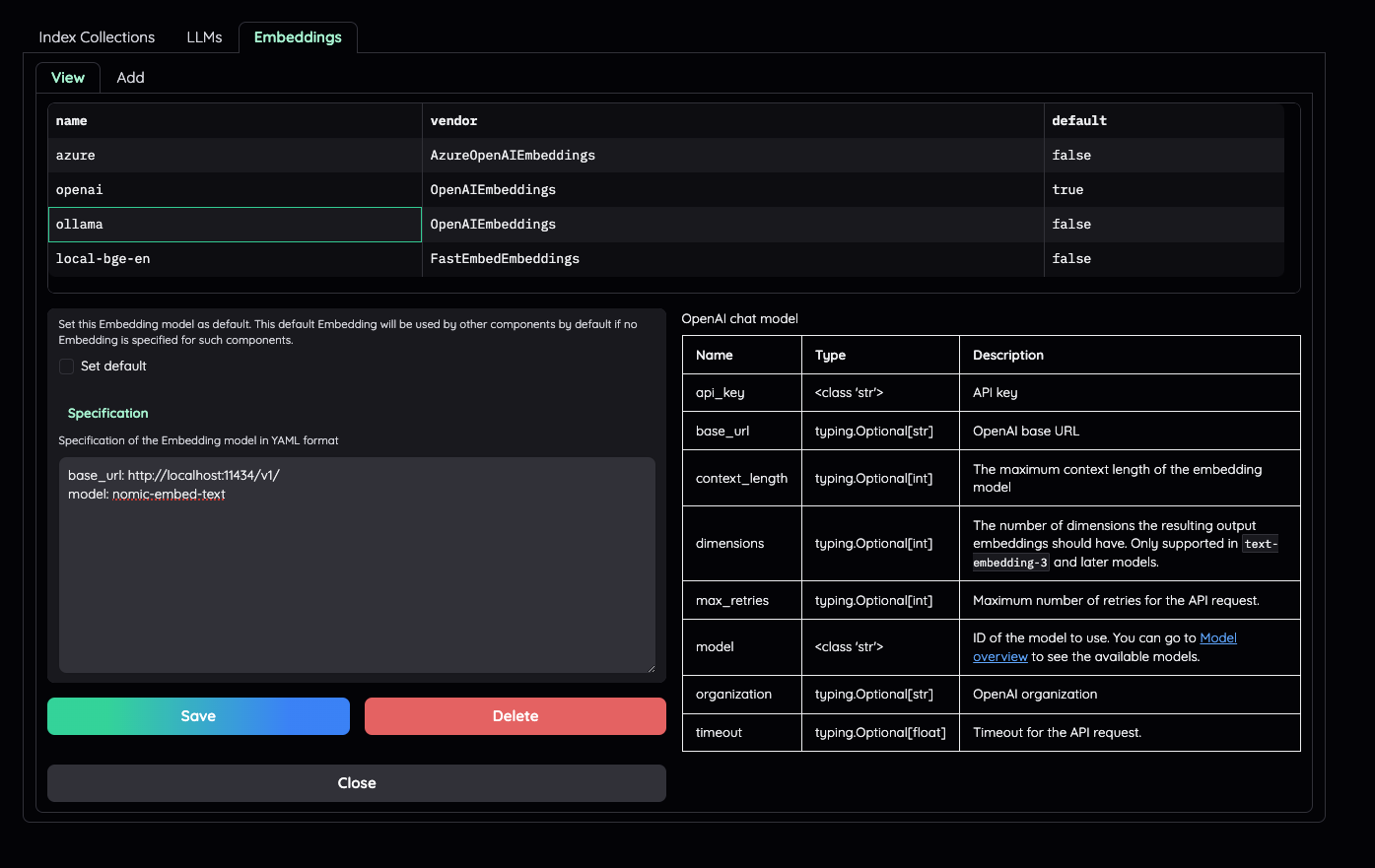
Image: the official kotaemon project (docs image at v0.12.0, "Models" screenshot). It is from 2024. In our Docker setup the address is http://ollama:11434/v1/, not localhost.

Tip: Documents you indexed before changing the collection's embedding model used the old one. Upload them again.
Tip: Changing
.envlater does nothing for models that are already stored. The README says the file only fills the database once, on the first run. Change models in the Resources tab.
Step 4: Upload a PDF and ask a question#
The lite image reads .pdf, .html, .mhtml and .xlsx. The README says other types, such as .docx, need the Unstructured package, which the full image includes.
Linux#
- Open the File Index tab. Drop in a short text-based PDF and click Upload and Index.
- Wait until the file appears in the list.
- Open the Chat tab. Under File Index, choose Select and pick your file.
- Ask a question with a clear answer in that PDF.
Windows (PowerShell)#
Same clicks in your browser.
Mac (Terminal)#
Same clicks in your browser.
Check it worked. The answer streams in, and the Information panel on the right shows the cited passages with relevance scores. Click a citation to see it highlighted in the PDF viewer. On a CPU the first answer can take minutes.
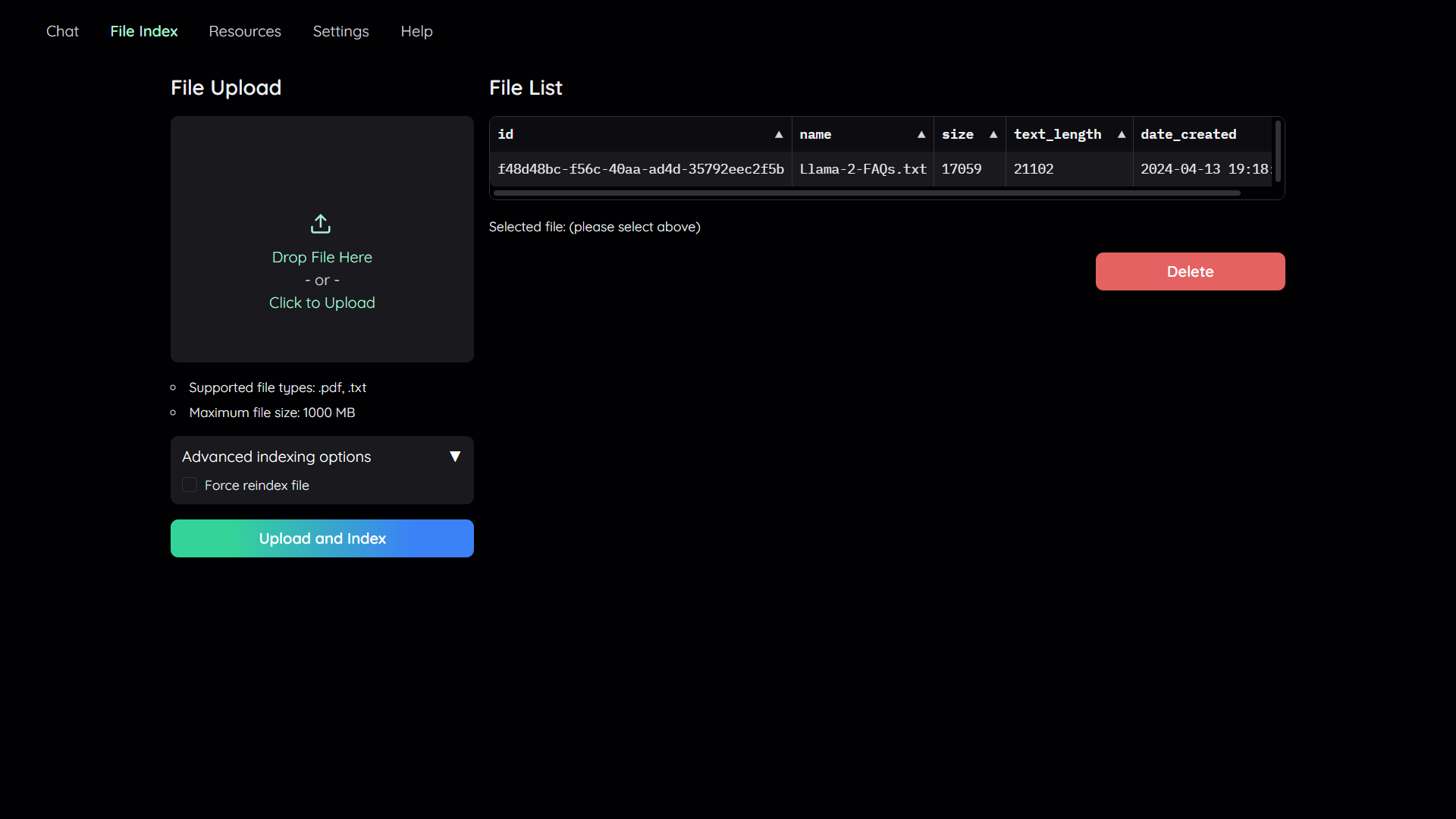
Image: the official kotaemon project (docs image at v0.12.0, "File Index" screenshot). It is older and lists fewer file types than v0.12.0.

Tip: Test with a 2-page PDF first. If citations show, a 200-page manual is only a matter of waiting.
Step 5: Optional: GraphRAG and other file readers#
GraphRAG builds a map of people, things and links across your documents instead of only matching text chunks. It makes many model calls, which is slow on a CPU. Start with the normal File Collection.
| Option | What to know |
|---|---|
| LightRAG | USE_LIGHTRAG is True by default. The full image installs it; lite does not |
| NanoGraphRAG | The README recommends it. It needs pip install nano-graphrag and USE_NANO_GRAPHRAG=true (not tested by us in the image) |
| Docling, PaddleOCR | Local readers for scans and tables (Settings, Retrieval settings, File loader). PaddleOCR's Docker target is GPU-only. Azure and Adobe readers send your files to the cloud |
To try the full image, replace the image: line with the digest below (the v0.12.0 build, about 6 GB):
ghcr.io/cinnamon/kotaemon:main-full@sha256:cb4b71561e529398bacdf12f1289c32290f6c70f286b8efb7a1ed7e66d089b66
Linux#
cd ~/docker_volumes/kotaemon
docker compose up -d
Windows (PowerShell)#
Set-Location "$HOME\docker_volumes\kotaemon"
docker compose up -d
Mac (Terminal)#
Same commands as Linux.
Check it worked. Extra collections such as "LightRAG Collection" appear in the File Index tab. Our LightRAG guide explains graph RAG.
Put it behind HTTPS (with or without Traefik)#
This section is optional. It is for a server on a private network with a name such as kotaemon.<your-domain>. Keep it to trusted devices or a VPN. Never open it to the internet, and never use a Cloudflare Tunnel for it.
Both routes add a password at the proxy. Issue 844 says kotaemon's own login only hides the tabs. A login at the proxy guards every path, so it helps, but it is a mitigation, not a fix. Use a host name, not a sub-path: GRADIO_ROOT_PATH breaks the PDF preview (issue 563).
docker network create proxy
With Traefik#
On a server that already runs Traefik v3 (v3.8.0 was the latest when we checked), edit the kotaemon service. Remove its ports: block and add this. We assume an entrypoint named https; use yours:
    networks:
      - default
      - proxy
    labels:
      - "traefik.enable=true"
      - "traefik.docker.network=proxy"
      - "traefik.http.routers.kotaemon.rule=Host(`kotaemon.<your-domain>`)"
      - "traefik.http.routers.kotaemon.entrypoints=https"
      - "traefik.http.routers.kotaemon.tls=true"
      - "traefik.http.routers.kotaemon.middlewares=kotaemon-auth"
      - "traefik.http.services.kotaemon.loadbalancer.server.port=7860"
      - "traefik.http.middlewares.kotaemon-auth.basicauth.users=<user>:<hash with every dollar sign doubled>"
Add the proxy network at the end of the file (external: true). Add your own certificate resolver label if your Traefik uses one. Make the hash with htpasswd -nB <user>; Traefik's docs say to double each $ inside a Compose file. Then run docker compose up -d.
Check it worked. curl -I https://kotaemon.<your-domain>/ returns 401. Adding -u <user> (curl asks for the password) returns 200. On Windows use curl.exe.
Without Traefik: Caddy#
Caddy gets certificates by itself and passes WebSockets through. Its basic_auth directive needs a hashed password (called basicauth before Caddy 2.8).
Create the Caddy folders. Mount the conf folder, not a single file:
mkdir -p ~/docker_volumes/caddy/{conf,data,config}
docker run --rm -it caddy:2.11.9 caddy hash-password
Save ~/docker_volumes/caddy/conf/Caddyfile. Add tls internal for a home-only name; Caddy then makes its own local certificate:
kotaemon.<your-domain> {
    basic_auth {
        <user> <hash from caddy hash-password>
    }
    reverse_proxy kotaemon:7860
}
In the kotaemon service, remove the ports: block and join the external proxy network (the networks: lines in the Traefik example). Then save ~/docker_volumes/caddy/docker-compose.yml:
services:
  caddy:
    image: caddy:2.11.9
    container_name: caddy
    restart: unless-stopped
    ports:
      - "80:80"
      - "443:443"
    volumes:
      - ./conf:/etc/caddy
      - ./data:/data
      - ./config:/config
    networks:
      - proxy
networks:
  proxy:
    external: true
Start both stacks with docker compose up -d in each folder. For tls internal, copy Caddy's root certificate and trust it on each device:
docker cp caddy:/data/caddy/pki/authorities/local/root.crt ./caddy-root.crt
- Linux: copy it to
/usr/local/share/ca-certificates/caddy-root.crtand runsudo update-ca-certificates. - Windows:
Import-Certificate -FilePath .\caddy-root.crt -CertStoreLocation Cert:\CurrentUser\Root. - Mac:
sudo security add-trusted-cert -d -r trustRoot -k /Library/Keychains/System.keychain caddy-root.crt.
Check it worked. curl -I https://kotaemon.<your-domain>/ returns 401, and 200 with -u <user>. Basic auth is not safe over plain HTTP, so never skip the certificate.
Tip: After the proxy works, test a chat answer and a PDF preview, not just the login. If the page loads but answers stall, look for
401errors on the/gradio_apirequests in your browser's developer tools.
Security and testing#
Anyone who can reach the page can try to attack it. Treat v0.12.0 accordingly.
Open reports, November 2026:
- Issue 844 (June 2026, open): an outside reporter claims remote code execution without a login. Gradio event routes can be called without signing in, and the model "test connection" code runs
deserialize(..., safe=False)on user text. That code is in v0.12.0. We did not reproduce the exploit, and the 10.0 score is the reporter's own. - Issue 846 and CVE-2026-82281 (published August 2026): through 0.12.0, conversation functions do not check who owns a conversation. A logged-in user can read, rename or delete other users' chats (CVSS 3.1: 7.4; CVSS 4.0: 9.1). No maintainer reply and no fixed release when we checked.
| Control | How |
|---|---|
| Local only | Keep 127.0.0.1:7860:7860. Never forward the port on your router |
| One user | Do not share an instance with people you do not trust (the CVE) |
| Proxy login | Needed for any access beyond this computer (see HTTPS) |
| Admin password | Change admin. Passwords are stored as plain SHA-256 hashes without a salt (the user.py source), so protect sql.db |
| Sign-up | Users are added by an admin under Resources, Users. We found no switch for public sign-up |
| No Docker socket | The official example does not mount it. Do not add it |
| What leaves | Cloud embedding, chat or reranker models get your chunks, questions and passages; Azure or Adobe readers get whole files. Local Ollama sends nothing out except model downloads |
| Secrets | API keys typed in Resources are stored in sql.db. Back it up carefully |
| Telemetry | Chroma telemetry is on by default (a user log shows Anonymized telemetry enabled.). Our file turns it and Gradio analytics off. We did not verify that this stops all outgoing traffic |
Quick tests on Linux or Mac (on Windows use curl.exe or Invoke-WebRequest):
cd ~/docker_volumes/kotaemon
docker compose ps
docker compose logs kotaemon --tail=50
curl -I http://127.0.0.1:7860/
There is no health endpoint. docker compose ps should show 127.0.0.1:7860->7860/tcp.
Kotaemon or something else?#
| Tool | Good at | Watch out for |
|---|---|---|
| kotaemon | Highlighted PDF citations; one data folder | Quiet project; open security reports; cloud defaults |
| RAGFlow | Messy scans and tables. Our guide | Larger stack; official start is 16 GB RAM |
| AnythingLLM | A gentle start. Our guide | Fewer retrieval controls |
| Open WebUI | Chat with documents. Our guide | Simpler citations |
Common mistakes#
| Mistake | Why it happens | Do this instead |
|---|---|---|
Pulling latest or latest-lite and thinking it is v0.12.0 | In the registry both are the same image as 0.11.0-lite, from July 2025 | Pin the digest from Step 1 |
| Expecting the first-setup wizard | It only shows when the data folder did not exist at start | Use the Resources tab, or add KH_FIRST_SETUP=true |
| Thinking "I chose Ollama, so it is private" | The stock defaults are Cohere for reranking and Google for chat and embeddings | Do Step 3 in full: LLM, embeddings, collection embedding, reranking |
Editing .env and seeing no change | The README: the file only fills the database on the first run | Edit models in the Resources tab |
| Indexing fails while chat works (issue 143) | Indexing uses the embedding model, which was still set to a cloud provider | Set ollama as the collection embedding model |
Removing /v1/ from the Ollama address (issue 797) | The reporter thought Ollama has no /v1/chat/completions. It does: kotaemon deliberately uses Ollama's OpenAI-compatible API | Keep http://ollama:11434/v1/ |
| Host Ollama refuses the container (Linux) | Ollama listens on 127.0.0.1 only by default. In issue 224 one user needed the host IP and OLLAMA_HOST=0.0.0.0:11434 | Keep Ollama in Compose as we do, or open it only to that host, behind a firewall |
Serving it at /kotaemon | GRADIO_ROOT_PATH breaks the file preview (issue 563) | Use a host name at / |
| Running the Windows ZIP installer | v0.12.0's run_windows.bat printed "Script completed successfully." after a failed install (issue 866) | Use Docker, as here |
| AI assistants: invented tags, files and settings | Typical wrong answers: an image tag 0.12.0, an official docker-compose.yml (the repo has none), PostgreSQL or Redis, port 8000 (that is the llama-cpp example), removing /v1/, LOCAL_MODEL as a GGUF path (old docs), a switch to disable sign-up | Copy only from the README, flowsettings.py and registry at the tag you pin |
Tip: The docs show
http://localhost:11434/v1/. Inside a containerlocalhostis the container itself, so our Compose file useshttp://ollama:11434/v1/.
Tip: Old guides pull
llama3.1:8b. The model name in Resources must matchollama listexactly, or you getmodel not foundor a 400 error.
Troubleshooting#
| Problem | Solution |
|---|---|
| Page does not open | docker compose ps and docker compose logs kotaemon --tail 50. Look for Running on local URL |
Upload ends in RetryError or a 404 | Check the embedding model, the collection setting, and the /v1/ address (issues 148, 688) |
| Answers take minutes | Normal on a CPU. Turn LLM relevance scoring off; try qwen2.5:1.5b (986 MB) |
Connection error.#
kotaemon cannot reach the model address. In our stack it must be http://ollama:11434/v1/. Check that Ollama is up:
docker compose exec ollama ollama list
docker compose logs ollama --tail 50
Error code: 400 - {'error': {'message': 'unexpected EOF'...#
Reported in issue 224. The reporter fixed it by changing llama3.1:8b to llama3.1:latest. Make the model name match ollama list, and check that the model fits in memory.
model "llama3.1:8b" not found, try pulling it first#
From a user report: the model in Resources was never pulled. Our guide uses qwen2.5:7b. Pull the model you typed, or change the name:
docker compose exec ollama ollama pull <model-name>
ModuleNotFoundError: No module named 'theflow'#
Seen after the Windows v0.12.0 ZIP install (issue 866): a pip install ran over 30 minutes and was never checked. Re-running says "Dependencies are already installed" and does not repair it. Use Docker.
ImportError: cannot import name 'HfFolder' from 'huggingface_hub'#
Reported on a Windows install (issue 833): a package-version clash. The pinned image avoids it.
Known bugs (open, November 2026)#
- Issues 844 and 846 and CVE-2026-82281: see "Security and testing". Workaround: local only, one user, proxy login.
- Issue 143: upload and indexing errors, 46 comments. Workaround: local embeddings everywhere.
- Issue 866: the Windows ZIP installer (see
theflowabove). Workaround: Docker.
Updates and backups#
There is no release newer than v0.12.0. Watch the releases page for a security fix. Our update steps (there is no official Docker guide): read the release notes, back up, change the digest, run docker compose up -d, and test sign-in, a model test and one cited answer.
Stored settings can need hand changes: v0.11.3 changed the default Cohere reranker to rerank-v4.0-fast, and a stored rerank-multilingual-v2.0 must be edited. There is no downgrade guide and no database dump command. The README names the data folder as the unit to back up or move. Stop the app first so SQLite and the indexes are closed. ollama/ can be downloaded again.
Linux#
cd ~/docker_volumes/kotaemon
cat > backup.sh << 'EOF'
#!/bin/bash
cd ~/docker_volumes/kotaemon || exit 1
docker compose stop kotaemon
tar -czf backups/kotaemon-data-$(date +%F).tar.gz data
chmod 600 backups/kotaemon-data-*.tar.gz
docker compose start kotaemon
EOF
chmod +x backup.sh
./backup.sh
crontab -e
In the editor that opens, add this line (03:00 every day) with your real home path:
0 3 * * * /home/<your-user>/docker_volumes/kotaemon/backup.sh
Windows (PowerShell)#
Windows 10 and 11 include tar.exe. We use it because Compress-Archive limits files to 2 GB (Microsoft Learn).
Set-Location "$HOME\docker_volumes\kotaemon"
docker compose stop kotaemon
tar.exe -czf ".\backups\kotaemon-data-$(Get-Date -Format yyyy-MM-dd).tar.gz" data
docker compose start kotaemon
Schedule it at 03:00 with Task Scheduler (Docker Desktop must be running):
$cmd = 'Set-Location $HOME\docker_volumes\kotaemon; docker compose stop kotaemon; tar.exe -czf ".\backups\kotaemon-data-$(Get-Date -Format yyyy-MM-dd).tar.gz" data; docker compose start kotaemon'
$action = New-ScheduledTaskAction -Execute "powershell.exe" -Argument "-NoProfile -WindowStyle Hidden -Command `"$cmd`""
Register-ScheduledTask -TaskName "KotaemonBackup" -Action $action -Trigger (New-ScheduledTaskTrigger -Daily -At 3:00AM)
Mac (Terminal)#
Same commands as Linux. Use cron as shown, or a launchd job.
Restore test#
A backup you never restored is a guess. Try it once:
cd ~/docker_volumes/kotaemon
docker compose stop kotaemon
mv data data.old
tar -xzf backups/kotaemon-data-<date>.tar.gz
docker compose start kotaemon
On Windows use tar.exe -xzf .\backups\kotaemon-data-<date>.tar.gz. Open the page. Your users, files and chats should be there. Then delete data.old.
Performance and resources#
The project publishes no RAM, CPU or speed figures, and we measured none. Run docker stats while you index a file and while an answer is written.
What helps on a slow machine:
- Untick Use LLM relevant scoring. The docs offer this for machines that cannot handle many parallel model requests. The
.envswitchUSE_LOW_LLM_REQUESTSturns it off by default. - Use the normal File Collection before graph indexes, and a smaller chat model such as
qwen2.5:1.5b(986 MB, Ollama library). - For a GPU, install Ollama on the host and set
KH_OLLAMA_URLtohttp://host.docker.internal:11434/v1/. On Linux, that needs Ollama listening where the container can reach it (see Common mistakes).
FAQ#
Is kotaemon abandoned? Not archived, not renamed. But v0.12.0 is from 31 May 2026, the newest commit is a day older, and 268 issues are open.
Is it free? Yes, under Apache-2.0. We found no paid edition.
Is it safe to share with my team or put on the internet? No, not as it stands. See the security reports. Local, one user, with a proxy login for anything else.
Can I use Ollama on my host instead? Yes. Remove the ollama service and set KH_OLLAMA_URL to the host address. On Linux, Ollama must listen where the container can reach it.
Does it send my data anywhere? Only to the providers you select, plus model downloads and Chroma telemetry unless you switch it off.
Can it use llama.cpp or vLLM? The docs show a llama-cpp-python server for chat only; you still need an embedding model. We found no official vLLM recipe.
Sources#
- kotaemon at tag v0.12.0: release, README, LICENSE.txt, Dockerfile, launch.sh, flowsettings.py, .env.example, docs/local_model.md, docs/index.md, llms/ui.py, pages/setup.py and build workflow - read November 2026
- Official user guide, the container registry (tags and digests checked in November 2026) and the commit history
- Security: issue 844, issue 846 and CVE-2026-82281 - read November 2026
- GitHub issues 143, 148, 224, 494, 545, 563, 688, 787, 797, 833, 866 - read November 2026
- Ollama FAQ, ollama/ollama on Docker Hub (
0.40.18checked), qwen2.5 and nomic-embed-text - November 2026 - Caddy v2.11.9, basic_auth, Traefik v3.8.0 and its BasicAuth middleware; Microsoft Learn: Compress-Archive, Chroma telemetry setting and Gradio environment variables - November 2026
Checked against the official docs on 2026-11-21.