Garage with Docker: a Light Self-Hosted S3 Store for Backups and Apps (Linux, Windows, Mac)
Before you start
- 22 min read
- Updated November 2026
Boxes marked Run in terminal are what you type; plain text explains why. Check what you need first
What you get in one minute#
Garage is a free, self-hosted S3 server: it stores your files as "objects" in "buckets" and speaks the same protocol as Amazon S3, so backup tools and apps can use your own disk instead of a cloud account.

Logo: the official Garage project (garagehq.deuxfleurs.fr, img/logo.svg, referenced by the README at v2.6.0)
S3 is Amazon's storage protocol, and many tools can write to it: restic, Duplicati, Kopia, Nextcloud and more. Garage is built by Deuxfleurs for small self-hosted setups. Its limits, stated plainly: one node means no redundancy, and there is no bucket versioning and no Object Lock.
| What | Value (official sources, read November 2026) |
|---|---|
| Current version | Garage v2.6.0, released 24 November 2026 (previous: v2.5.0, October 2026) |
| Image to pin | dxflrs/garage:v2.6.0 (amd64, arm64, arm, 386; about 28 MB compressed) |
| Time needed | About 30 minutes (our estimate, not measured) |
| RAM | Official baseline 1 GB for a node, from the project homepage. Not a measurement |
| Ports | TCP 3900 (S3), 3901 (node-to-node RPC), 3902 (static websites), 3903 (admin API and web UI) |
| Licence | AGPLv3 (README and LICENSE at the tag). We found no paid edition |
| Official docs | garagehq.deuxfleurs.fr and the repository |
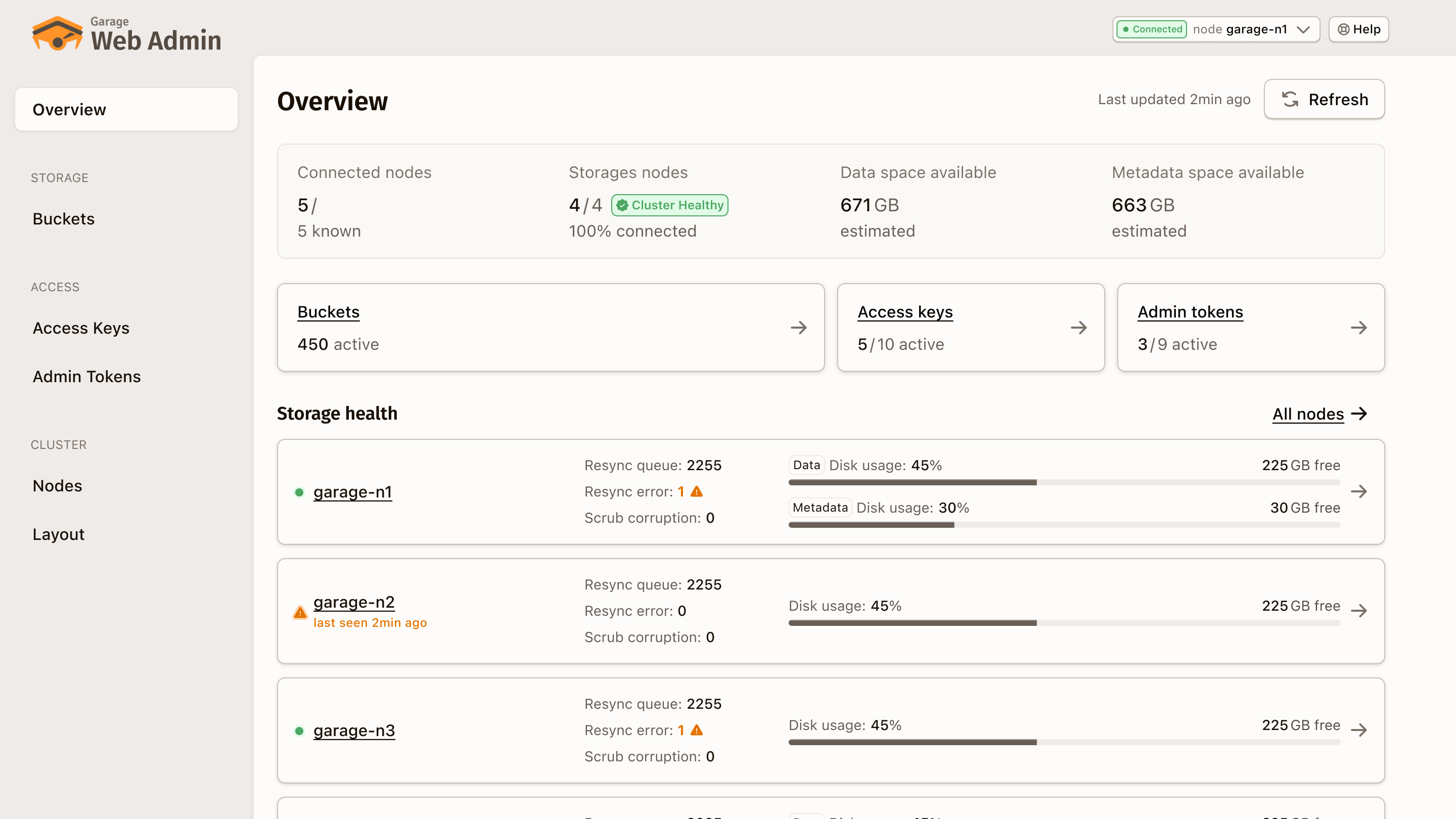
Image: the official Garage Web Admin project (README at v0.2.2, "dashboard" screenshot). Garage v2.6.0 embeds Web Admin 0.2.2. The sample shows a five-node cluster, not this guide's single node.
At a glance:
- What it is: one program in a
FROM scratchimage. No shell, no PostgreSQL, no Redis. - Web UI: new in v2.6.0, served by the admin port (3903).
- One node: easy, but the official quick start says it "should not be used in production".
- Three nodes: the recommended setup. A one-node install cannot grow into it.
- Backups: the docs list restic, Duplicati and Kopia. Borg is not S3-compatible.
Which version. We pin v2.6.0. It fixes the two serious v2.5.0 reports: an SQLite file that grew to 177 GB (#1594) and a listing bug that made a Docker registry delete blobs (#1596). The release is one day old, and the tracker had no newer issue when we looked. Release-note rules: never downgrade a node once it runs v2.5.0 or newer, and Garage v1.x is end-of-life.
How it fits together#
Your tools sign S3 requests with an access key and send them to port 3900; Garage keeps buckets, keys and the object index in SQLite files and the file contents in a data folder.

Drawn for this guide from the official docs. The HTTPS route (dashed) is optional.
Before you start#
| System | What to have |
|---|---|
| Linux | Docker Engine and the Compose plugin; x86-64, arm64 or ARM |
| Windows | Docker Desktop in Linux-container mode, PowerShell |
| Mac | Docker Desktop, Intel or Apple Silicon |
The official release list has Linux binaries only, so Docker is the route on Windows and Mac. Check it (same everywhere):
docker --version
docker compose version
Checklist:
- [ ] Both commands print a version
- [ ] Ports 3900 and 3903 are free on the host
- [ ] The folders will sit on a local disk, not a network share
- [ ] A password manager is ready for the keys
- [ ] For HTTPS only: a domain with a DNS record, and ports 80 and 443 free
Tested by DIY Lab Hub: not yet. Commands and file contents come from the official docs and source at v2.6.0, read in November 2026. We did not run them.
Step 1: Create the folders, secrets and garage.toml#
We make four folders, a .env file with three random secrets, and the config. Garage reads the secrets from environment variables, so garage.toml holds none: GARAGE_RPC_SECRET (node-to-node), GARAGE_ADMIN_TOKEN (admin API) and GARAGE_METRICS_TOKEN (/metrics).
Two choices are ours. metadata_fsync and data_fsync are on: the docs say this costs write speed but lowers corruption risk after a power cut. And we use SQLite, which the docs call more robust than the default LMDB after an unclean shutdown, though slower.
Linux#
mkdir -p ~/docker_volumes/garage/{config,meta,data,backups}
cd ~/docker_volumes/garage
cat > .env << EOF
GARAGE_RPC_SECRET=$(openssl rand -hex 32)
GARAGE_ADMIN_TOKEN=$(openssl rand -base64 32)
GARAGE_METRICS_TOKEN=$(openssl rand -base64 32)
EOF
chmod 600 .env
cat > config/garage.toml << 'EOF'
metadata_dir = "/var/lib/garage/meta"
data_dir = "/var/lib/garage/data"
db_engine = "sqlite"
metadata_fsync = true
data_fsync = true
metadata_auto_snapshot_interval = "6h"

replication_factor = 1

rpc_bind_addr = "0.0.0.0:3901"
rpc_public_addr = "127.0.0.1:3901"

[s3_api]
s3_region = "garage"
api_bind_addr = "0.0.0.0:3900"

[admin]
api_bind_addr = "0.0.0.0:3903"
metrics_require_token = true
EOF
Windows (PowerShell)#
$base = "$HOME\docker_volumes\garage"
New-Item -ItemType Directory -Force "$base\config", "$base\meta", "$base\data", "$base\backups" | Out-Null
Set-Location $base
$rng = [System.Security.Cryptography.RandomNumberGenerator]::Create()
function New-RandomBytes([int]$Count) { $b = New-Object byte[] $Count; $rng.GetBytes($b); ,$b }
$hex = [BitConverter]::ToString((New-RandomBytes 32)).Replace('-', '').ToLowerInvariant()
$admin = [Convert]::ToBase64String((New-RandomBytes 32))
$metrics = [Convert]::ToBase64String((New-RandomBytes 32))
$rng.Dispose()
@("GARAGE_RPC_SECRET=$hex", "GARAGE_ADMIN_TOKEN=$admin", "GARAGE_METRICS_TOKEN=$metrics") | Set-Content -Encoding ascii .env
icacls .env /inheritance:r /grant:r "${env:USERNAME}:(R,W)" | Out-Null
@'
metadata_dir = "/var/lib/garage/meta"
data_dir = "/var/lib/garage/data"
db_engine = "sqlite"
metadata_fsync = true
data_fsync = true
metadata_auto_snapshot_interval = "6h"

replication_factor = 1

rpc_bind_addr = "0.0.0.0:3901"
rpc_public_addr = "127.0.0.1:3901"

[s3_api]
s3_region = "garage"
api_bind_addr = "0.0.0.0:3900"

[admin]
api_bind_addr = "0.0.0.0:3903"
metrics_require_token = true
'@ | Set-Content -Encoding ascii config\garage.toml
Mac (Terminal)#
Same commands as Linux (macOS ships openssl).
Check it worked. The .env file has exactly three lines, and garage.toml shows db_engine = "sqlite" and replication_factor = 1. On Linux and Mac, ls -l .env starts with -rw-------.
Tip: Keep
metaanddataon a local disk. SQLite's own page says its WAL mode "does not work over a network filesystem", so an NFS or SMB share can break the metadata.
Step 2: Write the Compose file and start Garage#
The Compose file mounts the config folder, not one file, so an editor that replaces the file on save cannot break the mount. Only ports 3900 and 3903 are published, on 127.0.0.1; the RPC port 3901 stays closed on one node. The garage-net network lets other containers reach Garage as garage:3900.
--single-node makes Garage create its own layout (zone dc1) at start. It needs replication_factor = 1: no second copy of anything.
Linux#
cd ~/docker_volumes/garage
cat > docker-compose.yml << 'EOF'
services:
  garage:
    image: dxflrs/garage:v2.6.0
    container_name: garage
    restart: unless-stopped
    command: ["/garage", "server", "--single-node"]
    env_file:
      - .env
    environment:
      GARAGE_CONFIG_FILE: /etc/garage/garage.toml
    ports:
      - "127.0.0.1:3900:3900"
      - "127.0.0.1:3903:3903"
    volumes:
      - ./config:/etc/garage:ro
      - ./meta:/var/lib/garage/meta
      - ./data:/var/lib/garage/data

networks:
  default:
    name: garage-net
EOF
docker compose up -d
docker compose ps
docker compose logs --tail=50 garage
docker compose exec garage /garage status
curl -i http://127.0.0.1:3903/health
Windows (PowerShell)#
Set-Location "$HOME\docker_volumes\garage"
@'
services:
  garage:
    image: dxflrs/garage:v2.6.0
    container_name: garage
    restart: unless-stopped
    command: ["/garage", "server", "--single-node"]
    env_file:
      - .env
    environment:
      GARAGE_CONFIG_FILE: /etc/garage/garage.toml
    ports:
      - "127.0.0.1:3900:3900"
      - "127.0.0.1:3903:3903"
    volumes:
      - ./config:/etc/garage:ro
      - ./meta:/var/lib/garage/meta
      - ./data:/var/lib/garage/data

networks:
  default:
    name: garage-net
'@ | Set-Content -Encoding ascii docker-compose.yml
docker compose up -d
docker compose ps
docker compose logs --tail=50 garage
docker compose exec garage /garage status
curl.exe -i http://127.0.0.1:3903/health
Mac (Terminal)#
Same commands as Linux (Docker Desktop).
Check it worked. docker compose ps shows garage running. garage status prints ==== HEALTHY NODES ==== and a table with one node in zone dc1 (columns per the docs: ID, Hostname, Address, Tags, Zone, Capacity, DataAvail, Version; not a captured run). The health call returns 200 with the text Garage is fully operational.
Tip: The image is built
FROM scratch:docker exec -it garage shfails because there is no shell. Always call/garageas shown. The/healthroute needs no token.
Step 3: Create a bucket and a key#
A bucket is a named box for objects. An access key is a pair: a public Key ID and a secret key that signs requests. One key can reach many buckets.
Linux#
cd ~/docker_volumes/garage
docker compose exec garage /garage bucket create backups
docker compose exec garage /garage key create backups-app
docker compose exec garage /garage bucket allow --read --write backups --key backups-app
docker compose exec garage /garage bucket info backups
Windows (PowerShell)#
Set-Location "$HOME\docker_volumes\garage"
docker compose exec garage /garage bucket create backups
docker compose exec garage /garage key create backups-app
docker compose exec garage /garage bucket allow --read --write backups --key backups-app
docker compose exec garage /garage bucket info backups
Mac (Terminal)#
Same commands as Linux.
Check it worked. key create prints Key name:, Key ID: GK..., Secret key: and Authorized buckets:. Copy the Key ID and the secret into your password manager now. key info backups-app --show-secret prints the secret again. bucket info backups lists backups-app with read and write.
We leave out --owner: since v2.5.0 only owner keys may change lifecycle rules, which backups do not need.
Tip: Shortcut for one app: start with
--single-node --default-bucketand putGARAGE_DEFAULT_ACCESS_KEY,GARAGE_DEFAULT_SECRET_KEYandGARAGE_DEFAULT_BUCKETin.env. Garage then creates that key and bucket, and the key becomes owner. The Key ID must have 8 or more characters (letters, digits,-,_,.), the secret 16 or more.
Step 4: Upload and download a test file#
We use the official AWS CLI image (amazon/aws-cli) on garage-net, so nothing is installed on your host. Garage's path-style addresses (http://garage:3900/bucket/key) need no extra DNS. Replace the two placeholders with your key.
Linux#
export AWS_ACCESS_KEY_ID='<KEY_ID>'
export AWS_SECRET_ACCESS_KEY='<SECRET_KEY>'
mkdir -p ~/docker_volumes/garage/test-work
printf 'hello from garage\n' > ~/docker_volumes/garage/test-work/hello.txt
awsg() { docker run --rm --network garage-net -e AWS_ACCESS_KEY_ID -e AWS_SECRET_ACCESS_KEY -e AWS_DEFAULT_REGION=garage -v "$HOME/docker_volumes/garage/test-work:/work" amazon/aws-cli:2.42.3 --endpoint-url http://garage:3900 "$@"; }
awsg s3 ls
awsg s3 cp /work/hello.txt s3://backups/hello.txt
awsg s3 cp s3://backups/hello.txt /work/hello-down.txt
cmp ~/docker_volumes/garage/test-work/hello.txt ~/docker_volumes/garage/test-work/hello-down.txt && echo "Files match"
Windows (PowerShell)#
$env:AWS_ACCESS_KEY_ID = '<KEY_ID>'
$env:AWS_SECRET_ACCESS_KEY = '<SECRET_KEY>'
$work = "$HOME\docker_volumes\garage\test-work"
New-Item -ItemType Directory -Force $work | Out-Null
'hello from garage' | Set-Content -Encoding ascii "$work\hello.txt"
function Invoke-AwsGarage {
  docker run --rm --network garage-net -e AWS_ACCESS_KEY_ID -e AWS_SECRET_ACCESS_KEY -e AWS_DEFAULT_REGION=garage -v "${work}:/work" amazon/aws-cli:2.42.3 --endpoint-url http://garage:3900 @args
}
Invoke-AwsGarage s3 ls
Invoke-AwsGarage s3 cp /work/hello.txt s3://backups/hello.txt
Invoke-AwsGarage s3 cp s3://backups/hello.txt /work/hello-down.txt
(Get-FileHash "$work\hello.txt").Hash -eq (Get-FileHash "$work\hello-down.txt").Hash
Mac (Terminal)#
Same commands as Linux.
Check it worked. s3 ls lists backups, and the last line prints Files match (Linux, Mac) or True (Windows). Now restart with docker compose restart garage and run awsg s3 ls s3://backups/ (Windows: Invoke-AwsGarage s3 ls s3://backups/). hello.txt must still be listed.
Tip:
garage:3900works only from containers ongarage-net. From the host use127.0.0.1:3900. Your shell history now holds the secret key; clear it when you are done. The image is the AWS CLI's official one (AWS docs).
Open the web interface (new in v2.6.0)#
Garage v2.6.0 has a built-in web interface. The features page says it shows the cluster state and handles the layout, buckets, keys, permissions and maintenance. We have not run it: this comes from the v2.6.0 docs and source.
- Open
http://127.0.0.1:3903/. The server redirects/to/ui/. - Fill in the two login fields: API Endpoint (
http://127.0.0.1:3903) and Admin Token (theGARAGE_ADMIN_TOKENvalue from.env). - You should see an overview like the screenshot above, with Buckets, Access Keys, Admin Tokens, Nodes and Layout in the menu.
Tip: The admin token controls every bucket and key. Keep port 3903 on
127.0.0.1or behind a VPN, never on the internet.
Back up to Garage with restic#
restic is an encrypted backup tool that can write straight to an S3 bucket. Our restic guide covers it in depth and pins restic 0.18.1, and we use the same pin. The Garage docs show the same flow: key, bucket, init once, backup, snapshots, restore.
One trap hits almost everyone. The restic docs say that without a region restic uses us-east-1, and Garage answers a wrong region with an error (issue 858). So we pass AWS_DEFAULT_REGION=garage.
Linux#
export AWS_ACCESS_KEY_ID='<KEY_ID>'
export AWS_SECRET_ACCESS_KEY='<SECRET_KEY>'
mkdir -p ~/docker_volumes/restic/config ~/docker_volumes/restic/restore
openssl rand -base64 32 > ~/docker_volumes/restic/config/restic-password.txt
chmod 600 ~/docker_volumes/restic/config/restic-password.txt
img=ghcr.io/restic/restic:0.18.1
resticg() { docker run --rm --network garage-net --hostname docker-backup -e AWS_ACCESS_KEY_ID -e AWS_SECRET_ACCESS_KEY -e AWS_DEFAULT_REGION=garage -e RESTIC_REPOSITORY=s3:http://garage:3900/backups -e RESTIC_PASSWORD_FILE=/pass -v "$HOME/docker_volumes/restic/config/restic-password.txt:/pass:ro" "$@"; }
resticg $img init
resticg -v "$HOME/docker_volumes/garage/test-work:/data:ro" $img backup /data
resticg $img snapshots
resticg $img check
resticg -v "$HOME/docker_volumes/restic/restore:/restore" $img restore latest --target /restore
ls ~/docker_volumes/restic/restore/data
Windows (PowerShell)#
$env:AWS_ACCESS_KEY_ID = '<KEY_ID>'
$env:AWS_SECRET_ACCESS_KEY = '<SECRET_KEY>'
$r = "$HOME\docker_volumes\restic"
New-Item -ItemType Directory -Force "$r\config", "$r\restore" | Out-Null
$rng = [System.Security.Cryptography.RandomNumberGenerator]::Create()
$b = New-Object byte[] 32; $rng.GetBytes($b); $rng.Dispose()
[Convert]::ToBase64String($b) | Set-Content -Encoding ascii "$r\config\restic-password.txt"
$img = 'ghcr.io/restic/restic:0.18.1'
function Invoke-ResticGarage {
  docker run --rm --network garage-net --hostname docker-backup -e AWS_ACCESS_KEY_ID -e AWS_SECRET_ACCESS_KEY -e AWS_DEFAULT_REGION=garage -e RESTIC_REPOSITORY=s3:http://garage:3900/backups -e RESTIC_PASSWORD_FILE=/pass -v "${r}\config\restic-password.txt:/pass:ro" @args
}
Invoke-ResticGarage $img init
Invoke-ResticGarage -v "${work}:/data:ro" $img backup /data
Invoke-ResticGarage $img snapshots
Invoke-ResticGarage $img check
Invoke-ResticGarage -v "${r}\restore:/restore" $img restore latest --target /restore
Get-ChildItem "$r\restore\data"
Mac (Terminal)#
Same commands as Linux.
Check it worked. init says it created a repository, backup prints a snapshot ID, snapshots lists it, check ends without errors, and the restore folder holds hello.txt. The fixed --hostname keeps all snapshots under one host name. The Windows block reuses $work from Step 4, so run it in the same window.
Save the restic password in your password manager: without it the backups cannot be read.
Tip: A backup on the same machine as your apps is not a full backup. Copy it to another place too. Garage also has no versioning and no Object Lock: whoever holds the key can delete the backups, and replication does not prevent that.
Other tools: the Garage docs cover Duplicati (Storage Type "S3 Compatible", region garage) and Kopia. Borg is "not yet compatible with the S3 API". Synology Hyper Backup hard-codes us-east-1, so set s3_region = "us-east-1" for it.
Put it behind HTTPS with Traefik or Caddy#
Skip this on a home-only machine. Garage's S3 port has no TLS ("a reverse proxy should be used"), so clients across a network need HTTPS. You need a domain with a DNS record and ports 80 and 443 reachable.
First edit config/garage.toml. Under [s3_api] add the public address (the option exists since v2.5.0). It only tells Garage its public name; Traefik or Caddy ends the TLS:
public_endpoint = "https://s3.<your-domain>"
Use a host name, not a sub-path: the docs show none. Put no login page in front of S3, because clients sign requests and cannot answer a form. Both routes share a proxy network. Create it once:
docker network create proxy
With Traefik#
On a server that already runs Traefik v3 with the Docker provider, add labels and drop the 3900 port line. Our Traefik guide uses the entrypoint https, the network proxy and the certificate resolver le. Each router that wants a Let's Encrypt certificate carries its own tls.certresolver=le label.
services:
  garage:
    image: dxflrs/garage:v2.6.0
    container_name: garage
    restart: unless-stopped
    command: ["/garage", "server", "--single-node"]
    env_file:
      - .env
    environment:
      GARAGE_CONFIG_FILE: /etc/garage/garage.toml
    ports:
      - "127.0.0.1:3903:3903"
    volumes:
      - ./config:/etc/garage:ro
      - ./meta:/var/lib/garage/meta
      - ./data:/var/lib/garage/data
    networks:
      - default
      - proxy
    labels:
      - "traefik.enable=true"
      - "traefik.docker.network=proxy"
      - "traefik.http.routers.garage-s3.rule=Host(`s3.<your-domain>`)"
      - "traefik.http.routers.garage-s3.entrypoints=https"
      - "traefik.http.routers.garage-s3.tls=true"
      - "traefik.http.routers.garage-s3.tls.certresolver=le"
      - "traefik.http.services.garage-s3.loadbalancer.server.port=3900"

networks:
  default:
    name: garage-net
  proxy:
    external: true
Run docker compose up -d. The Garage docs show only a file-provider example for "Traefik v2", so these labels are ours.
Without Traefik: Caddy#
Choose this if you have no Traefik. Caddy gets and renews certificates by itself. Use the same Garage file as above without the labels: block, keep the proxy network on it, and add Caddy in its own folder. We mount the conf folder, not a single file.
mkdir -p ~/docker_volumes/caddy/{conf,data,config}
cd ~/docker_volumes/caddy
cat > docker-compose.yml << 'EOF'
services:
  caddy:
    image: caddy:2.11.9
    container_name: caddy
    restart: unless-stopped
    ports:
      - "80:80/tcp"
      - "443:443/tcp"
      - "443:443/udp"
    volumes:
      - ./conf:/etc/caddy:ro
      - ./data:/data
      - ./config:/config
    networks:
      - proxy

networks:
  proxy:
    external: true
EOF
Save ~/docker_volumes/caddy/conf/Caddyfile for a public domain:
s3.example.com {
    reverse_proxy garage:3900
}
For a home-only name use tls internal:
s3.home.arpa {
    tls internal
    reverse_proxy garage:3900
}
Start with docker compose up -d in each folder. Caddy reaches Garage by container name, so never write localhost:3900. Our Caddy guide shows how each device trusts Caddy's root certificate.
Check it worked (both routes). curl -I https://s3.<your-domain>/ prints an HTTP status line over TLS with no certificate error. S3 clients then use https://s3.<your-domain> as the endpoint.
Tip: Behind Apache, add
nocanonor presigned URLs break. Behind Cloudflare, turn caching off for the S3 name: caching gave403 Forbidden - Invalid signatureon the first HEAD (issue 1410).
Security and testing#
| Control | How |
|---|---|
| Ports | 3900 S3 (public only behind HTTPS), 3901 RPC (closed), 3902 static sites (off), 3903 admin (localhost only) |
| Secrets | In .env with chmod 600; never in garage.toml or Git |
| Admin token | The docs discourage the master token; make scoped, expiring ones (below) |
| Docker socket | Not needed. Never mount it |
| Logins | No default login. We found no OIDC or SSO for the S3 API |
A scoped token (the official example, run inside the container):
docker compose exec garage /garage admin-token create --expires-in 30d --scope ListBuckets,GetBucketInfo,ListKeys,GetKeyInfo,CreateBucket,CreateKey,AllowBucketKey,DenyBucketKey my-token
Garage prints the token once ("it will not be shown again"). Send it as Authorization: Bearer <token>.
What leaves the machine: nothing by default. trace_sink is optional, and unset sends no traces. We did not audit the traffic.
Tests after each change (on Windows use curl.exe):
docker compose ps
curl -i http://127.0.0.1:3903/health
docker compose exec garage /garage health
/health gives 200 when healthy and 503 when a quorum is missing. garage health exits with code 1 if the cluster is unavailable.
One node or three?#
A Garage cluster is several nodes that copy each other's data. Each node gets a zone (a place, such as a house or data centre), and Garage keeps copies in different zones. The official advice: at least three nodes, replication_factor = 3.
| Replication factor | Write quorum | Read quorum | One node down |
|---|---|---|---|
| 1 | 1 | 1 | Data unreachable. No second copy |
| 2 | 2 | 1 | Reads work, writes fail |
| 3 | 2 | 2 | Reads and writes work |
Changing the factor later is "dangerous" and "not officially supported", so a one-node install cannot simply grow: decide early. The known-issues page says to use factor 1 for test setups only.
The official cluster steps, from the docs, on each node after it runs with a shared rpc_secret:
garage node id
garage node connect <node-id>@<ip>:3901
garage layout assign <node-id> -z <zone> -c <capacity> -t <tag>
garage layout show
garage layout apply
rpc_public_addr = "127.0.0.1:3901" suits one node only; a cluster needs an address the other nodes can reach. Without --single-node (or before v2.3.0) a lone node needs garage layout assign -z dc1 -c 1G <node_id> and garage layout apply --version 1. The cluster doc uses host networking so Docker's network layer cannot block node-to-node traffic, and advises an SSD for metadata and an HDD with XFS for data.
Garage or MinIO?#
Many home labs ran MinIO, and its own repository tells the current story. GitHub shows it "archived by the owner on Apr 25, 2026" and read-only. The README says "THIS REPOSITORY IS NO LONGER MAINTAINED" and that the community edition is distributed as source code only, with no pre-built binaries. The last GitHub release is RELEASE.2025-10-15T17-29-55Z. The README names AIStor Free and AIStor Enterprise (commercial) as alternatives. Garage's docs also call the minio-client tool abandoned.
| Garage | MinIO community | SeaweedFS | |
|---|---|---|---|
| Licence | AGPLv3 | AGPLv3 | Apache-2.0 |
| Status (Nov 2026) | Active, v2.6.0 | Archived, source only | Active, release 4.55 |
| Install | One container | Build from source | More parts (not tested by us) |
| Versioning, Object Lock | No | Not checked by us | Not checked by us |
Pick Garage for a small lab that wants one light container, SeaweedFS for a bigger system. We would not start a new install on archived MinIO. This is a technical note, not legal advice: AGPLv3 has duties for modified code that users reach over a network.
Common mistakes#
These come from the official docs, the issue tracker and what AI assistants often write.
| Mistake | Why it happens | Do this instead |
|---|---|---|
400 Bad Request, Authorization header malformed, unexpected scope | The client region is not garage; restic defaults to us-east-1 (issue 858). restic then retries for minutes and looks frozen, printing Stat(<config/>) returned error, retrying after ...: Stat: 400 Bad Request (report) | Set the region to garage in every client |
manifest unknown when pulling | There is no latest tag (issue 1584) | Pin dxflrs/garage:v2.6.0 |
| Data lost after a reboot | The quick start puts data in /tmp, and its docker run has no volumes and misses a \ after the image line | Use our folders under ~/docker_volumes/garage |
docker compose down -v | -v deletes named volumes | Use docker compose stop. Our folders are bind mounts |
| One node treated as a backup | Replication factor 1 keeps one copy; a corrupt metadata file has no second copy | Copy backups elsewhere. Run three nodes for redundancy |
| Expecting versioning or Object Lock | Not implemented (issue 166) | Choose other storage if you need immutable backups |
| S3 port stops, admin port works | Open-file limit (No file descriptors available, issue 1508) | Fixed in v2.5.0; stay on v2.6.0 |
AI assistants: garage:latest, dxflrs/amd64_garage, replication_mode = "none", ports 9000 and 9001, a shell in the container, a default login, mc as the client | Mixed up with MinIO or with v0.x and v1.x guides | dxflrs/garage:v2.6.0, replication_factor, ports 3900-3903, /garage, and the AWS CLI |
Tip: Check config key names against the docs for the version you pin.
replication_modewas removed in v2.0.0.
Tip: Upload and download a file before you trust Garage with real data. A healthy container only proves the process runs.
Tip: Do not set
allow_world_readable_secretsto silence a permission error. Fix the file mode.
Troubleshooting#
| Problem | Solution |
|---|---|
| Container restarts at once | docker compose logs --tail=100 garage; check the mounts and .env |
curl to 3900 refused | docker compose ps; the port is on 127.0.0.1 only |
S3 calls fail but garage status works | Check the region garage, the key and bucket info |
| Web UI login fails | Use the GARAGE_ADMIN_TOKEN from .env |
Exact error texts#
Single-node mode requires replication_factor = 1 in the configuration file.Setreplication_factor = 1.Refusing to run in single-node mode: layout version is already superior to 1. Remove the --single-node flag to run the server in full mode.The layout was changed. Remove--single-nodefromcommand:.Flags --default-access-key and --default-bucket can only be used in single-node mode.Add--single-node.File <path> is world-readable! (mode: 0..., expected 0600) Refusing to start...A secret file is too open.chmod 600it. This applies to secret files, not to environment values.Error: IO error: Permission denied (os error 13)right after "Loading configuration...": a non-root container user (issue 1210).Error: Unable to connect to destination RPC host. Check that you are using the same value of rpc_secret as them, and that you have their correct public key.withConnection refused (os error 111): a reporter on Docker Desktop fixed it with bridge mode and published ports (issue 635).PANIC (internal Garage error) Could not automatically determine the process-level CryptoProvider: v2.4.0 only, fixed in v2.4.1 (issue 1536).
Known bugs (open, November 2026)#
- Issue 1549: AWS SDK for Java v2 (2.30.0 and later) uploads over plain HTTP fail with
400 Bad request: Invalid payload signature; HTTPS is not affected. Tested on v2.3.0 and v2.4.1. - Issue 1590: on one node (v2.5.0), a capacity-only
layout applycan leave the layout stuck in Sync and the resync queue unprocessed. Reads and writes kept working. - Issue 1592: the recovery page's snapshot commands are wrong; a maintainer calls it a documentation issue.
Diagnose with docker compose ps, docker compose logs --tail=100 garage and docker compose exec garage /garage status.
Updates and backups#
Update. Read the release notes first. A change inside v2.x is a minor upgrade: check health, run a table repair, confirm garage worker list shows Done, then update the node.
cd ~/docker_volumes/garage
docker compose exec garage /garage repair --all-nodes --yes tables
docker compose exec garage /garage worker list
Back up first, change the tag in docker-compose.yml, then run docker compose pull and docker compose up -d. Never run docker compose down -v and never go back to an older version after v2.5.0.
Back up Garage itself. The docs say never copy the metadata folder of a running node. We take Garage's own snapshot, stop it, archive, and start it again. Snapshots can need up to four times the metadata size.
Linux#
cd ~/docker_volumes/garage
docker compose exec -T garage /garage meta snapshot --all
docker compose stop garage
tar -czf "backups/garage-$(date +%F).tar.gz" docker-compose.yml .env config meta data
chmod 600 backups/garage-*.tar.gz
docker compose start garage
Schedule it at 03:00 with crontab -e. The archive holds .env, so keep copies off the machine.
Windows (PowerShell)#
Set-Location "$HOME\docker_volumes\garage"
docker compose exec -T garage /garage meta snapshot --all
docker compose stop garage
tar -czf "backups\garage-$(Get-Date -Format yyyy-MM-dd).tar.gz" docker-compose.yml .env config meta data
docker compose start garage
tar.exe ships with Windows 10 and 11. Run it nightly with Task Scheduler.
Mac (Terminal)#
Same commands as Linux.
Restore test. Unpack one archive into an empty folder, never over the live one, and look for meta and data:
mkdir -p /tmp/garage-restore-test && tar -xzf backups/garage-<date>.tar.gz -C /tmp/garage-restore-test
ls /tmp/garage-restore-test/meta
Restoring a metadata snapshot. The official page says: stop Garage, replace the database with a snapshot, run garage repair -a --yes tables. Issue 1592 shows its cp fails, because each snapshot is a folder (snapshots/<T>/db.sqlite), and Garage then starts with an empty store and no error. The reporter's SQLite steps worked in their tests on v2.5.0 and v1.3.1; we did not run them. Use them in the meta folder with Garage stopped:
mv db.sqlite db.sqlite.bak
mv db.sqlite-wal db.sqlite.bak-wal
mv db.sqlite-shm db.sqlite.bak-shm
cp snapshots/<T>/db.sqlite db.sqlite
Changes made after the snapshot are lost, because one node has no other copy.
Performance and resources#
There is no official benchmark, so we give no RAM figure of our own. The homepage baseline is 1 GB. Some operators report 50 to 90 MB in light use: anecdotes, so measure with docker stats garage.
| Setting | Default | What it does |
|---|---|---|
block_size | 1M | Object chunk size. The docs suggest 10M for large files on a fast network. Affects new uploads only |
block_ram_buffer_max | 256MiB | A buffer limit, not a hard RAM limit |
compression_level | 1 | Zstd level. none turns it off |
block_max_concurrent_writes_per_request | 3 | Docs suggest 10-30 for NVMe and 3-10 for HDD |
SQLite is slower than LMDB. Very large objects and about 10 million objects are known slow cases. The docs prefer XFS for data and warn that ext4 can run out of inodes.
FAQ#
Do I need three servers? No. One node works for a lab; the docs recommend three for real redundancy.
Does it have a web dashboard? Yes, since v2.6.0, at /ui/ on the admin port (see above).
Can I use it as a restic target? Yes. Set the region to garage and see the section above.
Does it run on Windows or Mac? Through Docker Desktop; the official binaries are Linux only.
Can Nextcloud or another app use it? Any app with S3 storage can. On the same Docker network use http://garage:3900, region garage, path-style addressing, a bucket and its key.
Sources#
- Garage release v2.6.0, releases index, README, Dockerfile and server source - read 25 November 2026
- Docs (read at the v2.6.0 tag): quick start, cluster, configuration, reverse proxy, admin API, backups, features, known issues, upgrading, recovering - 25 November 2026
- Garage Web Admin (README and login page source) - read 25 November 2026
- Docker Hub: dxflrs/garage (
v2.6.0checked), amazon/aws-cli, caddy - November 2026 - restic S3 documentation and SQLite WAL - read 25 November 2026
- MinIO repository and SeaweedFS repository - read 25 November 2026
- Every issue number above links to its page in the Garage issue tracker, read 25 November 2026. The restic hang report is itzg/docker-mc-backup issue 252
Checked against the official docs on 2026-11-25.