Glance with Docker: a Fast Dashboard for Feeds, Weather and Your Services (Linux, Windows, Mac)
Before you start
- 22 min read
- Updated November 2026
Boxes marked Run in terminal are what you type; plain text explains why. Check what you need first
What you get in one minute#
Glance is a free, self-hosted start page: you describe pages, columns and widgets in one YAML file, and it shows your news feeds, weather, bookmarks and service checks in one fast browser tab.

Logo: the official Glance project (github.com/glanceapp/glance)
Think of the page you open every morning: headlines, the forecast, and a green or red mark for each home service. There is no database and no setup wizard. The program is one small container.
| What | Value (official sources, read November 2026) |
|---|---|
| Current version | Glance v0.8.8, released 7 November 2026 (previous: v0.8.7, October 2026) |
| Image to pin | glanceapp/glance:v0.8.8 (tag checked on Docker Hub; amd64, arm64 and arm/v7) |
| Time needed | About 20 minutes (our estimate, not measured) |
| Size and RAM | No official minimum. Compressed image about 10 MB. Measure with docker stats |
| Port | TCP 8080 (the dashboard) |
| Licence | AGPL-3.0 (GNU Affero GPL v3, LICENSE at the release tag). No paid edition found |
| Official docs | README at v0.8.8 and configuration reference |
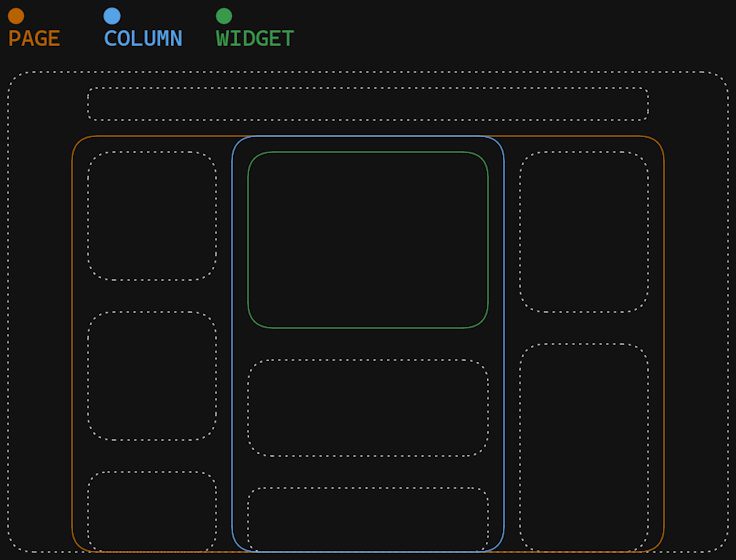
Image: the official Glance project (configuration docs at v0.8.8, "pages and columns" illustration)
At a glance:
- Config: one file,
config/glance.yml, reloaded when you save. - No background work: data is fetched when you open or refresh the page, then cached in memory.
- Shared by everyone: all logged-in users see the same dashboard.
- Not a monitoring tool: the Monitor widget shows OK or ERROR, with no history and no alerts.
- Not Glances: that is a different project (a system monitor).
Which version. The v0.8.8 release notes say it fixes vulnerabilities. We found no wave of breakage reports, so we pin it. Do not step back to an older tag to "be safe".
How it fits together#
You open the page, Glance reads your YAML, fetches what the widgets need, keeps it in memory for a while, and sends you the finished page on port 8080.

Drawn for this guide from the official README and docs. Dashed parts are optional.
A page is one tab, a column is a vertical strip on it (up to three), and a widget is one box, such as weather or a feed.
Before you start#
You need an always-on computer, Docker with Compose, and a text editor.
| System | What to have |
|---|---|
| Linux | Docker Engine and the Compose plugin; x86-64, arm64 or ARMv7 |
| Windows | Docker Desktop in Linux-container mode (WSL 2 backend), PowerShell |
| Mac | Docker Desktop, Intel or Apple Silicon (the image has an arm64 build) |
Check Docker (the same on every system):
docker --version
docker compose version
Checklist:
- [ ] Docker and Compose print versions
- [ ] Port 8080 is free on the host
- [ ] For HTTPS only: a domain with a DNS record, and ports 80 and 443 free
Tested by DIY Lab Hub: not yet. Commands and files come from the official README, configuration reference, source files and Docker Hub tag at v0.8.8, read in November 2026. We did not run them.
Step 1: Create the folders and the config file#
Glance needs config for glance.yml and assets for your own icons, here under ~/docker_volumes/glance.
We use one file on purpose. The official template splits the config with $include, and that is where beginners hit the "pages inside pages" error (see Common mistakes).
The file has three columns: calendar, weather and links on the left; search, a news feed and Hacker News in the middle; a service check on the right. Replace London, United Kingdom with your city and country. The last check asks Glance's own health route. Add your own services later.
Linux#
mkdir -p ~/docker_volumes/glance/{config,assets,backups}
cd ~/docker_volumes/glance
cat > config/glance.yml << 'EOF'
server:
  assets-path: /app/assets

pages:
  - name: Home
    columns:
      - size: small
        widgets:
          - type: calendar
            first-day-of-week: monday

          - type: weather
            location: London, United Kingdom
            units: metric
            hour-format: 24h

          - type: bookmarks
            groups:
              - title: Handy links
                links:
                  - title: Glance docs
                    url: https://github.com/glanceapp/glance/blob/v0.8.8/docs/configuration.md
                  - title: selfh.st
                    url: https://selfh.st/

      - size: full
        widgets:
          - type: search
            search-engine: duckduckgo

          - type: rss
            title: Home-lab news
            limit: 10
            collapse-after: 5
            cache: 1h
            feeds:
              - url: https://selfh.st/rss/
                title: selfh.st

          - type: hacker-news
            limit: 10
            collapse-after: 5

      - size: small
        widgets:
          - type: monitor
            title: Services
            cache: 1m
            sites:
              - title: Example site
                url: https://example.org
              - title: Glance itself
                url: http://127.0.0.1:8080/api/healthz
EOF
Windows (PowerShell)#
New-Item -ItemType Directory -Force "$HOME\docker_volumes\glance\config", "$HOME\docker_volumes\glance\assets", "$HOME\docker_volumes\glance\backups" | Out-Null
Set-Location "$HOME\docker_volumes\glance"
@'
server:
  assets-path: /app/assets

pages:
  - name: Home
    columns:
      - size: small
        widgets:
          - type: calendar
            first-day-of-week: monday

          - type: weather
            location: London, United Kingdom
            units: metric
            hour-format: 24h

          - type: bookmarks
            groups:
              - title: Handy links
                links:
                  - title: Glance docs
                    url: https://github.com/glanceapp/glance/blob/v0.8.8/docs/configuration.md
                  - title: selfh.st
                    url: https://selfh.st/

      - size: full
        widgets:
          - type: search
            search-engine: duckduckgo

          - type: rss
            title: Home-lab news
            limit: 10
            collapse-after: 5
            cache: 1h
            feeds:
              - url: https://selfh.st/rss/
                title: selfh.st

          - type: hacker-news
            limit: 10
            collapse-after: 5

      - size: small
        widgets:
          - type: monitor
            title: Services
            cache: 1m
            sites:
              - title: Example site
                url: https://example.org
              - title: Glance itself
                url: http://127.0.0.1:8080/api/healthz
'@ | Set-Content -Encoding ascii config\glance.yml
Mac (Terminal)#
Same commands as Linux.
Check it worked. The file exists and is plain text. On Windows, Get-Content config\glance.yml prints the YAML (glance.yml.txt is the classic mistake).
What the main lines mean:
| Line | Meaning |
|---|---|
server.assets-path | Folder inside the container served at /assets/. It must exist, or Glance refuses to start |
size: small / size: full | A small column is a fixed 300 px. A full column takes the rest. Use one or two full columns |
cache: | How long fetched data is reused: a number plus s, m, h or d |
Tip: Indent with spaces, never tabs, two spaces per level. One wrong indent turns the page into an error message.
Step 2: Write the Compose file and start Glance#
The official manual file uses glanceapp/glance with no tag and 8080:8080, which listens on every network interface. We pin the tag, mount assets and publish the port on 127.0.0.1 only, so only this computer can open it until Step 4 adds a login. The empty .env file is for the secret in Step 4.
Linux#
cd ~/docker_volumes/glance
touch .env
cat > docker-compose.yml << 'EOF'
services:
  glance:
    image: glanceapp/glance:v0.8.8
    container_name: glance
    restart: unless-stopped
    ports:
      - "127.0.0.1:8080:8080"
    env_file:
      - .env
    volumes:
      - ./config:/app/config
      - ./assets:/app/assets
EOF
docker compose config --quiet
docker compose run --rm glance config:validate
echo $?
docker compose up -d
docker compose ps
docker compose logs --tail=50 glance
Windows (PowerShell)#
Set-Location "$HOME\docker_volumes\glance"
New-Item -ItemType File -Force .env | Out-Null
@'
services:
  glance:
    image: glanceapp/glance:v0.8.8
    container_name: glance
    restart: unless-stopped
    ports:
      - "127.0.0.1:8080:8080"
    env_file:
      - .env
    volumes:
      - ./config:/app/config
      - ./assets:/app/assets
'@ | Set-Content -Encoding ascii docker-compose.yml
docker compose config --quiet
docker compose run --rm glance config:validate
$LASTEXITCODE
docker compose up -d
docker compose ps
docker compose logs --tail=50 glance
Mac (Terminal)#
Same commands as Linux (Docker Desktop).
Check it worked.
config:validateprints nothing and the exit code is0. In v0.8.8 the source prints no success message.docker compose psshowsglancerunning.- The log has a line like
Starting server on :8080 (base-url: "", assets-path: "/app/assets")(shape taken from the source and issue 910). - The health route answers 200 with an empty body (on Windows use
curl.exe):
curl -s -o /dev/null -w '%{http_code}\n' http://127.0.0.1:8080/api/healthz
200
docker compose exec glance /app/glance --versionprintsv0.8.8.- Open
http://127.0.0.1:8080and the dashboard appears. The first load can take a second or two.
If the server is another machine, 127.0.0.1 in your laptop's browser means the laptop. Use an SSH tunnel, or change the port line to "8080:8080" after Step 4 has added a login.
Tip:
docker compose psshows nohealthyflag. The built-in health check failed on non-default ports and was removed in v0.8.4 (issue 676). Use the/api/healthzcheck.
Tip:
--versiononly works as the only argument.docker run --rm glanceapp/glance:v0.8.8 --versionfails because the image already passes--config. Usedocker compose execas shown.
Step 3: Make it yours#
Edit config/glance.yml and save. Glance reloads it by itself and logs Config file changed, reloading.... After a mistake it logs Config has errors: and the old page keeps running.
Linux#
cd ~/docker_volumes/glance
nano config/glance.yml
docker compose logs --tail=30 glance
Windows (PowerShell)#
Set-Location "$HOME\docker_volumes\glance"
notepad config\glance.yml
docker compose logs --tail=30 glance
Mac (Terminal)#
Same as Linux. Any plain-text editor works.
Check it worked. The page changes after a refresh.
Things that surprise beginners:
- Nothing updates by itself. Press refresh. Only the clock and "3 minutes ago" labels move.
- Cache is not a refresh timer.
cache: 1hreuses fetched data for an hour. Weather and calendar update on the hour. - A reload clears the cache. Saving many times can trip outside rate limits.
- Environment variables need a recreate (Step 4).
For a second tab, add another item under pages: with its own name and columns.
For your own icons, put files in assets and use /assets/<file>. Names such as si:immich come from cdn.jsdelivr.net.
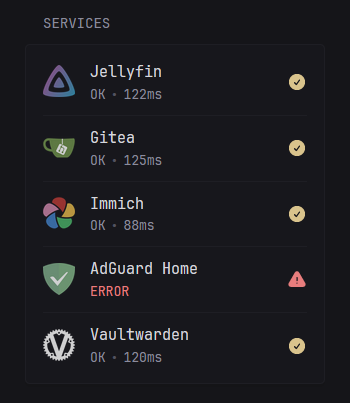
Image: the official Glance project (configuration docs at v0.8.8, Monitor widget preview)
The Monitor widget sends a GET request and counts status 200 as OK. For a service that answers with a redirect or login page, add alt-status-codes. The timeout is three seconds.
What leaves your machine#
| Feature | Who is contacted |
|---|---|
| RSS widget | The feed addresses you list |
| Weather | Open-Meteo |
Icon prefixes (si:, sh:, di:, mdi:) | cdn.jsdelivr.net, unless you host icons in assets |
| Videos and Reddit widgets | YouTube and Reddit, if you add them |
| Search widget | Your browser opens your chosen search engine |
We found no telemetry setting in the docs and did not audit the traffic.
Tip: Add widgets one at a time. A failing widget shows a red dot by its title (
hide-header: truehides it too).
Step 4: Add a login#
Glance has no default account. Without an auth block anyone who reaches the port sees everything. The login needs a username (3+ characters), a password (6+) and a secret key that signs the session cookie.
The password is typed in the command, so it stays in your shell history.
Linux#
cd ~/docker_volumes/glance
docker run --rm glanceapp/glance:v0.8.8 secret:make
docker run --rm glanceapp/glance:v0.8.8 password:hash '<your-password>'
printf "GLANCE_SECRET_KEY='%s'\n" '<paste-the-secret-key>' > .env
chmod 600 .env
Windows (PowerShell)#
Set-Location "$HOME\docker_volumes\glance"
docker run --rm glanceapp/glance:v0.8.8 secret:make
docker run --rm glanceapp/glance:v0.8.8 password:hash '<your-password>'
"GLANCE_SECRET_KEY='<paste-the-secret-key>'" | Set-Content -Encoding ascii .env
Mac (Terminal)#
Same commands as Linux.
secret:make prints a random key. password:hash prints a bcrypt hash starting with $2a$10$. Add this block at the top level of config/glance.yml, next to server: and pages::
auth:
  secret-key: ${GLANCE_SECRET_KEY}
  users:
    admin:
      password-hash: '<paste-the-bcrypt-hash>'
The hash goes into the YAML on purpose. Compose reads $ signs in a .env file as variable markers unless the value is in single quotes, and the hash is full of them. The secret key has none, so it can live in .env. Docker passes the key into the container, and Glance fills in ${GLANCE_SECRET_KEY} when it reads the YAML.
The YAML reloads by itself, but Glance only reads environment variables at start, so recreate the container (the same line works in PowerShell):
docker compose up -d --force-recreate
Check it worked. Refresh the browser: a login page replaces the dashboard. After five wrong passwords within five minutes, Glance blocks that address and logs Failed login attempt for user 'admin' from <address>.
- You can add several users, but all see the same dashboard (issue 1111, open).
- Single sign-on (OIDC) is not built in (issue 1018, open).
- Not everything is locked:
/api/healthzand/assets/answer without a login.
Tip: Never put secrets, backups or private documents in
assets. Anyone who can reach the port can read that folder.
Tip:
secret-key must be set when users are configuredorenvironment variable ... not foundat start means the.envchange was not picked up. Run the recreate line again.
Step 5: Show container status (optional, with a socket proxy)#
The Docker Containers widget shows a mark for each of your containers. It needs the Docker API, and that is the risky part. The socket is the control panel of your machine. Mounting it as :ro makes the file read-only, not the API. Docker's security page says only trusted users should control the daemon.
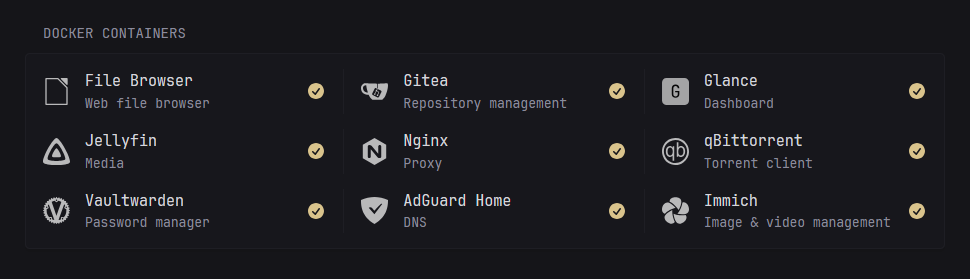
Image: the official Glance project (configuration docs at v0.8.8, Docker Containers widget preview)
The docs name docker-socket-proxy as the way to avoid the raw socket. Only the proxy touches the socket, and it lets through only what you switch on. CONTAINERS=1 allows the container list, POST=0 only read requests. Glance asks only for GET /containers/json, so that is enough.
The proxy's v0.6.0 release (17 November 2026) deprecated version tags such as v0.5.0 (not deleted). Supported tags are lts, latest and 3.4. We pin 3.4.
Extend docker-compose.yml. The proxy publishes no port. The labels show how the widget names a container:
services:
  glance:
    image: glanceapp/glance:v0.8.8
    container_name: glance
    restart: unless-stopped
    ports:
      - "127.0.0.1:8080:8080"
    env_file:
      - .env
    volumes:
      - ./config:/app/config
      - ./assets:/app/assets
    labels:
      glance.name: Glance
      glance.description: Dashboard
      glance.url: http://127.0.0.1:8080

  dockerproxy:
    image: ghcr.io/tecnativa/docker-socket-proxy:3.4
    container_name: dockerproxy
    restart: unless-stopped
    environment:
      - CONTAINERS=1
      - POST=0
    volumes:
      - /var/run/docker.sock:/var/run/docker.sock:ro
Then add the widget to a column in config/glance.yml:
          - type: docker-containers
            sock-path: http://dockerproxy:2375
Linux#
cd ~/docker_volumes/glance
nano docker-compose.yml
nano config/glance.yml
docker compose up -d
docker compose ps
Windows (PowerShell)#
Set-Location "$HOME\docker_volumes\glance"
notepad docker-compose.yml
notepad config\glance.yml
docker compose up -d
docker compose ps
Mac (Terminal)#
Same commands as Linux. Docker Desktop provides the socket in its Linux VM (untested). Rootless Docker keeps it elsewhere: change the host side of the mount.
Check it worked. docker compose ps lists glance and dockerproxy, and the widget shows your containers. All containers are shown unless you set hide-by-default: true and mark chosen ones with glance.hide: false.
Tip: The widget does not read
DOCKER_HOST. The address goes insock-path(issue 510).
Put it behind HTTPS (with or without Traefik)#
If you only open Glance on your own computer, skip this section. For https://glance.<your-domain> you need a DNS record pointing to the server and ports 80 and 443 reachable.
First tell Glance it sits behind a proxy. In config/glance.yml, extend server::
server:
  assets-path: /app/assets
  proxied: true
With proxied: true, Glance takes the visitor's address from the last entry of X-Forwarded-For, the one your proxy added. That makes the login block work per visitor, not per proxy. Set it only when visitors cannot reach port 8080 directly, or they could fake the header. The session cookie is Secure only when the proxy sends X-Forwarded-Proto: https.
Both routes use a shared proxy network. Create it once:
docker network create proxy
With Traefik#
On a server that already runs Traefik v3, add labels and drop the ports: block. Our Traefik guide sets up the https entrypoint, the le resolver and the proxy network. The router needs its own tls.certresolver=le label to get a certificate.
services:
  glance:
    image: glanceapp/glance:v0.8.8
    container_name: glance
    restart: unless-stopped
    env_file:
      - .env
    volumes:
      - ./config:/app/config
      - ./assets:/app/assets
    networks:
      - default
      - proxy
    labels:
      - "traefik.enable=true"
      - "traefik.docker.network=proxy"
      - "traefik.http.routers.glance.rule=Host(`glance.<your-domain>`)"
      - "traefik.http.routers.glance.entrypoints=https"
      - "traefik.http.routers.glance.tls=true"
      - "traefik.http.routers.glance.tls.certresolver=le"
      - "traefik.http.services.glance.loadbalancer.server.port=8080"

networks:
  proxy:
    external: true
The default network keeps the link to the socket proxy from Step 5; without Step 5 you can drop it. Run docker compose up -d.
Check it worked. curl -I https://glance.<your-domain>/ returns a status line over HTTPS. Then enter a wrong password once: the address in the Failed login attempt log line must be your device, not the proxy.
Without Traefik: Caddy#
Choose this if you have no Traefik. Caddy gets and renews its own certificates. Use the Glance file above without the labels: block, then add Caddy. Our Caddy guide has more detail. We mount the conf folder, not a single file:
mkdir -p ~/docker_volumes/caddy/{conf,data,config}
cd ~/docker_volumes/caddy
cat > docker-compose.yml << 'EOF'
services:
  caddy:
    image: caddy:2.11.9
    container_name: caddy
    restart: unless-stopped
    ports:
      - "80:80/tcp"
      - "443:443/tcp"
      - "443:443/udp"
    volumes:
      - ./conf:/etc/caddy:ro
      - ./data:/data
      - ./config:/config
    networks:
      - proxy

networks:
  proxy:
    external: true
EOF
Save ~/docker_volumes/caddy/conf/Caddyfile for a public domain:
glance.example.com {
    reverse_proxy glance:8080
}
For a home-only name, tls internal makes Caddy use its own local certificate:
glance.home.arpa {
    tls internal
    reverse_proxy glance:8080
}
Run docker compose up -d in each folder. Caddy reaches Glance by container name, so use glance:8080, never 127.0.0.1:8080 (that is Caddy itself). With tls internal, each device must trust Caddy's root certificate once.
Check it worked. curl -I https://glance.example.com/ shows an HTTP status line over HTTPS.
Glance can also live under a sub-path such as example.com/glance: set base-url: /glance and make the proxy strip the prefix (Caddy's handle_path). A host name does not need this.
Security and testing#
| Control | How |
|---|---|
| Where it listens | Keep 127.0.0.1:8080 or a proxy network |
| Login | The auth block (Step 4) |
| Secrets | Tokens in .env (chmod 600), used as ${NAME} in YAML. Names must be CAPITALS, digits and underscores, or they stay as plain text |
| Public folder | assets and /api/healthz are open even with a login |
| Docker socket | Use the socket proxy (Step 5). Never publish its port 2375 |
| Trusted code | custom-api, html, iframe and extension widgets run content you chose. Treat them like code |
| Debug output | config:print prints secrets too. Keep it private |
Quick tests after each change:
cd ~/docker_volumes/glance
docker compose ps
docker compose logs --tail=100 glance
curl -s -o /dev/null -w '%{http_code}\n' http://127.0.0.1:8080/api/healthz
Glance or Homepage?#
| Glance | Homepage | |
|---|---|---|
| Main idea | Feeds first: news, video, weather, then your services | Services first: many built-in app widgets |
| Config | One YAML file (or includes) | Several YAML files |
| Service check | A simple GET, OK or ERROR | Per-service widgets with live numbers |
Pick Glance for a calm page to read. Pick Homepage for live numbers from many apps (our guide). They run fine side by side. For check history and alerts, add Gatus.
Common mistakes#
From GitHub issues, the official README and common AI answers.
| Mistake | Why it happens | Do this instead |
|---|---|---|
no such file or directory for glance.yml | Only the template's docker-compose.yml was used, so no config file existed (issue 1102) | Create config/glance.yml first and mount ./config:/app/config |
cannot unmarshal !!map into []glance.page | A full example with pages: was pasted into a file included under pages: (issue 424) | Remove the top pages: from the included file, or use one file |
read glance.yml: is a directory | Old single-file mount. The maintainer saw a missing file; the reporter fixed a Windows path (issue 84) | Mount the folder, never one file |
| Login page loops back to itself behind Traefik | base-url was set to the full domain (discussion 857, the asker fixed it by removing it) | Leave base-url out on a host name |
permission denied on docker.sock | Socket mounted directly, owned by root and the docker group (discussion 895, unanswered) | Use the socket proxy from Step 5 |
Docker widget: 404 Not Found | An https:// sock-path was turned into http:// before v0.8.6 (issue 992) | Use v0.8.8 and http://dockerproxy:2375 |
| Reddit shows 403 | Reddit blocks anonymous access, mostly from hosting IPs (issue 1016) | Use the widget's app-auth (v0.8.7: search needs it) or skip Reddit |
| YouTube shows 404 or EOF | YouTube's feed address fails now and then (issue 910) | Wait. v0.8.6 reuses the cached list |
Server stats: disk N/A | Reported after 0.8.5 to 0.8.6 (issue 1074) | List mountpoints; it worked for the reporter |
| CPU stuck near 100% | The value is load average divided by cores, with disk waits included on Linux (issue 679) | Do not read it as CPU use |
| Widgets time out | Pi-hole or AdGuard Home rate-limits many quick DNS requests (README) | Raise the rate limit there |
| Broken layout in one browser | The Dark Reader extension rewrites the page (README) | Turn it off for your Glance address |
New .env value ignored | Only the YAML is watched | Recreate: docker compose up -d --force-recreate |
| Login block hits everyone behind a proxy | Without proxied: true all visitors share the proxy's address. Behind two proxies in a row Glance takes the last (issue 1086) | Set proxied: true, use one proxy |
AI assistants: mount ./glance.yml:/app/glance.yml | That was the layout before v0.7.0 | Mount ./config:/app/config |
| AI assistants: port 3000, 7575 or 61208, or the Glances monitor | Mixed up with other tools | Port 8080, image glanceapp/glance:v0.8.8 |
AI assistants: PostgreSQL, Redis, admin/admin, GLANCE_AUTH_ENABLED | Invented: no database, no default account, no such setting | Use the auth block from Step 4 |
AI assistants: homepage.* labels, /health, DOCKER_HOST | Taken from other tools | Use glance.* labels, /api/healthz and sock-path |
Tip: Run
docker compose run --rm glance config:validatebefore saving a big edit to a live file. It prints nothing when the file is fine.
Tip: Copy examples from the official docs at your pinned version, not from blogs. Examples from before v0.7.0 use a different mount.
Tip: Do not downgrade because one widget fails. Most open reports above are about outside services, not about v0.8.8.
Troubleshooting#
| Problem | Solution |
|---|---|
| Page does not load | docker compose ps, then docker compose logs --tail=100 glance |
| Refused from another computer | The port is on 127.0.0.1 only. Use a proxy, a tunnel, or "8080:8080" after Step 4 |
port is already allocated | Something else uses 8080. Change only the left number: "127.0.0.1:8081:8080" |
| Container exits at start | The config is invalid. Run config:validate and read the log |
| Config edits ignored | Look for Config has errors: in the log. A deleted and recreated file is no longer watched: restart. One user with the folder on an NFS share saw no reload at all (discussion 710, unanswered) |
| One widget shows a red dot | That widget failed; the log says why. Glance itself is fine |
| Page loads slowly | One slow outside service can hold the page. Lengthen cache or remove it |
Exact error texts#
parsing config: reading /app/config/glance.yml: open /app/config/glance.yml: no such file or directory: the file is missing on the host, or the folder is not mounted.Config has errors: yaml: unmarshal errors: line 12: cannot unmarshal !!map into []glance.page: the nestedpages:problem. With$includethe line numbers are wrong;config:printshows the merged file.failed parsing config file: read glance.yml: is a directory: an old single-file mount.secret-key must be set when users are configured: addsecret-keyunderauth.environment variable GLANCE_SECRET_KEY not found: check.env, then recreate the container.assets directory does not exist: /app/assets: createassetsand mount it.ERROR fetching containers: sending request to socket: Get "http://docker/containers/json?all=true": dial unix /var/run/docker.sock: socket: permission denied(discussion 895): use the socket proxy.
Known bugs (open, November 2026)#
- Issue 1016: Reddit blocks anonymous requests. Workarounds shipped, none is permanent.
- Issue 910: YouTube feeds fail at times with
unexpected status code 404orEOF, a temporary outside problem per the maintainer. - Issue 1074: disk
N/A. Workaround: listmountpoints. - Issue 952: edits ignored on a Runtipi install, even after a restart.
- Issue 950: after
Failed to start server: listen tcp ...: bind: cannot assign requested addressthe process may keep running.
Diagnose with these (read the warning on the last):
docker compose logs --tail=100 glance
docker compose run --rm glance diagnose
docker compose run --rm glance config:print
config:print shows secrets from .env. Keep its output private.
Updates and backups#
Update. The project gives release notes, no update chapter. Read the release notes, back up, change the tag in docker-compose.yml, then run:
cd ~/docker_volumes/glance
docker compose pull
docker compose run --rm glance config:validate
docker compose up -d
docker compose logs --tail=50 glance
Pulling an unchanged tag changes nothing; the tag edit is the upgrade. Installs older than v0.7.0 must first move glance.yml into a config folder (upgrade note).
Back up the Compose file, config, assets and .env. There is no database. The to-do widget keeps its tasks in your browser, so these backups do not cover them.
cd ~/docker_volumes/glance
tar -czf "backups/glance-$(date +%F).tar.gz" docker-compose.yml config assets .env
chmod 600 backups/glance-*.tar.gz
Schedule it at 03:00 with crontab -e (Linux, Mac). Use full paths in the cron line, because cron has a short PATH. The archive holds your .env: keep copies off the machine, for example with our restic guide.
Windows (PowerShell)#
Set-Location "$HOME\docker_volumes\glance"
tar -czf "backups\glance-$(Get-Date -Format yyyy-MM-dd).tar.gz" docker-compose.yml config assets .env
tar.exe ships with Windows 10 and 11. Run it nightly with Task Scheduler.
Restore test. Unpack one archive into a new empty folder, never over the live one:
mkdir -p /tmp/glance-restore-test && tar -xzf backups/glance-<date>.tar.gz -C /tmp/glance-restore-test
ls /tmp/glance-restore-test/config
You should see glance.yml.
Performance and resources#
The README claims low memory use, a binary under 20 MB, and uncached pages that usually load in about a second. These are claims, not requirements, and we give no RAM figure of our own. Measure it:
docker stats --no-stream glance
To keep it light: use longer cache values, split big pages, host icons in assets, and raise the DNS rate limit in Pi-hole or AdGuard Home if widgets time out. Run one instance; each copy has its own cache.
FAQ#
Is Glance free? Yes, under AGPL-3.0. We found no paid edition.
Does it refresh by itself? No. Data is fetched when the page loads, so refresh it.
Can I run it without Docker? Yes. The release has programs for Linux, Windows and Mac. We do not cover a service file because the docs give none.
Can each person have their own dashboard? Not yet (issue 1111). Run two instances for two layouts.
Does it need a database, a GPU or an AI model? No to all three.
Can it replace Uptime Kuma or Gatus? No. The Monitor widget has no history or alerts. Use Gatus.
Sources#
- Glance release v0.8.8, README, configuration reference, LICENSE, Dockerfile, .goreleaser.yaml, v0.7.0 upgrade note and the source files (
main.go,cli.go,glance.go,auth.go) - read November 2026 - Release notes v0.8.7, v0.8.6 and v0.8.4
- Docker Hub glanceapp/glance (tag
v0.8.8checked on the registry) and caddy (2.11.9) - November 2026 - Tecnativa docker-socket-proxy release v0.6.0 and Docker Engine security - November 2026
- Compose
.envquoting rules - November 2026 - GitHub discussions #710, #857, #895 and issues #84, #424, #510, #676, #679, #910, #950, #952, #992, #1016, #1018, #1074, #1086, #1102 and #1111 - read November 2026
Checked against the official docs on 2026-11-25.