FreshRSS with Docker: a Fast RSS Reader with Mobile App Sync (Linux, Windows, Mac)
Before you start
- 21 min read
- Updated November 2026
Boxes marked Run in terminal are what you type; plain text explains why. Check what you need first
What you get in one minute#
FreshRSS is a free, self-hosted RSS reader: it fetches the feeds of your favourite sites on a timer, stores the articles on your own server, and lets you read them in a browser or in a phone app.

Logo: the official FreshRSS project (github.com/FreshRSS/FreshRSS, logo from the README at tag 1.31.0)
An RSS feed is a file a website publishes with its newest posts. A reader checks many feeds for you, so you do not visit each site by hand. Your reading list and read marks stay on your machine. Two APIs let phone apps sync with it. It needs no GPU and no AI model.
| What | Value (official sources, read November 2026) |
|---|---|
| Current version | FreshRSS 1.31.0, released 23 November 2026 (previous: 1.30.4, 21 October 2026) |
| Image to pin | freshrss/freshrss:1.31.0 (Docker Hub tag checked 25 November 2026; amd64, arm64 and arm/v7) |
| Time needed | About 20 minutes (our estimate, not measured) |
| RAM and size | No official RAM minimum is published. The compressed image is about 87 MiB (amd64, from the Docker Hub tag) |
| Port | TCP 80 inside the container. We publish it on 127.0.0.1:8080 |
| Licence | GNU AGPL v3 (LICENSE.txt at the tag; composer.json says AGPL-3.0). No paid edition is mentioned in the README |
| Official docs | FreshRSS docs and Docker README at 1.31.0 |
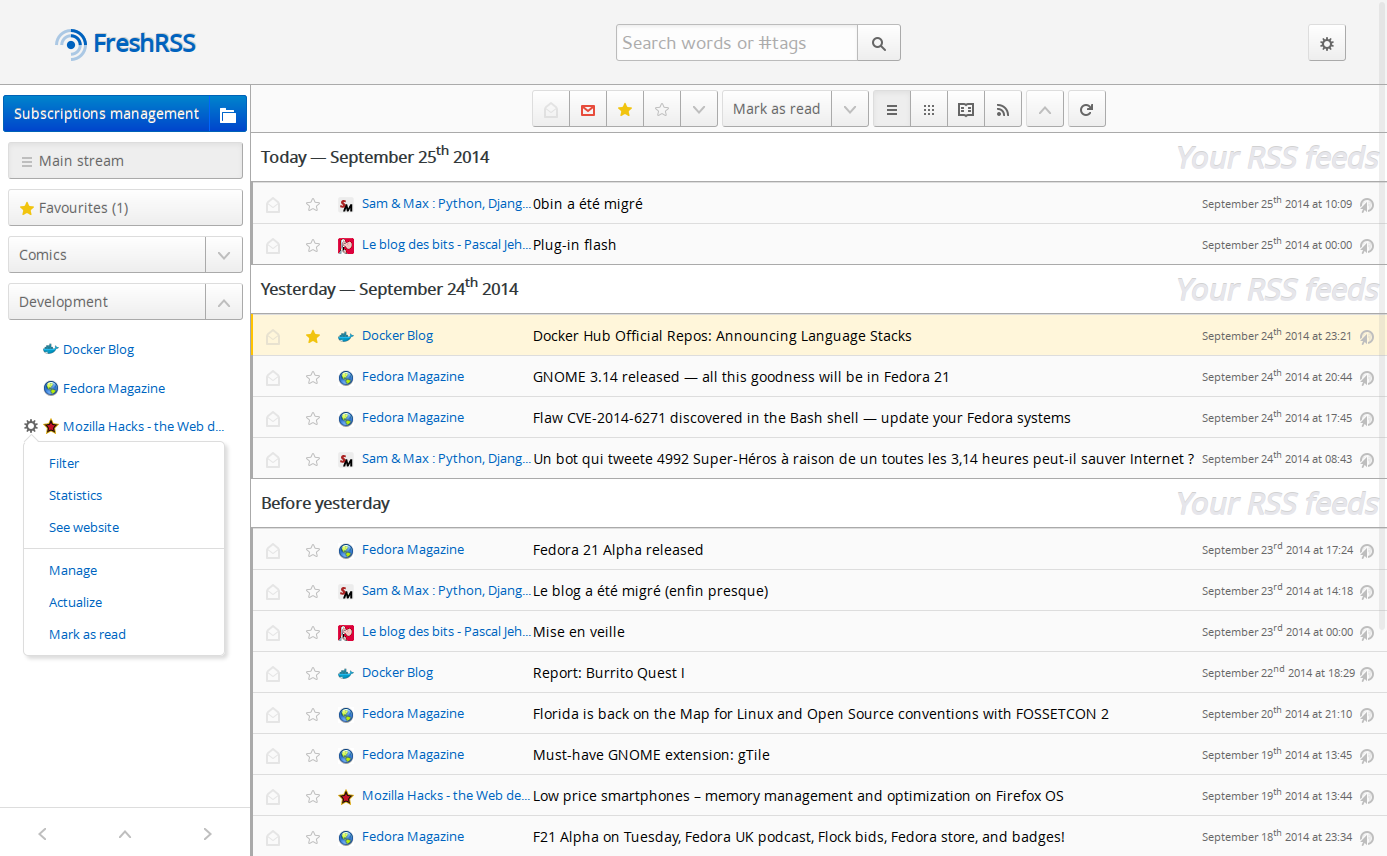
Image: the official FreshRSS project (README at 1.31.0, "FreshRSS screenshot"). It is an old picture (the sample articles are dated 2014), so today's menus and themes look different.
At a glance:
- What it is: one container with Apache and PHP. It fetches feeds, stores them, and serves the web page and the API.
- Storage: SQLite in a Docker volume, the easiest option per the docs.
- Refresh: a built-in timer, switched on with
CRON_MIN. Off by default. - Phone sync: Google Reader API (better) or Fever API. No official app exists.
Which version. We pin 1.31.0, not 1.30.4. A user reported 13 pending PHP security fixes for 1.30.4 (issue 9599), and the README says fixes are not backported. 1.31.0 is a security release with updated Apache, PHP and cURL. It also changes login: the browser now sends the password as typed, so outside your home you need HTTPS. In the issues we read on 25 November, we found two upgrade cookie reports (see Common mistakes) and no install blocker. The maintainers also run a rolling edge tag. We pin an exact tag so you update on purpose.
How it fits together#
Your browser or phone app talks to one FreshRSS container, which fetches feeds from the web on a timer and keeps everything in a data volume.

Drawn for this guide from the official Docker README. The HTTPS route (dashed) is optional.
- The built-in cron starts a refresh at the minutes you set in
CRON_MIN. - FreshRSS (Apache plus PHP, port 80) fetches each feed and saves the articles in the data volume.
- You read through the web page (
/i/) or a phone app (/api/greader.php), with an HTTPS proxy in front outside your home.
SQLite needs no Redis, worker or database container.
Before you start#
You need an always-on machine, Docker with Compose, and a browser. Linux: Docker Engine plus the Compose plugin on x86-64, arm64 or ARMv7. Windows: Docker Desktop in Linux-container mode (WSL 2), and PowerShell. Mac: Docker Desktop, Intel or Apple Silicon.
Check Docker (the same on every system). docker info should print text, not an error:
docker --version
docker compose version
docker info
Checklist:
- [ ] Docker and Compose work (the commands above print versions)
- [ ] Port 8080 is free on the host (we publish it on
127.0.0.1only) - [ ] For phone sync away from home: a domain with a DNS record, and ports 80 and 443 free
- [ ] A password manager ready for two passwords: login and API
Tested by DIY Lab Hub: not yet. Commands and file contents come from the official Docker README, compose files and docs at tag 1.31.0, read in November 2026. We did not run them.
Step 1: Create the folder and the Compose file#
The official base file has no ports: line and uses latest. The official docker-compose-local.yml adds ${PUBLISHED_PORT:-8080}:${LISTEN:-80}. We merge both, pin the tag, publish on 127.0.0.1 only and switch on the official health check.
Linux#
mkdir -p ~/docker_volumes/freshrss/backups
cd ~/docker_volumes/freshrss
cat > docker-compose.yml << 'EOF'
services:
  freshrss:
    image: freshrss/freshrss:1.31.0
    container_name: freshrss
    hostname: freshrss
    restart: unless-stopped
    ports:
      - "127.0.0.1:8080:80"
    environment:
      TZ: UTC
      CRON_MIN: "13,43"
    volumes:
      - data:/var/www/FreshRSS/data
      - extensions:/var/www/FreshRSS/extensions
    logging:
      options:
        max-size: 10m
    healthcheck:
      test: ["CMD", "cli/health.php"]
      timeout: 10s
      start_period: 60s
      start_interval: 11s
      interval: 75s
      retries: 3

volumes:
  data:
  extensions:
EOF
docker compose config -q
Windows (PowerShell)#
New-Item -ItemType Directory -Force "$HOME\docker_volumes\freshrss\backups" | Out-Null
Set-Location "$HOME\docker_volumes\freshrss"
@'
services:
  freshrss:
    image: freshrss/freshrss:1.31.0
    container_name: freshrss
    hostname: freshrss
    restart: unless-stopped
    ports:
      - "127.0.0.1:8080:80"
    environment:
      TZ: UTC
      CRON_MIN: "13,43"
    volumes:
      - data:/var/www/FreshRSS/data
      - extensions:/var/www/FreshRSS/extensions
    logging:
      options:
        max-size: 10m
    healthcheck:
      test: ["CMD", "cli/health.php"]
      timeout: 10s
      start_period: 60s
      start_interval: 11s
      interval: 75s
      retries: 3

volumes:
  data:
  extensions:
'@ | Set-Content -Encoding ascii docker-compose.yml
docker compose config -q
Mac (Terminal)#
Same commands as Linux.
Check it worked. docker compose config -q prints nothing. That means the YAML is valid.
| Line | Meaning |
|---|---|
image: ...:1.31.0 | An exact release. latest would move at the next pull |
127.0.0.1:8080:80 | Only this computer can open the page. 80 is the container's own port |
TZ: UTC | Server time zone. Use a name from the PHP list, such as Asia/Tokyo |
CRON_MIN: "13,43" | Refresh at minute 13 and 43 of every hour (Step 4) |
data, extensions | The two paths the docs say to keep: /var/www/FreshRSS/data and /var/www/FreshRSS/extensions |
Tip: Compose names the volumes after the folder: here
freshrss_dataandfreshrss_extensions. Rename the folder and Compose makes new, empty volumes, so your feeds seem gone. Check withdocker volume ls.
Step 2: Start FreshRSS#
Linux#
cd ~/docker_volumes/freshrss
docker compose pull
docker compose up -d
docker compose ps
docker compose logs --tail=30 freshrss
Windows (PowerShell)#
Set-Location "$HOME\docker_volumes\freshrss"
docker compose pull
docker compose up -d
docker compose ps
docker compose logs --tail=30 freshrss
Mac (Terminal)#
Same commands as Linux.
Check it worked. docker compose ps lists freshrss as running. After about a minute it should read healthy, because the official health check runs the script cli/health.php. The docs give no expected log text, so look for error lines only.
Tip: There is no web address such as
/health. The official health check is a command inside the container.
Step 3: Finish the setup in the browser#
The Docker README recommends the web installer. Open http://127.0.0.1:8080 on the machine that runs Docker. A phone cannot reach that address yet.
- Pick your language ("Choose a language for FreshRSS") and continue.
- Read the checks page (PHP, extensions, permissions). Fix any red line first.
- Under "Type of database" choose SQLite. Leave host, user and password alone.
- Under "General configuration" fill "Username of the default user": 1 to 39 characters, letters, digits and
. _ @ -. - Under "Authentication method" choose "Web form (traditional)". The others are "HTTP (advanced: managed by Web server, OIDC, SSO…)" and "None (dangerous)".
- Enter a password of at least 7 characters and press "Complete installation".
Check it worked. You see "Congratulations!" and "The installation process was successful." Then confirm the account from the command line:
Linux#
cd ~/docker_volumes/freshrss
docker compose exec --user www-data freshrss cli/list-users.php
Windows (PowerShell)#
Set-Location "$HOME\docker_volumes\freshrss"
docker compose exec --user www-data freshrss cli/list-users.php
Mac (Terminal)#
Same commands as Linux. The list shows your user name.
Tip:
FRESHRSS_INSTALLandFRESHRSS_USERrun only at the very first start. Editing them later changes nothing, and the docs say rerunning them means deleting the data volume. Use the web installer.
Step 4: Add feeds and check the refresh#
Click the "+" button next to "Subscriptions management" and paste an address into "Feed URL". The docs use https://framablog.org/feed/. For many sites the normal page address works, because FreshRSS looks for the feed itself.
CRON_MIN is only the minute part of a cron time. Use "13,43" or "*/20", never */15 * * * *. If it is empty, the built-in timer is off.
The project advises about two refreshes an hour. One feed is never fetched more than once every twenty minutes, so a shorter timer gains nothing. The docs list three ways to refresh, and you pick one: CRON_MIN (easiest, no monitoring), a host cron job that runs the script below with docker exec (then leave CRON_MIN unset), or a second container of the same image started with cron -f.
To test one refresh by hand, run the script below. Do not schedule it while CRON_MIN is on.
Linux#
cd ~/docker_volumes/freshrss
docker compose exec --user www-data freshrss php ./app/actualize_script.php
docker compose logs --tail=50 freshrss
Windows (PowerShell)#
Set-Location "$HOME\docker_volumes\freshrss"
docker compose exec --user www-data freshrss php ./app/actualize_script.php
docker compose logs --tail=50 freshrss
Mac (Terminal)#
Same commands as Linux.
Check it worked. Your feeds show articles. The log lists lines that start with SimplePie GET and a feed address (the shape one user posted in issue 3855). After minute 13 or 43 the same lines appear by themselves.
Tip: Moving from another reader? Use the OPML or JSON import in the web page. An OPML export is not a full backup: it skips refresh settings and passwords.
Step 5: Turn on the API and connect a phone app#
A phone app uses a second password, the API password. Do this once per user.
- Open Settings, then "Authentication". Tick "Allow API access (required for mobile apps and sharing user queries)". Save.
- Open Settings, then "Profile". Set "API password (e.g., for mobile apps)". Save.
- Click the
/api/link next to that field, then "Check full server configuration". - In the app, enter
https://<your-domain>/api/greader.php, your user name and the API password.
Check it worked. The check page says PASS. If it shows Bad Request! or Not Found, see Troubleshooting.
Test the API from a terminal before you blame the app. --data-urlencode keeps special characters safe.
Linux#
curl -X POST --data-urlencode 'Email=<your-username>' --data-urlencode 'Passwd=<api-password>' 'https://<your-domain>/api/greader.php/accounts/ClientLogin'
Windows (PowerShell)#
curl.exe -X POST --data-urlencode 'Email=<your-username>' --data-urlencode 'Passwd=<api-password>' 'https://<your-domain>/api/greader.php/accounts/ClientLogin'
Mac (Terminal)#
Same command as Linux.
The reply has lines starting SID= and Auth=. Keep them private, and do not paste your password into shared notes or screenshots. The profile page warns: "Use HTTPS. The API password is transmitted in clear text and may appear in server logs if sent via GET." So finish the HTTPS section before you give the password to an app.
The official README lists these apps. We tested none. Check each app's help for the address it wants.
- Android: Capy Reader, Readrops, Read You, FeedMe, FocusReader (Google Reader API)
- iOS and macOS: Reeder Classic, Readkit, lire, NetNewsWire (Google Reader API); Unread, Fiery Feeds (Fever API)
- Desktop: RSS Guard, FeedFlow, NewsFlash, Newsboat
Tip: The README calls Fever limited, less efficient and less safe. Pick a Google Reader API app.
Step 6: Add extensions (optional)#
The official Extensions repository says extensions must sit in the ./extensions folder, which is our extensions volume. Unzip the repository, then copy one extension folder in, from the folder with your Compose file:
Linux#
docker compose cp ./xExtension-ReadingTime freshrss:/var/www/FreshRSS/extensions/xExtension-ReadingTime
Windows (PowerShell)#
docker compose cp .\xExtension-ReadingTime freshrss:/var/www/FreshRSS/extensions/xExtension-ReadingTime
Mac (Terminal)#
Same command as Linux.
Check it worked. Settings, then "Extensions" lists it, and you can switch it on. The docs do not describe file owners for copied folders. If it is missing, look with docker compose exec freshrss ls -l /var/www/FreshRSS/extensions.
Put it behind HTTPS (with or without Traefik)#
If you only read on the computer that runs Docker, skip this section. For phone sync away from home you need a domain with a DNS record to the server, and ports 80 and 443 open. Use a host name such as rss.<your-domain>. FreshRSS can run under a sub-path, but a host name avoids path-rewriting trouble.
Both routes drop the host port and join a shared network named proxy. Create it once if missing:
docker network create proxy
In docker-compose.yml, delete the ports: block of the freshrss service and add these lines (the second block sits next to the top-level volumes:). Then run docker compose up -d. Your volumes are kept.
    networks:
      - proxy
networks:
  proxy:
    external: true
With Traefik#
On a server that already runs Traefik v3 with the Docker provider, add labels to the same service. Names match our Traefik guide (https, le); use yours.
    labels:
      - "traefik.enable=true"
      - "traefik.docker.network=proxy"
      - "traefik.http.routers.freshrss.rule=Host(`rss.<your-domain>`)"
      - "traefik.http.routers.freshrss.entrypoints=https"
      - "traefik.http.routers.freshrss.tls=true"
      - "traefik.http.routers.freshrss.tls.certresolver=le"
      - "traefik.http.services.freshrss.loadbalancer.server.port=80"
The official proxy sample does more, and we leave three things out. It mounts the Docker socket, which gives a container control of Docker. It adds --global.sendAnonymousUsage, a Traefik usage report. And it mounts tls.yaml while the command reads tls.yml.
Check it worked. curl -I 'https://rss.<your-domain>/' shows an HTTP status line over HTTPS with a valid certificate.
Without Traefik: Caddy#
Choose this if you have no Traefik. Caddy gets and renews its own certificates. Run it from its own folder and mount the folder with the Caddyfile, not the single file.
mkdir -p ~/docker_volumes/caddy/{conf,data,config}
cd ~/docker_volumes/caddy
cat > docker-compose.yml << 'EOF'
services:
  caddy:
    image: caddy:2.11.9
    container_name: caddy
    restart: unless-stopped
    ports:
      - "80:80/tcp"
      - "443:443/tcp"
      - "443:443/udp"
    volumes:
      - ./conf:/etc/caddy:ro
      - ./data:/data
      - ./config:/config
    networks:
      - proxy

networks:
  proxy:
    external: true
EOF
cat > conf/Caddyfile << 'EOF'
rss.example.com {
    reverse_proxy freshrss:80
}
EOF
docker compose up -d
On Windows, create the same files in $HOME\docker_volumes\caddy with Notepad and run docker compose up -d in PowerShell. For a home-only name add tls internal inside the braces; each device must then trust Caddy's root once. Our Caddy guide shows how on Linux, Windows and Mac. Caddy reaches FreshRSS by container name, so write freshrss:80, never 127.0.0.1 (inside Caddy that is Caddy).
Check it worked. curl -I https://rss.example.com/ shows an HTTP status line over HTTPS. Use your real name.
Tell FreshRSS its public address#
The "Base URL" is the address FreshRSS puts into links. The docs say it is shown under System configuration but not editable there, and that the install sets it from your environment. After installing through 127.0.0.1:8080 it may still say so. The CLI docs say reconfigure.php takes the same options as do-install.php:
docker compose exec --user www-data freshrss cli/reconfigure.php --base-url 'https://rss.<your-domain>'
The same line works in PowerShell and Terminal. We did not run it. If it complains about missing options, edit base_url in data/config.php, as the Docker README describes. Then reload /api/: the API address it shows should use your domain.
Tip: The Base URL does not make a server reachable. A home-network address (the
192.168kind) works only at home (issue 8601).
Security and testing#
| Control | How |
|---|---|
| Where it listens | Keep 127.0.0.1:8080 or the proxy network only. A plain 8080:80 opens it to your whole network |
| Login and API | Use HTTPS. Since 1.31.0 the password travels as typed |
| Sign-up | Closed by default: limits.max_registrations is 1, the admin itself (0 means unlimited) |
| Authentication method | Keep "Web form". The docs say never use "None" outside your home |
| Local feeds | Blocked by default since 1.30.0. Allow only what you need, such as INTERNAL_HOST_ALLOWLIST: "rss-bridge:80". Never * |
TRUSTED_PROXY | IPs whose headers FreshRSS trusts. A loose list lets an attacker send Remote-User and become admin. Leave it unset |
| Docker socket | FreshRSS needs none. Never mount it |
Inside a container, localhost means the container itself. A feed on the Docker host needs the host's address or a shared Docker network.
What leaves the machine: requests to the feeds you add. The default config also holds auto_update_url set to https://update.freshrss.org. We found no telemetry switch and did not audit the traffic. In Docker you update by pulling a new image, not with the in-app updater.
Quick test after each change: docker compose ps and the logs.
Day to day: users, database and the command line#
More users. Sign-up is closed, so the admin adds people. Each gets their own feeds and API password:
docker compose exec --user www-data freshrss cli/create-user.php --user alice --password '<password>' --api-password '<api-password>'
SQLite or PostgreSQL. Start with SQLite. The repository also ships docker-compose-db.yml with a postgres:19 service. Choose PostgreSQL only for a concrete reason, such as many users, and keep its major version when you update: a new major version refuses to start with old data. The installer's database host is the container name, such as freshrss-db, never localhost.
Other scripts live in cli/: actualize-user.php --user <name> refreshes one user, user-info.php shows sizes, db-optimize.php and purge.php tidy the database.
Miniflux (needs PostgreSQL) and NewsBlur (a larger stack) are alternatives. We did not test them.
Common mistakes#
These come from the official docs and real GitHub issues we read in November 2026.
| Mistake | Why it happens | Do this instead |
|---|---|---|
After upgrading, Safari reloads forever or every click gives Error 403 - Forbidden (issue 9617, issue 9586) | Old browser data. A private window worked, and clearing site data fixed it | Remove the site's cookies and stored data, or try another browser |
| Login fails with "The web server seems to be incorrectly configured for cookies required for PHP sessions!" (issue 8850, issue 8192) | An old Waterfox in one case. Behind Caddy in the other (the maintainer guessed a cookie or proxy cause; a redeploy fixed it) | Compare with http://127.0.0.1:8080. Clear cookies. Use a current browser |
403 behind Authelia with [warning] --- Multiple HTTP authentication headers! (issue 7699) | The proxy sent more than one identity header | Send one header only |
| The phone app works only on home Wi-Fi (issue 8601) | The address in use is a home-network one | Set up HTTPS on a domain, then the Base URL |
CRON_MIN is set, yet a feed is not fetched every 10 minutes (issue 3855) | Per-feed refresh is limited on purpose to once every twenty minutes | Use "13,43" and wait |
| A feed host blocks you (issue 6973) | A manual refresh sends up to 10 requests at once; cron sends them one by one | Lower nb_parallel_refresh |
| Your RSS-Bridge feed broke after 1.30.0 | Local networks are blocked by default (1.30.0 notes) | Allow the exact host:port in INTERNAL_HOST_ALLOWLIST |
You edited .env or FRESHRSS_INSTALL and nothing changed | They run at the first start only | Change settings in the web page or with cli/ scripts. Do not delete the data volume |
AI assistants: BASE_URL, DISABLE_REGISTRATION or PUID and PGID as container settings | Copied from other images. The official variable list has none of them | Use the Docker README variables. Registration is limits.max_registrations |
AI assistants: CRON_MIN: "*/15 * * * *", a /health URL, or "FreshRSS listens on 8080" | Mixed up with full cron lines and other tools | Minute field only. The check is cli/health.php. The container port is 80 |
Tip: After an upgrade, if a click gives
Error 403 - Forbiddenand the log is empty, clear the site's cookies before you touch folder permissions.
Tip: If it works on
http://127.0.0.1:8080but not through the proxy, the problem is in the proxy.
Tip: Keep the allowlist tiny: one
host:portper feed source.*turns the protection off.
Troubleshooting#
| Problem | Solution |
|---|---|
| Page does not open | docker compose ps and docker compose logs --tail=100 freshrss. The port is 127.0.0.1 only |
| Feeds never update | Is CRON_MIN set, with no second timer? Read the log at minute 13 or 43 |
| Phone app login fails | Run the /api/ check, then the curl test from Step 5 |
Exact error texts#
Bad Request!orNot Foundon the/api/page: the server may refuse escaped slashes (%2F). Click "Check partial server configuration (without %2F support)". If that passes, Apache needsAllowEncodedSlashes On, or use a client that does not escape slashes, such as EasyRSS.Service Unavailable!: the API is off or the user has no API password. Redo Step 5.FAIL getallheaders!: Apache needsmod_setenviformod_rewrite. On nginx,Bad Request!points toPATH_INFO, andFile not found!tofastcgi_split_path_info.FAIL 64-bit or GMP extension!: only on 32-bit PHP. Installphp-gmp.exec format error: the image is for another CPU type (images exist for amd64, arm64 and arm/v7).The web server seems to be incorrectly configured for cookies required for PHP sessions!: see Common mistakes.Error 403 - Forbidden You don’t have permission to access this page: stale cookies after an upgrade, or proxy headers.[warning] --- Multiple HTTP authentication headers!: the proxy sends two identity headers.
With an nginx proxy, forward the login header for the API: the official example sets proxy_set_header Authorization $http_authorization;. We found no issue that proves a missing header behind a failed app login, so this is the docs' advice only.
Known issues (read 25 November 2026)#
- Issue 9586 is open: a
403after upgrading. Reporters fixed it with another browser or by deleting the FreshRSS cookies. A commenter's old-cookie theory is not confirmed by the maintainers. - Issue 9617 was closed on 24 November: a Safari refresh loop after 1.31.0. Removing the site's stored data fixed it.
- Numeric-only category names lost on OPML import: listed as fixed in 1.31.0 (change 9552). Not tested by us.
Updates and backups#
Update. Back up first, read the release notes, change the tag, then:
cd ~/docker_volumes/freshrss
docker compose pull
docker compose up -d
docker compose logs --tail=50 freshrss
Data and extensions stay in the volumes. On Windows, use the same commands after Set-Location "$HOME\docker_volumes\freshrss".
What to back up. The docs say: data/ (required; SQLite lives in it), extensions/ if you added some, and any external database separately.
Our backup script. It stops FreshRSS, packs both volumes with a throw-away container of the same image, and starts FreshRSS again. It is our own method, not from the official docs, and we did not run it. It assumes the volumes freshrss_data and freshrss_extensions.
Linux#
Save as ~/docker_volumes/freshrss/backup.sh:
#!/usr/bin/env bash
cd "$HOME/docker_volumes/freshrss" || exit 1
STAMP=$(date +%F)
docker compose stop freshrss
for V in data extensions; do
  docker run --rm -v "freshrss_$V:/src:ro" -v "$PWD/backups:/backup" \
    --entrypoint tar freshrss/freshrss:1.31.0 -czf "/backup/freshrss-$V-$STAMP.tar.gz" -C /src .
done
docker compose start freshrss
cp docker-compose.yml "backups/docker-compose-$STAMP.yml"
find backups -name 'freshrss-*.tar.gz' -mtime +14 -delete
Run it with bash ~/docker_volumes/freshrss/backup.sh. For 03:00 every day, run crontab -e and add this line with your real home path:
0 3 * * * /bin/bash /home/<your-user>/docker_volumes/freshrss/backup.sh
Windows (PowerShell)#
Save as $HOME\docker_volumes\freshrss\backup.ps1:
Set-Location "$HOME\docker_volumes\freshrss"
$stamp = Get-Date -Format yyyy-MM-dd
docker compose stop freshrss
foreach ($v in "data", "extensions") {
  docker run --rm -v "freshrss_${v}:/src:ro" -v "${PWD}\backups:/backup" --entrypoint tar freshrss/freshrss:1.31.0 -czf "/backup/freshrss-$v-$stamp.tar.gz" -C /src .
}
docker compose start freshrss
Copy-Item docker-compose.yml "backups\docker-compose-$stamp.yml"
Run it nightly at 03:00 with Task Scheduler:
$action = New-ScheduledTaskAction -Execute "powershell.exe" -Argument "-NoProfile -File `"$HOME\docker_volumes\freshrss\backup.ps1`""
Register-ScheduledTask -TaskName "FreshRSS backup" -Action $action -Trigger (New-ScheduledTaskTrigger -Daily -At 3am)
Mac (Terminal)#
Same as Linux. Use crontab -e. Docker Desktop must be running at 03:00.
Official extras. cli/db-backup.php writes one portable SQLite file per user to data/users/*/backup.sqlite. auto_sqlite_export with retention: 7 in data/config.php, plus cli/export-sqlite-auto.php from cron, keeps timestamped copies in data/users/<user>/sqlite-backups/. They share the volume's fate, so copy them away too. Our restic guide covers off-machine copies.
Restore test. Never test over live data. Unpack an archive into a throw-away volume and start a second FreshRSS on another port, without CRON_MIN:
cd ~/docker_volumes/freshrss
docker volume create freshrss-restore-test
docker run --rm -v freshrss-restore-test:/dst -v "$PWD/backups:/backup:ro" --entrypoint tar freshrss/freshrss:1.31.0 -xzf /backup/freshrss-data-<date>.tar.gz -C /dst
docker run -d --name freshrss-restore-test -p 127.0.0.1:8081:80 -v freshrss-restore-test:/var/www/FreshRSS/data freshrss/freshrss:1.31.0
On Windows use "${PWD}\backups:/backup:ro" in PowerShell. Open http://127.0.0.1:8081 and sign in: your feeds should be there. Then clean up:
docker rm -f freshrss-restore-test
docker volume rm freshrss-restore-test
For a real restore: stop FreshRSS, unpack both archives into freshrss_data and freshrss_extensions the same way, and start it again.
Performance and resources#
The project publishes no RAM or disk minimum and no benchmark for 1.31.0, so we give no RAM figure. Measure with docker stats freshrss. The README reports a Raspberry Pi 1 answering in under a second with 150 feeds and 22,000 articles. That is old and project-reported.
| Setting | Default | What it does |
|---|---|---|
nb_parallel_refresh | 10 | Feeds refreshed in parallel from the web page. Reduce on low memory |
limits.cache_duration | 800 s | How long a fetched feed counts as fresh (minimum 60, maximum 86400) |
limits.timeout | 20 s | Wait time for a feed request |
These live in data/config.php. Leave them until you have a reason.
FAQ#
Does FreshRSS have its own mobile app? No. It has an API, and third-party apps use it.
Why do feeds not refresh every few minutes? A feed is fetched at most once every twenty minutes.
Does it run on a Raspberry Pi? The images support arm64 and arm/v7. We did not test a Pi.
Can my family use it? Yes. It is multi-user. Sign-up is closed, so you add each person with cli/create-user.php.
Is there a paid edition? We found none in the README or Docker docs. The licence is GNU AGPL v3.
Sources#
- Release 1.31.0, release 1.30.0, README, Docker README, compose files, config.default.php, CLI README and LICENSE - read November 2026
- Docs: Mobile access, Google Reader API, Backup, Feed updates, Access control, Subscriptions, config keys and Extensions - read November 2026
- Docker Hub: freshrss/freshrss (tags
1.31.0and1.31.0-alpinechecked) and caddy (2.11.9checked) - 25 November 2026 - GitHub issues #3855, #6973, #7699, #8192, #8601, #8850, #9586, #9599 and #9617 - read 25 November 2026
- Related guides: Caddy and restic backups
Checked against the official docs on 2026-11-25.