Gatus with Docker: Health Checks and a Status Page from One YAML File (Linux, Windows, Mac)
Before you start
- 21 min read
Boxes marked Run in terminal are what you type; plain text explains why. Check what you need first
What you get in one minute#
Gatus is a free, self-hosted health dashboard: you list your websites and services in one YAML file, it checks them on a timer, judges each answer against conditions you write, shows the history on a status page, and alerts you when something fails.

Logo: the official Gatus project (github.com/TwiN/gatus)
The project's own pitch is that metrics only show a problem once clients hit it, while a health check can warn you first. For a home lab: is my website up, is the certificate about to expire, does the NAS answer, does DNS resolve. Everything lives in a text file you can keep in Git. There is no admin account and no database server.
| What | Value (official sources, read November 2026) |
|---|---|
| Current version | Gatus v5.38.0, released 28 October 2026 (previous: v5.37.0, September 2026) |
| Image to pin | twinproduction/gatus:v5.38.0 (tag checked on Docker Hub; amd64, arm64 and arm/v7) |
| Time needed | About 15 minutes (our estimate, not measured) |
| RAM | No official minimum. A maintainer says it can use as little as 20 MB, and 100 Mi is enough as a request (discussion 1374) |
| Port | TCP 8080 (dashboard and API) |
| Licence | Apache-2.0 (LICENSE at the release tag); no paid self-hosted edition found. gatus.io sells a separate managed service |
| Official docs | README at v5.38.0 and gatus.io |
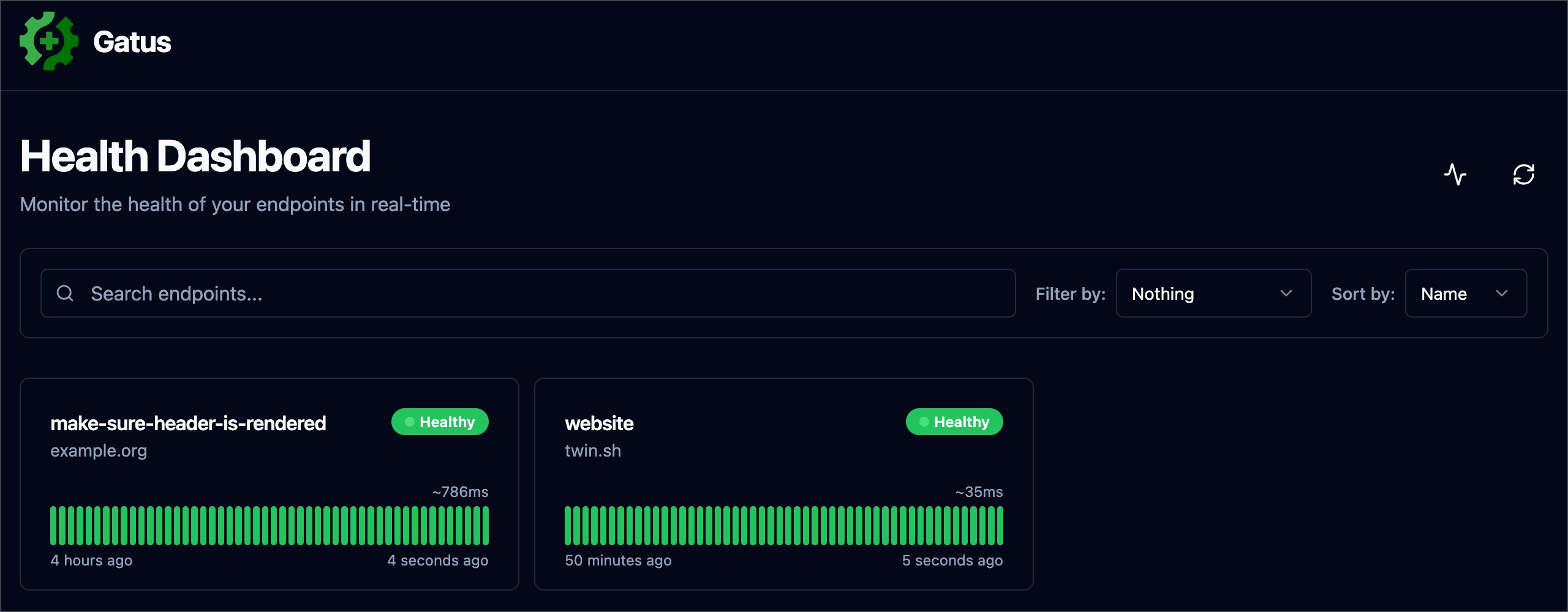
Image: the official Gatus project (README at v5.38.0, "simple example" screenshot)
At a glance:
- What it is: one small Go program in one container. It checks, stores, alerts and serves the page.
- Config:
config/config.yaml. Gatus reloads it by itself when the file changes. - Storage: memory by default, which forgets everything on restart. This guide uses SQLite in a data folder.
- Check types: HTTP, TCP, ICMP ping, DNS, SSH and more, with conditions on status, time, body and certificate.
- Alerts: about 40 providers. We use ntfy, our self-hosted push guide.
- Not a host monitor: it does not collect CPU, RAM or disk of your machines. For that see our Beszel guide.
Which version. I found no breakage reports that stop an install of v5.38.0. Open bugs are listed under Known bugs, and most were reported against older releases. The maintainers move latest after every change to the main branch (it changed on 15 November 2026, after the release), while stable follows releases. We pin the exact tag.
How it fits together#
Gatus reads your YAML file, runs each check on its own interval, saves every result in a SQLite file, sends an alert when a check fails several times in a row, and serves the dashboard on port 8080.

Drawn for this guide from the official README and the SQLite example. The HTTPS route (dashed) is optional.
Before you start#
You need an always-on machine, Docker with Compose, and a text editor.
| System | What to have |
|---|---|
| Linux | Docker Engine and the Compose plugin; x86-64, arm64 or ARMv7 |
| Windows | Docker Desktop in Linux-container mode (WSL 2 backend), PowerShell |
| Mac | Docker Desktop, Intel or Apple Silicon (the image has an arm64 build) |
Check Docker (the same on every system):
docker --version
docker compose version
Checklist:
- [ ] Docker and Compose work (the two commands above print versions)
- [ ] Port 8080 is free on the host (we publish it on
127.0.0.1only) - [ ] For ntfy alerts: a running ntfy server, a topic and a token (our ntfy guide)
- [ ] For the HTTPS section only: a domain with a DNS record, and ports 80 and 443 free
Tested by DIY Lab Hub: not yet. Commands and file contents come from the official README, example files and Docker Hub tag at v5.38.0, read in November 2026. We did not run them.
Step 1: Create the folders and the config file#
Gatus needs config for the YAML and data for the SQLite file, here under ~/docker_volumes/gatus.
The first config has two checks. One asks Gatus's own /health route, which answers {"status":"UP"} (from the health library the source uses); it only proves Gatus is alive. The other checks a public page.
Linux#
mkdir -p ~/docker_volumes/gatus/{config,data,backups}
cd ~/docker_volumes/gatus
cat > config/config.yaml << 'EOF'
storage:
  type: sqlite
  path: /data/data.db

endpoints:
  - name: gatus
    group: internal
    url: "http://127.0.0.1:8080/health"
    interval: 60s
    conditions:
      - "[STATUS] == 200"
      - "[BODY].status == UP"

  - name: example-website
    group: external
    url: "https://example.org/"
    interval: 60s
    conditions:
      - "[STATUS] == 200"
      - "[RESPONSE_TIME] < 1500"
EOF
Windows (PowerShell)#
New-Item -ItemType Directory -Force "$HOME\docker_volumes\gatus\config", "$HOME\docker_volumes\gatus\data", "$HOME\docker_volumes\gatus\backups" | Out-Null
Set-Location "$HOME\docker_volumes\gatus"
@'
storage:
  type: sqlite
  path: /data/data.db

endpoints:
  - name: gatus
    group: internal
    url: "http://127.0.0.1:8080/health"
    interval: 60s
    conditions:
      - "[STATUS] == 200"
      - "[BODY].status == UP"

  - name: example-website
    group: external
    url: "https://example.org/"
    interval: 60s
    conditions:
      - "[STATUS] == 200"
      - "[RESPONSE_TIME] < 1500"
'@ | Set-Content -Encoding ascii config\config.yaml
Mac (Terminal)#
Same commands as Linux.
Check it worked. The file exists and is plain text. On Windows, Get-Content config\config.yaml should print the YAML (not config.yaml.txt).
Tip: The
storageblock keeps your history. Without it Gatus uses memory and every restart starts with an empty page./data/data.dbis inside the container; Step 2 mounts the hostdatafolder there.
Step 2: Write the Compose file and start Gatus#
This is the official SQLite example with the image pinned, a restart policy and the port published on 127.0.0.1 only. The official file uses twinproduction/gatus:latest and 8080:8080, which listens on every interface.
Linux#
cd ~/docker_volumes/gatus
cat > docker-compose.yml << 'EOF'
services:
  gatus:
    image: twinproduction/gatus:v5.38.0
    container_name: gatus
    restart: unless-stopped
    ports:
      - "127.0.0.1:8080:8080"
    volumes:
      - ./config:/config
      - ./data:/data
EOF
docker compose up -d
docker compose ps
docker compose logs --tail=50 gatus
Windows (PowerShell)#
Set-Location "$HOME\docker_volumes\gatus"
@'
services:
  gatus:
    image: twinproduction/gatus:v5.38.0
    container_name: gatus
    restart: unless-stopped
    ports:
      - "127.0.0.1:8080:8080"
    volumes:
      - ./config:/config
      - ./data:/data
'@ | Set-Content -Encoding ascii docker-compose.yml
docker compose up -d
docker compose ps
docker compose logs --tail=50 gatus
Mac (Terminal)#
Same commands as Linux (Docker Desktop).
Check it worked. docker compose ps shows gatus running. Ask the health route (Linux and Mac; on Windows use curl.exe or Invoke-RestMethod):
curl -s http://127.0.0.1:8080/health
{"status":"UP"}
That output is the shape from the health library source, not a captured run. Open http://127.0.0.1:8080: both endpoints appear and turn green within a minute, and data.db appears in the data folder. The docs give no expected log text, so look for error lines.
Tip: The image is built
FROM scratch: it has no shell,curlorwget.docker compose pstherefore shows nohealthyflag, anddocker compose exec gatus shfails. Test from outside with thecurlline above (issue 711).
Step 3: Add your own checks#
Edit config/config.yaml and save. Gatus reloads a changed config file by itself. A maintainer says it looks for changes every 30 seconds (issue 151), so wait about half a minute, then read the log. You should not see The configuration file was updated, but it is not valid. The old configuration will continue being used.
Each endpoint has a name, an optional group, a URL, an interval (default 60s) and conditions. If any condition fails, the endpoint is unhealthy. The URL prefix picks the check type:
| Prefix | Checks | Typical condition |
|---|---|---|
https:// or http:// | Web page or API | [STATUS] == 200 |
tcp://host:port | A port accepts connections | [CONNECTED] == true |
icmp://host | Ping | [CONNECTED] == true |
a bare DNS server plus a dns: block | DNS answer | [DNS_RCODE] == NOERROR |
Here is a fuller file. Replace the placeholders with your own addresses:
storage:
  type: sqlite
  path: /data/data.db

connectivity:
  checker:
    target: 1.1.1.1:53
    interval: 60s

ui:
  title: "Home status"
  default-sort-by: group

endpoints:
  - name: gatus
    group: internal
    url: "http://127.0.0.1:8080/health"
    conditions:
      - "[STATUS] == 200"
      - "[BODY].status == UP"

  - name: my-website
    group: external
    url: "https://<your-domain>/"
    interval: 5m
    conditions:
      - "[STATUS] == 200"
      - "[RESPONSE_TIME] < 1500"
      - "[CERTIFICATE_EXPIRATION] > 240h"
      - "[DOMAIN_EXPIRATION] > 720h"

  - name: router
    group: home
    url: "icmp://<your-router-address>"
    conditions:
      - "[CONNECTED] == true"

  - name: nas-web
    group: home
    url: "http://<your-nas-address>:<your-nas-port>/"
    conditions:
      - "[STATUS] == any(200, 302)"
    ui:
      hide-url: true

  - name: server-ssh-port
    group: home
    url: "tcp://<your-server-address>:22"
    conditions:
      - "[CONNECTED] == true"

  - name: dns-resolves
    group: home
    url: "1.1.1.1"
    dns:
      query-name: "example.com"
      query-type: "A"
    conditions:
      - "[BODY] == pat(*.*.*.*)"
      - "[DNS_RCODE] == NOERROR"
What the less obvious lines do, all from the README:
connectivity.checkertests Gatus's own internet access. While that fails, all checks are skipped (LAN checks too), so a dead line causes no flood of false alerts.[DOMAIN_EXPIRATION]asks RDAP or WHOIS, so Gatus refuses it on an interval under5m.ui.hide-urlkeeps an address (or a token inside it) off the page.[CONNECTED] == trueon a TCP check only proves that something listens on that port, not that the app works.
Linux#
Edit with nano ~/docker_volumes/gatus/config/config.yaml, save, then watch the reload:
cd ~/docker_volumes/gatus
docker compose logs --tail=30 gatus
Windows (PowerShell)#
notepad "$HOME\docker_volumes\gatus\config\config.yaml"
Set-Location "$HOME\docker_volumes\gatus"
docker compose logs --tail=30 gatus
Save as plain text without a trailing .txt.
Mac (Terminal)#
Same as Linux. Any editor works; open -e ~/docker_volumes/gatus/config/config.yaml uses TextEdit (switch it to plain text first).
Check it worked. The dashboard shows the groups internal, external and home. Hover a result bar to see the conditions evaluated. Per the README, ICMP needs no extra Docker capability since v5.31.0; we did not test it from Docker Desktop.
Tip: From inside the container,
localhostis the container itself, not your computer. To check a service on the Docker host, use the host's LAN address. Docker Desktop also offershost.docker.internal; on Linux addextra_hosts: ["host.docker.internal:host-gateway"]to the service.
Step 4: Send alerts to ntfy#
Without an alert, Gatus is a page you must remember to open. The README's ntfy provider takes topic, url (default https://ntfy.sh), token and priority. Keep the token out of the YAML: Gatus replaces ${NAME} in the config with an environment variable, and Compose reads it from a .env file next to the Compose file.
Create the token as in our ntfy guide (a write-only user for your topic).
Linux#
cd ~/docker_volumes/gatus
printf 'NTFY_TOKEN=<your-ntfy-token>\n' > .env
chmod 600 .env
cat > docker-compose.yml << 'EOF'
services:
  gatus:
    image: twinproduction/gatus:v5.38.0
    container_name: gatus
    restart: unless-stopped
    ports:
      - "127.0.0.1:8080:8080"
    environment:
      - NTFY_TOKEN=${NTFY_TOKEN}
    volumes:
      - ./config:/config
      - ./data:/data
EOF
Then add this to config/config.yaml (top level), and alerts to every endpoint you want to be told about:
alerting:
  ntfy:
    url: "https://ntfy.<your-domain>"
    topic: "<your-topic>"
    token: "${NTFY_TOKEN}"
    priority: 3
    default-alert:
      failure-threshold: 3
      success-threshold: 2
      send-on-resolved: true

endpoints:
  - name: my-website
    url: "https://<your-domain>/"
    conditions:
      - "[STATUS] == 200"
    alerts:
      - type: ntfy
Apply the new Compose file (a changed environment needs a recreate):
docker compose up -d
Windows (PowerShell)#
Set-Location "$HOME\docker_volumes\gatus"
'NTFY_TOKEN=<your-ntfy-token>' | Set-Content -Encoding ascii .env
Then add the environment: lines from the Linux Compose file (- NTFY_TOKEN=${NTFY_TOKEN} under the gatus service) in Notepad, add the alerting block and the alerts list to config\config.yaml as shown above, and run:
docker compose up -d
Mac (Terminal)#
Same commands as Linux.
You must still list type: ntfy on each endpoint even with a default-alert (README warning). If a provider is badly configured, its alerts are ignored without an error on the page.
Check it worked. Add a test endpoint that cannot succeed and lowers the threshold so it fires on the first failure:
  - name: alert-test
    url: "http://127.0.0.1:9/"
    conditions:
      - "[STATUS] == 200"
    alerts:
      - type: ntfy
        failure-threshold: 1
        description: "Gatus test alert"
A notification should arrive on your phone within about a minute. Delete the test endpoint afterwards. With send-on-resolved you will not get a "resolved" message for an endpoint that never recovers.
Tip: Alerting fires only after
failure-thresholdfailures in a row (default 3). With a 60-second interval that is about three minutes of downtime before you hear anything. Use5mintervals for slow checks and30sfor the few things you must know about at once; the README's own rule of thumb is the same.
Step 5: Add a password (optional)#
Gatus has HTTP Basic and OIDC login; for one admin, Basic is enough. The config wants password-bcrypt-base64: the password hashed with bcrypt, then base64-encoded. The README suggests bcrypt cost 9 (advice dated January 2023) because the hash is checked on every request.
The README gives no command for this value. The Caddy image can: its hash-password command outputs base64 per Caddy's docs. We did not run it, so check that the output starts with JDJh (the README's example does).
Linux#
docker run --rm -it caddy:2.11.9 caddy hash-password --algorithm bcrypt --bcrypt-cost 9
Put the output into config/config.yaml:
security:
  basic:
    username: "<your-username>"
    password-bcrypt-base64: "<hash-from-above>"
Windows (PowerShell)#
The same docker run line works in PowerShell. Edit the file with Notepad.
Mac (Terminal)#
Same as Linux.
Check it worked. After the reload, curl -s -o /dev/null -w "%{http_code}\n" http://127.0.0.1:8080/api/v1/endpoints/statuses prints 401, and the browser asks for the login.
Tip: Basic auth does not hide everything. In v5.38.0 the source registers
/health,/metrics, the badges, the uptime and response-time routes and/api/v1/configbefore the security step, so they stay open. Only the status APIs behind the dashboard are protected. If the whole site must be private, put it behind a VPN or a proxy login too.
Put it behind HTTPS (with or without Traefik)#
If you only open Gatus on your own computer, skip this section. For a status page at https://status.<your-domain> you need a domain with a DNS record pointing to the server, and ports 80 and 443 reachable. Gatus cannot run under a sub-path such as example.org/status/; the README says only a host name works (issue 88).
Both routes drop the host port and use a shared proxy network. Create it once:
docker network create proxy
With Traefik#
On a server that already runs Traefik v3 with the Docker provider, add labels and drop the ports: block. Use your own entrypoint name (we assume https).
services:
  gatus:
    image: twinproduction/gatus:v5.38.0
    container_name: gatus
    restart: unless-stopped
    environment:
      - NTFY_TOKEN=${NTFY_TOKEN}
    volumes:
      - ./config:/config
      - ./data:/data
    networks:
      - proxy
    labels:
      - "traefik.enable=true"
      - "traefik.docker.network=proxy"
      - "traefik.http.routers.gatus.rule=Host(`status.<your-domain>`)"
      - "traefik.http.routers.gatus.entrypoints=https"
      - "traefik.http.routers.gatus.tls=true"
      - "traefik.http.services.gatus.loadbalancer.server.port=8080"

networks:
  proxy:
    external: true
Run docker compose up -d. Check it worked. curl -I https://status.<your-domain>/ returns an HTTP status line over HTTPS with a valid certificate.
Without Traefik: Caddy#
Choose this if you have no Traefik. Caddy gets and renews its own certificates. Caddy's docs describe Let's Encrypt certificates for a public domain and tls internal for a local one at home. Use the same Gatus file as above without the labels: block, then add Caddy:
mkdir -p ~/docker_volumes/caddy/{conf,data,config}
cd ~/docker_volumes/caddy
cat > docker-compose.yml << 'EOF'
services:
  caddy:
    image: caddy:2.11.9
    container_name: caddy
    restart: unless-stopped
    ports:
      - "80:80/tcp"
      - "443:443/tcp"
      - "443:443/udp"
    volumes:
      - ./conf:/etc/caddy:ro
      - ./data:/data
      - ./config:/config
    networks:
      - proxy

networks:
  proxy:
    external: true
EOF
Save ~/docker_volumes/caddy/conf/Caddyfile for a public domain:
status.example.com {
    reverse_proxy gatus:8080
}
For a home-only name use tls internal:
status.home.arpa {
    tls internal
    reverse_proxy gatus:8080
}
Start both stacks with docker compose up -d in each folder. Caddy reaches Gatus by container name on the proxy network, so use gatus:8080, never 127.0.0.1:8080 (that would be Caddy itself). For tls internal, each device must trust Caddy's root certificate once: our Caddy guide has the Linux, Windows and Mac commands. The Docker commands work unchanged in PowerShell or Terminal.
Check it worked. curl -I https://status.example.com/ shows an HTTP status line over HTTPS. For a home name the browser shows a padlock only after the root is trusted.
Tip: Let's Encrypt needs the DNS record to point at the server and ports 80 and 443 to reach it. A certificate error usually means the name in the Caddyfile differs from the DNS record.
Security and testing#
A status page tells strangers what you run, so decide what is public.
| Control | How |
|---|---|
| Where it listens | Keep 127.0.0.1:8080 or a proxy network. The default 0.0.0.0 is open to your whole LAN |
| Login | Basic or OIDC (Step 5). OIDC allowed-subjects empty means every signed-in subject is allowed |
| Secrets | Tokens in .env (chmod 600), referenced as ${NAME} in YAML. A literal $ in a value must be written $$ |
| What the page shows | ui.hide-url, hide-hostname, hide-port, hide-conditions per endpoint |
| Docker socket | Gatus does not need it. Never mount /var/run/docker.sock for it |
| TLS checks | Leave client.insecure at its default false. It switches certificate checking off |
| Whole-site privacy | Basic auth leaves some routes open (Step 5 tip). Use a VPN or proxy login |
What leaves the machine: your checks, and alerts to the providers you configure. The README lists no telemetry setting and we did not audit the traffic. The demo config built into the image checks twin.sh, example.org and a DNS query to 8.8.8.8, so never run the image without your own config.yaml.
Quick tests after each change:
cd ~/docker_volumes/gatus
docker compose ps
docker compose logs --tail=100 gatus
curl -s http://127.0.0.1:8080/health
curl -s http://127.0.0.1:8080/api/v1/endpoints/statuses
On Windows use curl.exe; on Mac the commands work as shown.
Gatus or Uptime Kuma?#
| Gatus | Uptime Kuma | |
|---|---|---|
| You set it up by | Editing a YAML file | Clicking in a web interface |
| Good at | Rich conditions (body, JSON, certificate, response time); config in Git | Adding monitors fast; many notification options; several status pages |
| Login | Optional Basic or OIDC | Built-in accounts |
| Cost to learn | YAML and condition syntax | Almost none |
Pick Gatus if you like files you can review and version; pick Kuma if you would rather click. Our Uptime Kuma guide covers it. Neither watches the machine that runs it, so add a second check from elsewhere.
Common mistakes#
These come from the official README warnings, GitHub issues and what AI assistants often write.
| Mistake | Why it happens | Do this instead |
|---|---|---|
| Editing the config and nothing changes | Mounting only the file (./config.yaml:/config/config.yaml): bind mounts follow the file's inode, and editors like vim replace the file (issue 151) | Mount the folder ./config:/config as this guide does |
Seeing twin.sh and example.org on a fresh page | No config mounted, so the demo config built into the image runs | Mount your own config folder |
| History gone after a restart | storage missing: the default memory type keeps nothing on disk | Use type: sqlite and mount /data |
memory storage does not support persistence, use sqlite if you want persistence on file | A path with type: memory | Set type: sqlite, or remove the path |
| A renamed endpoint loses its history | The key is made from group and name; a custom ID is only a feature request (issue 1146) | Keep names stable; back up first. External push URLs change too |
| Certificate check shows an old certificate | Reused connections can keep the old TLS session (issue 856, issue 1857) | Add headers: with Connection: close to that endpoint, or restart Gatus |
| Alerts never arrive | Provider misconfigured (silently ignored), or type: missing on the endpoint | Test with failure-threshold: 1 (Step 4); list type: ntfy on each endpoint |
| Special characters in a PostgreSQL password break the start | The sample URL puts the password into a URL (issue 1642) | Use SQLite, or URL-encode the password |
| Gatus will not start when the OIDC provider is down | Confirmed on v5.38.0 (issue 1493) | Keep the provider up, or use Basic login |
| Random 1.8-second spikes on HTTPS checks | One Docker user traced it to an IPv6 DNS resolver (issue 1789) | Give the container IPv4 dns: servers if you see the same |
AI assistants: a top-level services: list or web.context-root | Old configs (the repro in issue 151 still shows services:); the context root was removed | Use endpoints:. Use a host name, not a sub-path |
AI assistants: image: gatus/gatus, latest, port 3001, GATUS_BASE_URL, curl in a health check | Mixed up with Uptime Kuma (3001) or invented | Image twinproduction/gatus:v5.38.0 or ghcr.io/twin/gatus:v5.38.0, port 8080. No base-URL variable is documented. The scratch image has no curl |
Tip: After every edit, read
docker compose logs --tail=30 gatus. If the reload fails, Gatus can stay running with checks stopped (issue 1838). Thendocker compose restart gatusafter you fix the file.
Tip: Do not set
skip-invalid-config-update: trueto be safe. The README itself recommends against it: a bad file can then stop a later restart.
Tip: Check image tag and key names against the README at the version you pin. Most "it does not work" posts use old examples.
Troubleshooting#
| Problem | Solution |
|---|---|
| Page loads but shows no endpoints | Config not mounted or invalid. docker compose logs gatus, check the folder is ./config:/config |
curl to port 8080 refused | docker compose ps; the host port is 127.0.0.1:8080 only, so a remote machine cannot reach it |
| Everything unhealthy at once | The connectivity checker (if set) pauses checks when it cannot reach its target; check the host's internet |
431 Request Header Fields Too Large | Large cookies behind a proxy. Set web.read-buffer-size: 32768 (default 8192) |
| Check fine in a browser, failing in Gatus | Self-signed certificate: use client.insecure: true on that endpoint only, or fix the certificate |
| Alert sent for the wrong Slack channel | Reported override bug (issue 1933); test your exact setup |
Exact error texts#
sql storage requires a non-empty path to be defined:storage.typeissqliteorpostgresbutpathis empty. Setpath: /data/data.db.memory storage does not support persistence, use sqlite if you want persistence on file: removepathor settype: sqlite.The configuration file was updated, but it is not valid. The old configuration will continue being used.: a YAML mistake in the last edit. Fix it and keep watching the log.invalid port ":s3cr3t" after host(from issue 1642): a reserved character in the PostgreSQL password.panic: EOFwith Supabase on v5.35.0 (issue 1633): a regression in that release; the reporter's v5.34.0 worked.panic: dial tcp: lookup <db-host> on 127.0.0.11:53: server misbehaving(issue 1793): the database host is not on the same Docker network. Gatus stops at startup if storage fails.
Known bugs (open, November 2026)#
- Issue 1838: with
skip-invalid-config-update, an invalid reload can stop checks and the web server while the process keeps running. - Issue 1857: idle HTTP connections are reused, so DNS and certificates look stale. Workaround: the
Connection: closeheader. - Issue 1872: SSH and STARTTLS checks reject IPv6 addresses. Use IPv4 or a host name.
- Issue 1910: a scanner report lists high findings in four indirect dependencies of v5.38.0. The reporter did not check whether Gatus reaches the affected code.
Diagnose with docker compose ps, docker compose logs --tail=100 gatus and docker inspect gatus.
Updates and backups#
Update. Read the release notes, back up, change the tag, then:
cd ~/docker_volumes/gatus
docker compose pull
docker compose up -d
docker compose logs --tail=100 gatus
The v5.38.0 notes announce no manual migration from v5.37.0. Never use latest as an update plan.
Back up the Compose file, config, data and .env. Stop Gatus first so the SQLite file is quiet. Restoring a database with the wrong config deletes history for endpoints that are no longer listed, so back them up together:
cd ~/docker_volumes/gatus
docker compose stop gatus
tar -czf "backups/gatus-$(date +%F).tar.gz" docker-compose.yml config data .env
chmod 600 backups/gatus-*.tar.gz
docker compose start gatus
Schedule it at 03:00 with crontab -e (Linux, Mac). The archive holds your .env: keep copies off the machine, or use our restic guide.
Windows (PowerShell)#
Set-Location "$HOME\docker_volumes\gatus"
docker compose stop gatus
tar -czf "backups\gatus-$(Get-Date -Format yyyy-MM-dd).tar.gz" docker-compose.yml config data .env
docker compose start gatus
tar.exe ships with Windows 10 and 11. Run it nightly with Task Scheduler.
Restore test. Unpack one archive into a new empty folder, never over the live one:
mkdir -p /tmp/restore-test && tar -xzf backups/gatus-<date>.tar.gz -C /tmp/restore-test
ls /tmp/restore-test/data
The folder should contain data.db.
Performance and resources#
There is no official benchmark, so we give no RAM figure of our own. Measure on your machine with docker stats gatus.
| Setting | Default | What it does |
|---|---|---|
concurrency | 3 | Checks running at once. 0 is unlimited; high values can distort [RESPONSE_TIME] |
endpoints[].interval | 60s | Wait between checks; the request time is added on top |
client.timeout | 10s | A slow endpoint can hold up others when concurrency is low |
storage.maximum-number-of-results | 100 | Results kept per endpoint (a count, not a time span) |
storage.maximum-number-of-events | 50 | Events kept per endpoint |
storage.caching | false | Write-through cache for SQLite or PostgreSQL; may speed up big dashboards |
For many endpoints raise concurrency and lengthen intervals first. Gatus has no supported high-availability mode (issue 64); never run two copies on one SQLite file. metrics: true exposes Prometheus metrics at /metrics.
FAQ#
Is Gatus free? Yes, under Apache-2.0. The repository has no licence key. gatus.io is a separate paid, managed service.
Do I need PostgreSQL? No. SQLite in a folder is enough for a home lab.
Can it monitor things it cannot reach? Yes, with external endpoints: a script on the other network posts results to Gatus with a token. See the README section "External Endpoints".
Does it need a GPU or AI model? No. It is a small Go program.
Can I use /status on my main domain? Not natively. Use a host name such as status.<your-domain> (issue 88).
Gatus or Uptime Kuma first? Kuma if you want clicks, Gatus if you want a file. You can run both.
Sources#
- Gatus release v5.38.0, README, LICENSE, Dockerfile, SQLite example, bundled config, api.go, storage config and release workflow - read November 2026
- Docker Hub tags twinproduction/gatus (
v5.38.0andstablechecked) and caddy (2.11.9checked) - November 2026 - Gatus website and the health library used for
/health - Caddy command line (
hash-password), Caddy reverse proxy and Caddy release v2.11.9 - November 2026 - GitHub issues #88, #151, #711, #856, #1146, #1493, #1633, #1642, #1789, #1793, #1838, #1857, #1872, #1910, #1933 and discussion 1374 - read November 2026
Checked against the official docs on 2026-11-16.