llamafile: run a local LLM from one single file (Linux, Windows, Mac)
Before you start
- 20 min read
Boxes marked Run in terminal are what you type; plain text explains why. Check what you need first
What you get in one minute#
llamafile turns a local language model into one executable file you can download, run and chat with, with no Python environment, no package manager and no cloud account. The file is an Actually Portable Executable (APE): the same download starts on Linux, Windows, macOS, FreeBSD, NetBSD and OpenBSD. Inside, it carries a small loader, the llama.cpp server and, in the model-bundled builds, the model weights.
Logo: the official llamafile project (github.com/mozilla-ai/llamafile)
Use it to test a model on a laptop, give a Windows machine an offline assistant, or serve a model to an app through an OpenAI-compatible API. You do not need Docker, a GPU or an account. Pick a file that fits your machine; on Windows, respect the 4 GB executable limit.
| Item | Detail |
|---|---|
| Current version | 0.10.6, published 15 September 2026 |
| Time needed | About 10 to 20 minutes, mostly download time |
| Disk | 1.77 GB for the sample Qwen3.5 0.8B file; 368 MB for the runner alone |
| RAM | Model-dependent; not measured in this guide |
| Default port | 8080 (HTTP) |
| Official docs | docs.mozilla.ai/llamafile |
At a glance:
- One file runs the model, the server and the web UI.
- A terminal chat and a browser UI start together in the default mode.
- The API speaks OpenAI Chat Completions and Anthropic Messages.
- CPU inference works out of the box; GPU support is optional and uneven.
- The code is Apache-2.0; the bundled model keeps its own licence.
How it fits together#
A llamafile is a self-extracting executable. The APE loader picks the operating system and CPU and maps the weights into memory; the llama.cpp server then serves a local UI and API.

The release runner contains the server and runtime. A model-bundled llamafile adds the weights. Diagram: DIY Lab Hub, based on the official docs (November 2026).
Two kinds of file matter:
- A model-bundled llamafile has the weights inside. The official Qwen3.5 0.8B download is 1.77 GB. This is the easiest route.
- A runner has no model.
llamafile-0.10.6is 368 MB with CUDA and Vulkan libraries for x86_64 Linux and Windows;llamafile-0.10.6-thinis 44 MB without them. Both need-m model.gguf.
With no flags, a model-bundled file runs in combined mode: a terminal chat and a server at http://localhost:8080/. Use --server for the server alone, --chat for the terminal chat alone, or --cli -p "..." for one answer and exit.
Before you start#
Check three things before you download: the OS, the CPU and the executable size.
| System | Minimum | Notes |
|---|---|---|
| Linux | 2.6.18+ | AMD64 needs AVX; ARM64 needs ARMv8a+ |
| Windows | 10+ | AMD64 only; rename the file to .exe; 4 GB executable limit |
| macOS | Darwin 23.1.0+ | GPU support only on Apple Silicon (ARM64) |
The CPU rule is strict: AMD64 needs AVX (Intel Core or AMD K8 and newer); ARM64 needs ARMv8a (Apple Silicon or a 64-bit Raspberry Pi). Check yours:
Linux#
uname -m
curl --version
Windows (PowerShell)#
$env:PROCESSOR_ARCHITECTURE
curl.exe --version
Mac (Terminal)#
uname -m
curl --version
A result of x86_64 or amd64 means AMD64. A result of arm64 or aarch64 means ARM64. Then check the checklist:
- [ ] About 2 GB of free disk for the sample file, more for larger models.
- [ ] Port 8080 is free. Stop any other server on that port.
- [ ] You know the model licence. The file may bundle weights with their own terms.
- [ ] On Windows, the file is under 4 GB, or you will use an external
.gguf.
GPU support is optional. Metal works on Apple Silicon by default. NVIDIA needs compute capability 7.5+ for the bundled CUDA; Maxwell, Pascal and Volta are not covered. AMD ROCm is experimental and not bundled. Vulkan covers NVIDIA, AMD and Intel, including macOS through MoltenVK. If a backend fails, llamafile falls back to the CPU, often quietly.
Tip: Start with the Qwen3.5 0.8B sample. The project calls it the smallest pre-built llamafile and the one most likely to work out of the box. A 20B model is a bad first test.
Tested on 2026-11-16: Linux, Windows and Mac were not run by DIY Lab Hub. Official commands were checked against the 0.10.6 docs; Docker and proxy recipes are DIY and untested. AMD ROCm is experimental.
Step 1: Download the right file#
Pick one of three routes.
Route A: a model-bundled file. One file with the weights inside. The official sample is Qwen3.5 0.8B Q8_0, 1.77 GB; it also accepts images in the browser UI.
Route B: the full runner plus an external .gguf. Download llamafile-0.10.6 (368 MB) and your own .gguf. Use this for models over 4 GB on Windows, to reuse a GGUF, or for the bundled CUDA and Vulkan libraries.
Route C: the thin runner plus an external .gguf. Download llamafile-0.10.6-thin (44 MB). It is the same code without bundled GPU libraries: Apple Silicon builds Metal on the fly; other systems need a matching library. Good for CPU-only servers and small containers.
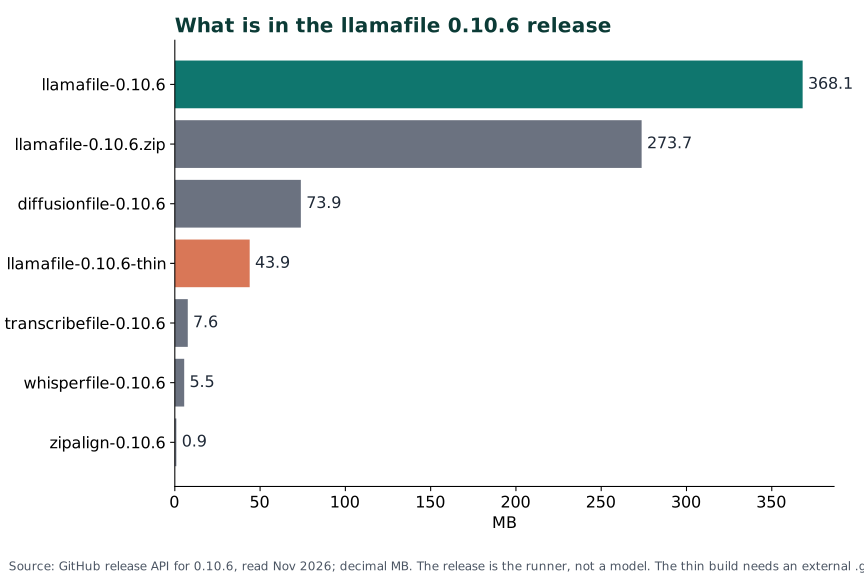
The release assets are independent programs. The .zip contains all of them; the bare llamafile does not contain the other tools.
| Release asset | Size | What it is |
|---|---|---|
llamafile-0.10.6 | 368.1 MB | Runner with CUDA and Vulkan libraries for x86_64 Linux and Windows |
llamafile-0.10.6.zip | 273.7 MB | All release programs in one archive |
llamafile-0.10.6-thin | 43.9 MB | Runner without the bundled GPU libraries |
diffusionfile-0.10.6 | 73.9 MB | Image generation with Stable Diffusion |
transcribefile-0.10.6 | 7.6 MB | Speech-to-text with transcribe.cpp |
whisperfile-0.10.6 | 5.5 MB | Speech-to-text with whisper.cpp |
zipalign-0.10.6 | 0.9 MB | Utility for packing weights into a llamafile |
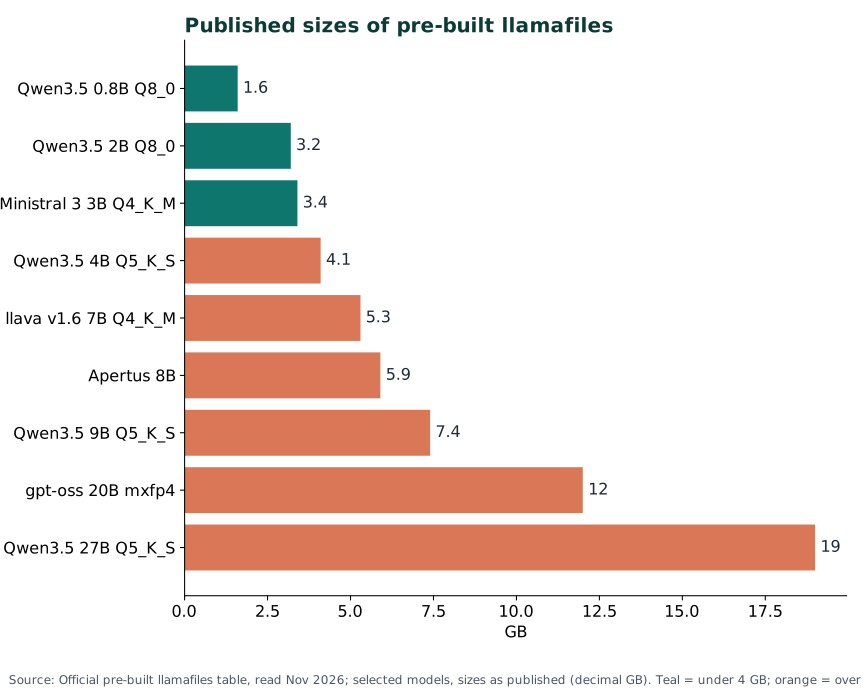
These are the published model sizes, rounded by the project. The 4 GB line is the Windows executable limit, not a RAM limit.
| Model | Published size | Runs as one file on Windows? |
|---|---|---|
| Qwen3.5 0.8B Q8_0 | 1.6 GB | Yes |
| Qwen3.5 2B Q8_0 | 3.2 GB | Yes |
| Ministral 3 3B Q4_K_M | 3.4 GB | Yes |
| Qwen3.5 4B Q5_K_S | 4.1 GB | No, over 4 GB |
| llava v1.6 7B Q4_K_M | 5.3 GB | No |
| Apertus 8B | 5.9 GB | No |
| Qwen3.5 9B Q5_K_S | 7.4 GB | No |
| gpt-oss 20B mxfp4 | 12 GB | No |
| Qwen3.5 27B Q5_K_S | 19 GB | No |
The official page says the table is not an endorsement. It rounds the 0.8B file to 1.6 GB; the quickstart gives 1.77 GB for the download. Use 1.77 GB for the download and 1.6 GB for table comparisons.
Linux#
curl -LO https://huggingface.co/mozilla-ai/llamafile_0.10/resolve/main/Qwen3.5-0.8B-Q8_0.llamafile
For the runner route, download the release asset instead:
curl -LO https://github.com/mozilla-ai/llamafile/releases/download/0.10.6/llamafile-0.10.6
Windows (PowerShell)#
curl.exe -LO https://huggingface.co/mozilla-ai/llamafile_0.10/resolve/main/Qwen3.5-0.8B-Q8_0.llamafile
For the runner route:
curl.exe -L -o llamafile.exe https://github.com/mozilla-ai/llamafile/releases/download/0.10.6/llamafile-0.10.6
Use curl.exe, not curl. In PowerShell, curl is an alias for Invoke-WebRequest, and the -LO flags do not mean the same thing.
Mac (Terminal)#
Same commands as Linux. Use curl -LO for the model file or the runner.
Check it worked#
The sample should be about 1.8 GB.
ls -lh Qwen3.5-0.8B-Q8_0.llamafile
Get-Item .\Qwen3.5-0.8B-Q8_0.llamafile | Select-Object Length
For the runner, verify the SHA-256. The published hash for llamafile-0.10.6 is:
d579f61dcd3a306f518e6d90e599d77793ed5f09543023d09c96ad35fcfa63f0
sha256sum llamafile-0.10.6
Get-FileHash .\llamafile.exe -Algorithm SHA256
Renaming the file does not change the hash. If the hash does not match, delete the file and download it again.
Tip: Do not use
-hfas your first download method. The official test code shows that model downloads through-hfand--model-urldo not verify TLS certificates. Download the file yourself, check the size or hash, then run it locally.
Step 2: Run it#
Linux#
chmod +x Qwen3.5-0.8B-Q8_0.llamafile
./Qwen3.5-0.8B-Q8_0.llamafile
Windows (PowerShell)#
Rename-Item .\Qwen3.5-0.8B-Q8_0.llamafile Qwen3.5-0.8B-Q8_0.llamafile.exe
.\Qwen3.5-0.8B-Q8_0.llamafile.exe
Mac (Terminal)#
chmod +x Qwen3.5-0.8B-Q8_0.llamafile
./Qwen3.5-0.8B-Q8_0.llamafile
On first run, the APE loader extracts a small loader to $TMPDIR/.ape-1.10 on Unix, then starts the server. You should see a terminal chat and a line for port 8080. The default mode is combined.
If you want only the server, add --server. If you want only the terminal chat, add --chat. For a one-shot answer:
./Qwen3.5-0.8B-Q8_0.llamafile --cli -p "Write a haiku about local models."
Check it worked#
In a second terminal, ask the server for its health:
curl -i http://127.0.0.1:8080/health
curl.exe -i http://127.0.0.1:8080/health
A 200 OK means the server is ready. You can also open http://localhost:8080/ in a browser. Stop the process with Ctrl-C.
If macOS says "cannot be opened because the developer cannot be verified", allow the file in Privacy & Security. The spctl fallback is in Troubleshooting.
Step 3: Chat in the browser#
Open http://localhost:8080/ or http://127.0.0.1:8080/. The page is llama.cpp's built-in web UI. Some labels call the process llama-server; that is the upstream name, not a second program.
Linux#
xdg-open http://localhost:8080/
Windows (PowerShell)#
Start-Process http://localhost:8080/
Mac (Terminal)#
open http://localhost:8080/
Both chat windows use the same model and can stay open together. In the terminal, /help lists commands and /upload adds an image for a multimodal model such as Qwen3.5 0.8B.
Ask a short question first: "Say hello in five words." If the answer arrives, the model is loaded and the server is working. If the page loads but no answer comes, check the terminal for an error and try the health endpoint again.
Tip: If the model feels slow, check whether it is on the CPU. On NVIDIA and AMD, pass
-ngl 999to request maximum offload. On Apple Silicon, Metal is on by default. The startup log says which backend loaded; a silent CPU fallback is common when a GPU library is missing.
Step 4: Use the OpenAI-compatible API#
The server exposes an OpenAI-compatible API under /v1, the shape many local clients already speak.
Linux#
curl http://127.0.0.1:8080/v1/chat/completions \
  -H "Content-Type: application/json" \
  -d '{
    "model": "local-model",
    "messages": [
      {"role": "system", "content": "You are a helpful assistant."},
      {"role": "user", "content": "Write a limerick about llamas."}
    ]
  }'
Windows (PowerShell)#
$body = @'
{"model":"local-model","messages":[{"role":"user","content":"Hello!"}]}
'@
curl.exe http://127.0.0.1:8080/v1/chat/completions -H "Content-Type: application/json" -d $body
Mac (Terminal)#
Same command as Linux.
The model field is required even with one model loaded. local-model is a placeholder; --alias local-model sets a stable name.
Anthropic clients can use /v1/messages instead:
curl http://127.0.0.1:8080/v1/messages \
  -H "Content-Type: application/json" \
  -d '{
    "model": "local-model",
    "max_tokens": 256,
    "messages": [
      {"role": "user", "content": "Explain why llamas hum."}
    ]
  }'
If you use the OpenAI Python package, point it at the local server:
from openai import OpenAI

client = OpenAI(
    base_url="http://127.0.0.1:8080/v1",
    api_key="no-key-required",
)

response = client.chat.completions.create(
    model="local-model",
    messages=[{"role": "user", "content": "Hello!"}],
)

print(response.choices[0].message.content)
The SDK needs a non-empty key even when the server does not check one; no-key-required is a common placeholder.
By default, the server binds to localhost only. If you bind it wider, add authentication:
./llamafile-0.10.6 -m model.gguf --server --host 0.0.0.0 --port 8080 --api-key '<YOUR_API_KEY>'
Clients then send either header:
Authorization: Bearer <YOUR_API_KEY>
X-Api-Key: <YOUR_API_KEY>
Use --api-key-file to keep the key out of the process list. --api-prefix /llama moves every endpoint under /llama, so /v1/chat/completions becomes /llama/v1/chat/completions.
Useful endpoints:
| Endpoint | Purpose |
|---|---|
GET /health | Readiness check |
GET /v1/models | List model metadata and capabilities |
POST /v1/chat/completions | OpenAI-style chat |
POST /v1/messages | Anthropic-style messages |
GET /metrics | Prometheus metrics, when started with --metrics |
The API also has native llama.cpp endpoints and an experimental /tools endpoint. Client-defined tool calls do not need --tools; that flag enables built-in tools that can read local files with the process's permissions. Enable only what you need.
Step 5: Run it in Docker (optional)#
The project does not publish a Dockerfile or an official image at 0.10.6. This is a DIY Lab Hub recipe, not a supported deployment. It runs the CPU path; GPU passthrough is not covered.
Put the runner next to the Dockerfile and the model in ~/docker_volumes/llamafile/models, then create a small image:
FROM debian:bookworm-slim

COPY llamafile-0.10.6 /usr/local/bin/llamafile
RUN chmod +x /usr/local/bin/llamafile

EXPOSE 8080
ENTRYPOINT ["sh", "/usr/local/bin/llamafile"]
The sh wrapper is how the project's tests start the APE on non-Windows systems. Use a Compose file without the obsolete version: line:
services:
  llamafile:
    build: .
    restart: unless-stopped
    ports:
      - "127.0.0.1:8080:8080"
    volumes:
      - ${HOME}/docker_volumes/llamafile/models:/models:ro
    command: ["-m", "/models/model.gguf", "--server", "--host", "0.0.0.0", "--port", "8080"]
On Windows, use an absolute path from $HOME\docker_volumes\llamafile\models, or set the path in a Compose .env file. The model folder is mounted read-only; the server only reads the .gguf.
Linux#
docker compose up -d --build
docker compose logs -f llamafile
curl -i http://127.0.0.1:8080/health
Windows (PowerShell)#
docker compose up -d --build
docker compose logs -f llamafile
curl.exe -i http://127.0.0.1:8080/health
Mac (Terminal)#
Same commands as Linux.
The port is published on 127.0.0.1 only. Behind a reverse proxy, remove the host port and let the proxy reach the container over a shared network.
Tip: Mount the model folder read-only and keep the model outside the image. A 12 GB model baked into an image makes every rebuild slow and wastes disk.
Put it behind HTTPS with Traefik#
For a server with a domain and ports 80 and 443 open. If you use llamafile only on your own machine, skip this or use Caddy's tls internal route.
The labels below assume Traefik is already running on an external Docker network called proxy. If it is not:
docker network create proxy
Put both services on the same network and add these labels to llamafile:
services:
  llamafile:
    build: .
    restart: unless-stopped
    volumes:
      - ${HOME}/docker_volumes/llamafile/models:/models:ro
    command: ["-m", "/models/model.gguf", "--server", "--host", "0.0.0.0", "--port", "8080"]
    labels:
      - "traefik.enable=true"
      - "traefik.http.routers.llamafile.rule=Host(`llm.example.com`)"
      - "traefik.http.routers.llamafile.entrypoints=websecure"
      - "traefik.http.routers.llamafile.tls=true"
      - "traefik.http.routers.llamafile.tls.certresolver=letsencrypt"
      - "traefik.http.services.llamafile.loadbalancer.server.port=8080"
    networks:
      - proxy

  traefik:
    image: traefik:v3.7.19
    restart: unless-stopped
    command:
      - "--providers.docker=true"
      - "--providers.docker.exposedbydefault=false"
      - "--entrypoints.web.address=:80"
      - "--entrypoints.websecure.address=:443"
      - "--certificatesresolvers.letsencrypt.acme.email=<YOUR_EMAIL>"
      - "--certificatesresolvers.letsencrypt.acme.storage=/letsencrypt/acme.json"
      - "--certificatesresolvers.letsencrypt.acme.httpchallenge.entrypoint=web"
    ports:
      - "80:80"
      - "443:443"
    volumes:
      - "/var/run/docker.sock:/var/run/docker.sock:ro"
      - "./letsencrypt:/letsencrypt"
    networks:
      - proxy

networks:
  proxy:
    external: true
There is no host port mapping; Traefik reaches 8080 over the proxy network. Start the stack and check the certificate:
docker compose up -d --build
curl -I https://llm.example.com
Pin a tested version; do not use latest on a public server.
If the model is reachable from the internet, set an API key on llamafile as well. The proxy gives you TLS, not authentication.
Without Traefik: Caddy#
Caddy is a simpler option if you already use it. Put the Caddyfile in a folder and mount the folder, not a single file:
llm.example.com {
    reverse_proxy llamafile:8080
}
Add Caddy to the same Compose project:
services:
  caddy:
    image: caddy:2.11.9
    restart: unless-stopped
    ports:
      - "80:80"
      - "443:443"
    volumes:
      - ./caddy/conf:/etc/caddy
      - ./caddy/data:/data
      - ./caddy/config:/config
    networks:
      - proxy
Add networks: [proxy] to the llamafile service too, so Caddy can reach it by name.
Save it as ./caddy/conf/Caddyfile and run docker compose up -d. Caddy gets a Let's Encrypt certificate when the domain points at the server and ports 80 and 443 are reachable.
If llamafile runs directly on the host instead of in Docker, use reverse_proxy 127.0.0.1:8080 and install Caddy with your package manager or Homebrew. For a home-only name, use tls internal:
llamafile.local {
    tls internal
    reverse_proxy 127.0.0.1:8080
}
Use llamafile:8080 instead when Caddy and llamafile share the Docker network.
Caddy creates a local root certificate; import it into your OS trust store with Keychain Access on macOS, certmgr.msc on Windows, or update-ca-certificates on Debian.
Security and testing#
Keep the server on 127.0.0.1. If you bind to 0.0.0.0, set --api-key or --api-key-file and restrict the port with a firewall.
In server mode, llamafile uses pledge() with stdio anet rpath: standard I/O, network sockets and read-only paths. It does not allow outbound network, writes, exec or fork. --confine-reads adds read confinement (Linux 5.13+); --unsecure disables the sandbox.
The sandbox has limits: GPU offload, combined mode and -hf downloads are outside it. Built-in tools (--tools) can read local files with the process's permissions, so do not enable them in an untrusted environment. The project's test code shows that -hf and --model-url downloads do not verify TLS certificates; download models yourself and check the hash.
Keep secrets out of commands where possible:
chmod 600 ./llamafile.key
./llamafile-0.10.6 -m model.gguf --server --api-key-file ./llamafile.key
Test the running service:
curl -fsS http://127.0.0.1:8080/health
curl -fsS http://127.0.0.1:8080/v1/models
curl -I https://llm.example.com
docker compose ps
docker compose logs --tail 100 llamafile
/health should return 200 OK; /v1/models should list the model. Through the proxy, curl -I should show a valid certificate and a 200 or 401 response.
Common mistakes#
| Mistake | Why it happens | Do this instead |
|---|---|---|
| Downloading the 368 MB release and expecting a model inside | The release assets are runners; the weights are separate | Download a model-bundled file, or add -m model.gguf |
| Double-clicking a 12 GB model file on Windows | Windows has a 4 GB limit for executable files | Use the runner plus an external .gguf, or run it in WSL |
AI assistants give Windows users Unix commands (chmod +x, ./file.exe) | They copy the Linux quickstart; PowerShell uses .exe and .\ | Rename the file to .exe and run .\file.exe |
Typing --gpu-latyers | The flag is --gpu; a typo is ignored or rejected | Use --gpu disable, --gpu nvidia, --gpu amd or --gpu vulkan |
| Assuming every NVIDIA card works with the bundled CUDA | The bundled kernels need compute capability 7.5+; Maxwell, Pascal and Volta are not covered | Use Vulkan, or build a CUDA 12.x library for the older card |
Binding to 0.0.0.0 with no API key | A wider bind exposes the model and its tools to the network | Keep 127.0.0.1, or set --api-key and a firewall |
Using -hf and assuming the download is verified | llamafile does not verify TLS certificates for model downloads | Download manually and check the size or SHA-256 |
| Copying a multi-line docs command with a missing backslash | One official gpt-oss example is missing a \ after --host 0.0.0.0 | Put the command on one line or add the backslash |
Tip: If a command fails with an unknown option, run
./llamafile-0.10.6 --server --helpand search the list. The wrapper flags and the llama.cpp flags are mixed in the same help text.
Troubleshooting#
| Problem | Solution |
|---|---|
| macOS says the developer cannot be verified | Allow it in Privacy & Security, or use the spctl fallback below |
Linux mentions run-detectors or WINE | Install the APE loader with the commands below |
| zsh has trouble running the file | Run sh -c ./llamafile |
| Windows file does nothing | Rename it to .exe; check the 4 GB limit |
| The process dies immediately | Check CrowdStrike; ask for the file to be whitelisted |
| GPU is not used | Add -ngl 999, force a backend, and read the startup log |
| Out of memory | Use a smaller model or quantization; close other apps |
... cannot be opened because the developer cannot be verified#
This is macOS Gatekeeper. Open System Settings, go to Privacy & Security, and click Allow for the file. If it is not listed, use the official fallback:
sudo spctl --master-disable
./Qwen3.5-0.8B-Q8_0.llamafile
sudo spctl --master-enable
The middle command runs the model. The first and last commands turn Gatekeeper off and back on. Do not leave it off.
run-detectors or WINE errors on Linux#
The kernel does not recognise the APE format. Register the APE loader:
sudo wget -O /usr/bin/ape https://cosmo.zip/pub/cosmos/bin/ape-$(uname -m).elf
sudo chmod +x /usr/bin/ape
sudo sh -c "echo ':APE:M::MZqFpD::/usr/bin/ape:' >/proc/sys/fs/binfmt_misc/register"
sudo sh -c "echo ':APE-jart:M::jartsr::/usr/bin/ape:' >/proc/sys/fs/binfmt_misc/register"
Run the commands one at a time. The loader path must match your CPU architecture; uname -m supplies it.
failed to load library on AMD#
ROCm is not bundled. --verbose prints probing library ...ggml-rocm.dll then failed to load library when the runtime is missing. Install the ROCm runtime or AMD HIP SDK and put ggml-rocm.so/.dll next to the executable or in ~/.llamafile/v/LLAMAFILE_VERSION. On Windows it needs amdhip64_7.dll and libhipblas.dll.
Windows: the 4 GB executable limit#
A Windows executable cannot be larger than 4 GB. The 0.8B, 2B and 3B pre-built files are under the limit; the 4.1 GB file and everything above it are not. Use the runner plus an external .gguf, or run the model inside WSL, which does not have the same executable-size limit.
GPU is not used#
A failed backend falls back to the CPU, often quietly. Force it to turn the fallback into an error:
./llamafile-0.10.6 -m model.gguf --server --gpu nvidia -ngl 999
Use --gpu amd for ROCm or --gpu vulkan for Vulkan. Check the startup log for the library name. On NVIDIA, check the compute capability:
nvidia-smi --query-gpu=name,compute_cap --format=csv
The bundled CUDA needs 7.5+. Maxwell, Pascal and Volta need a custom CUDA 12.x build. On AMD, multi-GPU may be broken on Radeon; export HIP_VISIBLE_DEVICES=0 uses the first GPU.
Known bugs#
- Windows Vulkan with a multimodal projector can crash with SIGSEGV. Workaround:
--no-mmproj-offload(issue #1083). - macOS can crash with SIGBUS in about 1% of runs (issue #1085).
- Windows exit codes are multiplied by 256, which can confuse scripts (issue #1084).
- Older NVIDIA mobile GPUs such as the GTX 970M fail with
--gpu nvidiaor--gpu vulkan(issue #1048).
Updates and backups#
For a model-bundled file, download the new release and keep the old file until the new one answers /health. For the runner, replace the asset, verify its SHA-256 and restart.
For the DIY container, rebuild and restart:
docker compose build --pull
docker compose up -d
docker compose logs --tail 50 llamafile
Back up the small things, not the models. The compose file, Caddyfile or Traefik labels, and a list of model names and hashes are what you cannot recreate easily.
mkdir -p ~/backups
tar -czf ~/backups/llamafile-$(date +%F).tar.gz \
  compose.yaml Dockerfile caddy/conf models.txt
On Linux or macOS, schedule it with cron at 03:00:
0 3 * * * tar -czf $HOME/backups/llamafile-$(date +\%F).tar.gz -C $HOME/llamafile compose.yaml Dockerfile caddy/conf models.txt
On Windows, use Task Scheduler to run a PowerShell archive. Test the restore once: unpack into a fresh folder, run docker compose up -d, and check /health.
Performance and resources#
This guide did not benchmark llamafile. The project's one reference: Qwen3.5 0.8B Q8 runs at about 8 tokens per second on a Raspberry Pi 5. That is a CPU result for the smallest model, not a promise.
Model size matters most: a 0.8B model fits almost anywhere; a 27B model needs much more RAM and disk and will be slow on CPU. Q4 and Q5 files are smaller than Q8 or BF16, at some quality cost.
The backend is next. Metal is on by default on Apple Silicon. On NVIDIA and AMD, pass -ngl 999 to offload as many layers as possible; if the GPU is full, some layers stay on the CPU. The bundled NVIDIA CUDA leaves out IQ-quant kernels, so those layers stay on the CPU.
Monitor with docker stats for the container or your OS task manager for a host process. For Prometheus, start with --metrics and scrape GET /metrics. Raise --ctx-size only as far as memory allows.
FAQ#
Is llamafile the same as llama.cpp? llamafile packages llama.cpp into one executable and adds the APE loader. The server, web UI and model format are llama.cpp's. For the plain server, see our llama.cpp guide.
Does it work on Windows? Yes, on Windows 10 or newer with an AMD64 CPU. Rename the file to .exe and run it. A single executable cannot exceed 4 GB, so larger models need the runner plus an external .gguf, or WSL.
Do I need a GPU? No. CPU inference works on AMD64 with AVX and ARM64 with ARMv8a. A GPU helps with larger models, but support is uneven: Metal works on Apple Silicon, NVIDIA needs compute capability 7.5+ for the bundled library, AMD ROCm is experimental, and Vulkan covers more hardware.
Is it private? The model runs on your machine, and the default server binds to localhost. The server sandbox blocks outbound network in server mode, but GPU offload, combined mode and -hf downloads are outside the sandbox. Do not expose the port without an API key.
Can I use a GGUF I already have? Yes. Download the runner and pass -m model.gguf. The file must be GGUF; Ollama's blobs are GGUF, but the project warns that not every one works with llama.cpp. If you use Ollama, our Ollama guide may fit better.
How is it different from Ollama or KoboldCpp? llamafile is one executable with no service to install. Ollama manages a model library and runs as a service; KoboldCpp is another local option. See our KoboldCpp guide for the comparison.
Sources#
- llamafile repository and README (read November 2026)
- llamafile 0.10.6 release (read November 2026)
- Quickstart (read November 2026)
- Pre-built llamafiles (read November 2026)
- Supported systems (read November 2026)
- Running a llamafile (read November 2026)
- API server (read November 2026)
- Troubleshooting (read November 2026)
- Security model (read November 2026)
- Test code: test_ssl.py (read November 2026)
- Licence (Apache-2.0, read November 2026)
Checked against the official docs on 2026-11-16.