NetBird with Docker: a Self-Hosted WireGuard Mesh VPN with SSO and a Web Dashboard (Linux server, Windows and Mac clients)
Before you start
- 20 min read
- Updated November 2026
Boxes marked Run in terminal are what you type; plain text explains why. Check what you need first
What you get in one minute#
NetBird is a free, self-hosted VPN that joins your laptops, phones and servers into one private network: you run the sign-in server and a web dashboard, and the devices then connect to each other directly with encrypted WireGuard tunnels.

Logo: the official NetBird project (github.com/netbirdio/netbird, docs/media/logo-full.png at v0.83.2)
Use it to reach a home server, a NAS or a laptop from anywhere without opening a port per service. Groups and policies decide who may talk to whom. Your traffic skips your server unless two devices cannot reach each other directly.
| What | Value (official sources, read November 2026) |
|---|---|
| Current version | NetBird v0.83.2, released 20 November 2026 (previous: v0.83.1, 13 November) |
| Images to pin | netbirdio/netbird-server:0.83.2 and netbirdio/dashboard:v2.99.0 (checked on Docker Hub; amd64, arm64, arm/v7) |
| Time needed | About 30 minutes with a domain ready (our estimate, not measured) |
| Server size | Linux VM with at least 1 CPU and 2 GB of memory (quickstart) |
| Ports | TCP 443 and UDP 3478 public; TCP 80 must be free on the server |
| Licence | BSD-3-Clause for most of the repository; AGPLv3 for the server parts and the dashboard (LICENSE at the tag). A paid edition exists |
| Official docs | docs.netbird.io and the repository |
At a glance:
- On your server: three containers. Traefik does HTTPS,
dashboardis the web page,netbird-serverdoes sign-in, key exchange, STUN and the relay. - Data: SQLite files in the Docker volume
netbird_data. - Clients: Linux, Windows, Mac, Android, iOS and Docker. They only dial out and need no open port.
- Logins: built in since v0.62. Zitadel, Keycloak or Authentik are optional.
- Not for home-only use: the server needs a real domain and must be reachable from the internet.
Which version. The installer pulls latest images unless told otherwise, so we export two variables. Dashboard v2.99.0 came out on 25 November and moves its in-browser client to v0.83.2; v2.98.0 (19 November) is the one before. 0.84.0-rc.1 is a pre-release: skip it. We found no reports that stop an install of v0.83.2.
How it fits together#
Devices ask your server for keys and rules over HTTPS, then talk to each other directly over WireGuard; the server's relay carries the traffic only when no direct path works.

Drawn for this guide from the official docs and the v0.83.2 installer. The dashed parts are used only when needed.
WireGuard is the fast VPN protocol NetBird uses. STUN is a helper that tells a device its public address, so two devices can find a direct path. The project's own picture shows the same idea:
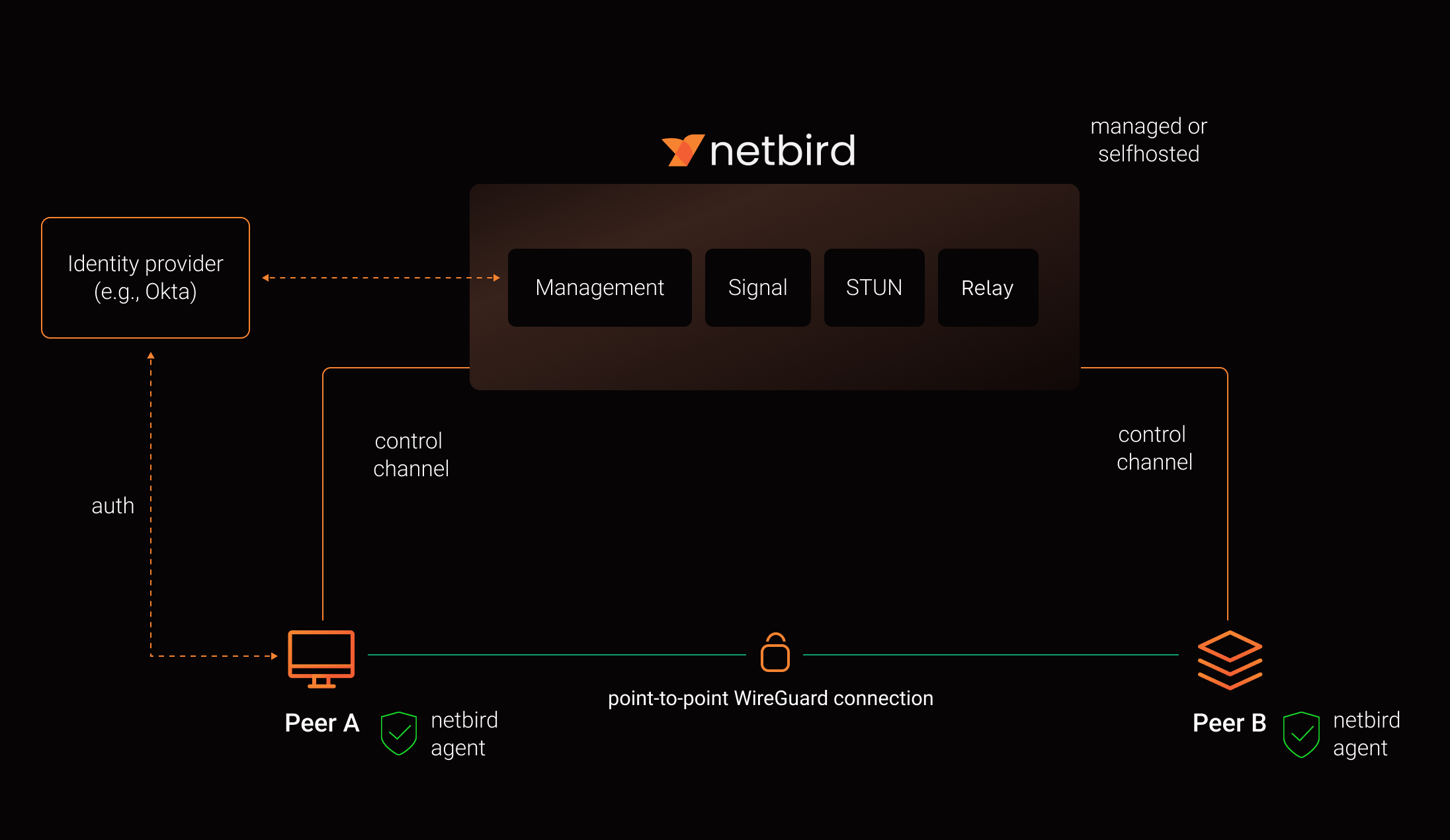
Image: the official NetBird project (README at v0.83.2, "high-level architecture diagram")
Before you start#
You need an always-on Linux server reachable from the internet, a domain name and a shell.
| Role | What works |
|---|---|
| Server | Linux VM, 1 CPU, 2 GB memory, public IP, Docker with Compose, jq, curl, openssl, Docker socket access. We found no official way to host the server on Windows or Mac |
| Client | Linux, Windows, Mac, Android, iOS or the Docker image |
On Windows and Mac, PowerShell or Terminal runs ssh to the server and the client. Check the server tools:
docker --version
docker compose version
jq --version
curl --version
openssl version
Checklist:
- [ ] A DNS name (an A record, and an AAAA record if the server has IPv6) points to the server's public IP
- [ ] TCP 443 and UDP 3478 are open in the cloud firewall and on the server
- [ ] TCP 80 is free on the server (Traefik binds it to redirect to HTTPS)
- [ ] Docker and Compose work, and your user may use the Docker socket
- [ ] You have a second device to test with
Tested by DIY Lab Hub: not yet. Commands come from the official docs, the v0.83.2 installer script and Docker Hub, read in November 2026. We did not run them.
Step 1: Point your domain at the server#
Certificates and clients fail until the name resolves. Keep the record DNS-only (no provider proxy).
Linux#
dig +short <your-domain>
ss -tulpn | grep ':80 ' || echo "port 80 is free"
Check it worked. The first command prints your server's public IP. The second prints port 80 is free.
Windows (PowerShell)#
The server steps run on the Linux server. Connect first, then use the Linux commands:
ssh <your-user>@<your-server-ip>
Mac (Terminal)#
Same as Windows: ssh <your-user>@<your-server-ip>, then the Linux commands.
Tip: DNS changes take time. If
digshows nothing or an old IP, wait before you run the installer.
Step 2: Download and check the installer#
NetBird's own command is curl ... | bash on latest. We download the v0.83.2 file and check its SHA-256 checksum (a fingerprint). We downloaded this asset and the checksum matched the release listing.
Linux#
mkdir -p ~/netbird && cd ~/netbird
curl -fsSL https://github.com/netbirdio/netbird/releases/download/v0.83.2/getting-started.sh -o getting-started.sh
echo "f14326e564ac2a6672ecd4f0b4b9cadb8c086160eed6f7b247ab44f9dac109a4  getting-started.sh" | sha256sum -c -
Check it worked. The last line prints getting-started.sh: OK. Do not run the script if it says FAILED.
Windows (PowerShell)#
Run the same Linux commands on the server over ssh.
Mac (Terminal)#
Same as Windows (sha256sum runs on the Linux server).
Step 3: Run the installer with pinned images#
The script uses latest unless you export image names. It writes into the current folder and refuses to run when config.yaml exists.
Linux#
cd ~/netbird
export NETBIRD_SERVER_IMAGE='netbirdio/netbird-server:0.83.2'
export DASHBOARD_IMAGE='netbirdio/dashboard:v2.99.0'
export NETBIRD_DOMAIN='<your-domain>'
export NETBIRD_LETSENCRYPT_EMAIL='<your-email>'
export NETBIRD_NON_INTERACTIVE=true
bash getting-started.sh
Use your real domain (no https://, no port). The script rejects a bare IP and the sample netbird.example.com. For prompts, leave out the last three export lines and press Enter to choose [0] Traefik.
The files it writes:
| File | What it holds |
|---|---|
docker-compose.yml | Services, ports, volumes, Traefik labels |
config.yaml | Server settings and secrets (mode 600) |
dashboard.env | Your URL and login settings for the web page |
Check it worked. After about a minute:
docker compose ps
docker compose config --images
curl -s https://<your-domain>/api/instance
curl -s https://<your-domain>/oauth2/.well-known/openid-configuration
docker compose ps lists netbird-traefik, netbird-dashboard and netbird-server. The image list shows your two tags and traefik:v3.7.18. Before the first user exists, the third command returns "setup_required": true. The last returns JSON with "issuer".
Windows (PowerShell)#
Run the Linux block on the server over ssh, in one session.
Mac (Terminal)#
Same as Windows.
Tip: Set the variables for
bash, not forcurl. If you writeNETBIRD_DOMAIN=... curl ... | bash, onlycurlsees the value and the script stops withNETBIRD_DOMAIN is required for a non-interactive install.
Step 4: Create the first owner#
There is no default admin. Whoever reaches the setup page first becomes the owner, so do this right after Step 3.
Linux#
Open https://<your-domain> in a browser. You land on /setup. Enter your email, a name and a password of at least 8 characters, then click Create Account.
Check it worked. You see the dashboard. https://<your-domain>/setup now redirects to the login page.
Windows (PowerShell)#
Same, in any Windows browser.
Mac (Terminal)#
Same, in any Mac browser.
Step 5: Connect your first computer#
Install the client and point it at your server with --management-url. Without that option it talks to NetBird Cloud.
Linux#
curl -fsSL https://pkgs.netbird.io/install.sh | sh
sudo netbird up --management-url https://<your-domain>
netbird status
ip addr show wt0
netbird up opens your browser to sign in. With no browser, use a setup key (Step 7). Other ways to install are on the Linux install page.
Check it worked. netbird status shows Management: Connected; wt0 has a 100.64.0.0/10 address.
Windows (PowerShell)#
Download the EXE (https://pkgs.netbird.io/windows/x64) or MSI (https://pkgs.netbird.io/windows/msi/x64) and run it. It installs to C:\Program Files\NetBird and adds a service. Then open a new PowerShell window: the old one lacks the new PATH.
netbird up --management-url https://<your-domain>
netbird status
Check it worked. netbird status shows Management: Connected. netsh interface ip show config name="wt0" shows the NetBird address.
Mac (Terminal)#
curl -fsSL https://pkgs.netbird.io/install.sh | sh
netbird up --management-url https://<your-domain>
netbird status
That script installs the app and the service. Packages exist for Apple Silicon (https://pkgs.netbird.io/macos/arm64) and Intel (https://pkgs.netbird.io/macos/amd64). brew install netbirdio/tap/netbird gives only the command line; then run sudo netbird service install and sudo netbird service start.
Check it worked. netbird status shows Management: Connected. The docs name the interface utun100; check with sudo ifconfig utun100.
Tip: A wrong URL is kept. Run
netbird down, thennetbird up --management-url https://<correct-host>/.
Step 6: Connect a second device and test#
Repeat Step 5 on another computer, or install the phone app. In the dashboard peers list, copy the DNS name from the peer's Domain Name field. On NetBird Cloud it ends in netbird.cloud; the self-hosted ending can differ.
Linux#
netbird status -d
ping -c 3 <other-device-netbird-ip>
ping -c 3 <other-device-dns-name>
Windows (PowerShell)#
netbird status -d
ping -n 3 <other-device-netbird-ip>
ping -n 3 <other-device-dns-name>
Mac (Terminal)#
Same as Linux.
Check it worked. The Relays: list in netbird status -d shows lines like these (from the docs, with your domain):
Relays:
  [stun:<your-domain>:3478] is Available
  [rels://<your-domain>:443] is Available via ws
Pings answer, and both peers show Status: Connected with a recent WireGuard handshake. If a ping fails, try a TCP port you know is open (SSH): a device firewall can drop ping.
Step 7: Add a server, a phone or a container#
A setup key is a sign-in token for machines without a browser. In the dashboard open Settings, Setup Keys, and create one. Keys are one-off or reusable; the form pre-fills 7 days and you can limit uses. An expired or revoked key blocks new sign-ins only; enrolled machines stay connected. Laptops of people should sign in as users instead.
For a phone, install the app from Google Play (Android 8.0 or newer) or the App Store. On Android open the menu, choose Change Server and enter https://<your-domain>:443. The docs give no server steps for iOS.
Linux#
sudo netbird up --management-url https://<your-domain> --setup-key <your-setup-key>
A Docker client uses the client image netbirdio/netbird, not the server image. The capabilities come from the docs example; the CLI docs name NB_MANAGEMENT_URL for the server URL. We pin the tag:
docker run -d --name netbird-client --hostname netbird-client \
  --restart unless-stopped \
  --cap-add=NET_ADMIN --cap-add=SYS_ADMIN --cap-add=SYS_RESOURCE \
  -e NB_SETUP_KEY='<your-setup-key>' \
  -e NB_MANAGEMENT_URL='https://<your-domain>:443' \
  -v netbird-client:/var/lib/netbird \
  netbirdio/netbird:0.83.2
Check it worked. The machine appears in the dashboard peers list within seconds.
Windows (PowerShell)#
netbird up --management-url https://<your-domain> --setup-key <your-setup-key>
Mac (Terminal)#
sudo netbird up --management-url https://<your-domain> --setup-key <your-setup-key>
Tip: Since v0.83.0 every client profile has an owner. Desktops and setup-key peers need no action. If a command fails because nobody owns the default profile, run
sudo netbird uponce, orsudo netbird profile claim default --owner <user>.
Step 8: Replace the Default policy#
No peer can reach another until a policy allows it. To ease the first test, every new account gets a Default policy: all peers reach all peers. The docs say to remove it once you have your own.
Linux#
In the dashboard create groups (say laptops and servers), add peers, and create a policy from laptops to servers for the ports you need. Test it, then delete Default.
Check it worked. The laptop still reaches the server; a device outside the groups does not.
Windows (PowerShell)#
Same in the dashboard. Test a port with Test-NetConnection <server-netbird-ip> -Port 22.
Mac (Terminal)#
Same in the dashboard. Test a port with nc -vz <server-netbird-ip> 22.
Tip: Build and test the new policy before you delete Default. With no policy at all, all peer traffic stops.
Put it behind HTTPS with Traefik (or Caddy)#
The steps above already include HTTPS: Traefik gets a Let's Encrypt certificate over TCP 443. Skip this part unless your server already runs a proxy.
With Traefik#
For your own Traefik, choose option 1 ("Existing Traefik"): the script writes labels instead of a Traefik container. Your Traefik must run on the same host, share a Docker network with NetBird, and have an HTTPS entrypoint and a working certificate resolver (names below match our Traefik guide; use yours). Set NETBIRD_TRUSTED_PEERS to the address Traefik reaches NetBird from, or the server trusts forwarded client IPs from any source:
export NETBIRD_REVERSE_PROXY_TYPE=1
export NETBIRD_TRAEFIK_EXTERNAL_NETWORK='proxy'
export NETBIRD_TRAEFIK_ENTRYPOINT='https'
export NETBIRD_TRAEFIK_CERTRESOLVER='<your-resolver>'
export NETBIRD_TRUSTED_PEERS='<traefik-address-or-network>'
Then export the image and domain variables from Step 3 and run bash getting-started.sh. Check it worked. curl -I https://<your-domain>/ returns an HTTP status line over HTTPS with a valid certificate.
Without Traefik: Caddy#
Choose option 4 if you already use Caddy. The proxy must speak HTTP/2 and gRPC. UDP 3478 cannot pass an HTTP proxy, so the server publishes it directly. Use a shared network and mount the Caddy folder, not one file:
docker network create proxy
export NETBIRD_REVERSE_PROXY_TYPE=4
export NETBIRD_EXTERNAL_PROXY_NETWORK=proxy
export NETBIRD_TRUSTED_PEERS="$(docker network inspect proxy --format '{{(index .IPAM.Config 0).Subnet}}')"
Run the Step 3 exports and bash getting-started.sh in the same shell. The script writes caddyfile-netbird.txt with your domain. Save it as ~/docker_volumes/caddy/conf/Caddyfile; the docs show this content:
<your-domain> {
    @grpc header Content-Type application/grpc*
    reverse_proxy @grpc h2c://netbird-server:80

    @backend path /relay* /ws-proxy/* /api/* /oauth2/*
    reverse_proxy @backend netbird-server:80

    reverse_proxy /* netbird-dashboard:80
}
mkdir -p ~/docker_volumes/caddy/{conf,data,config}
cd ~/docker_volumes/caddy
cat > docker-compose.yml << 'EOF'
services:
  caddy:
    image: caddy:2.11.9
    container_name: caddy
    restart: unless-stopped
    ports:
      - "80:80/tcp"
      - "443:443/tcp"
      - "443:443/udp"
    volumes:
      - ./conf:/etc/caddy:ro
      - ./data:/data
      - ./config:/config
    networks:
      - proxy

networks:
  proxy:
    external: true
EOF
docker compose up -d
Check it worked. curl -I https://<your-domain>/ returns an HTTP status line over HTTPS, and Step 6 works from a client. Our Caddy guide covers certificates. Add no CORS headers in Caddy: netbird-server sends them, and duplicates make browsers reject the answer.
Tip: gRPC and the relay WebSocket must reach
netbird-server; the rest goes to the dashboard. A proxy that passes only the dashboard shows a working page while every client fails.
Security and testing#
| Control | How |
|---|---|
| Public ports | Only TCP 443 and UDP 3478. Keep the metrics port 9090 and health port 9000 private |
| First owner | Create it at once (Step 4); the setup page is open until a user exists |
| Default policy | Remove it (Step 8) |
| Secrets | config.yaml holds the relay secret and encryption key: mode 600, never in Git. Guard .env too |
| Docker socket | The generated Traefik mounts /var/run/docker.sock:ro. Read-only on the mount does not make the Docker API read-only: treat that container as privileged |
| Proxy trust | With your own proxy, set NETBIRD_TRUSTED_PEERS |
| Users | Users, Add User: an invite link (3 days) or a generated password shown once; 8 characters minimum. Add Google, Microsoft or authentik under Settings, Identity Providers |
What leaves the machine. Peer traffic goes between devices or through your own relay. Your server keeps peers, users, groups and policies. By default it sends anonymous usage metrics to metrics.netbird.io; stop that with disableAnonymousMetrics: true under server: in config.yaml, then docker compose restart netbird-server. A client without --management-url talks to NetBird Cloud. We did not audit traffic.
Quick tests after each change:
cd ~/netbird
docker compose ps
docker compose logs --tail=100 netbird-server
curl -s https://<your-domain>/api/instance
On clients, netbird status -d is the main test.
NetBird, Headscale or wg-easy?#
| NetBird (this guide) | Headscale | wg-easy | |
|---|---|---|---|
| Shape | Mesh: devices connect directly | Mesh, using the Tailscale apps | One WireGuard server; clients connect to it |
| Web interface | Yes, with built-in logins | No, command line | Yes, for creating clients |
| Server needs | Domain, HTTPS, TCP 443, UDP 3478 | Domain, HTTPS | UDP 51820 and a web port |
| Client apps | NetBird apps (Linux, Windows, Mac, phones) | Official Tailscale apps | WireGuard apps (file or QR code) |
Pick NetBird for a dashboard, users and group rules; Headscale for the Tailscale apps; wg-easy for a few devices behind one home server.
The free Community edition has networking, access control and routing. The paid edition adds high availability, SCIM, device-security integrations, traffic-flow logging, peer approval, audit streaming and support. A self-hosted install is one account.
Common mistakes#
These come from the official docs, GitHub issues we opened, and what AI assistants often write.
| Mistake | Why it happens | Do this instead |
|---|---|---|
AI assistants: netbirdio/netbird for the server, or old management, signal, coturn, zitadel services | Old tutorials predate the combined server (v0.65.0) and built-in logins (v0.62) | Server netbirdio/netbird-server, dashboard netbirdio/dashboard; netbirdio/netbird is the client |
AI assistants: ports 33073 and 10000, or --management-url http://localhost:33073 | Old examples, still on some client docs pages | https://<your-domain>; public ports 443 and 3478/udp |
AI assistants: latest, v0.83.2 for the server or 0.83.2 for the dashboard | Tag styles differ: the server has no v, the dashboard has one | netbird-server:0.83.2, dashboard:v2.99.0 |
The sample name netbird.example.com or an IP as the domain | Sample text copied as is | A real domain, no scheme, no port; the script refuses the other two |
Editing config.yaml or .env, then docker compose restart | A restart keeps the old container environment | docker compose up -d recreates the container |
docker compose down -v, or rerunning getting-started.sh, to update | -v deletes the volumes (every account and peer); the script is for new installs | Edit the tags, pull, up -d --force-recreate |
encryption key must be 32 bytes, got 24 (issue 5063) | The key is base64 text that must decode to 32 bytes; 32 characters decode to 24 | Let the script make it. A June 2026 comment says there is no migration route for old keys |
| A peer answers by IP but not by name (issue 1483) | File-managed DNS needs a nameserver with no match domain | Add a nameserver for all domains in the DNS settings |
PermissionDenied ... invalid user (issue 3158) | The machine is already a peer under another user | Remove that peer or reinstall the client |
| Dashboard works, clients fail behind your proxy (issue 5909) | The proxy passes web pages only, not gRPC, the relay WebSocket or UDP 3478 | Use the Caddy routes above; a load balancer that carries UDP |
| A hidden sign-up button seen as closed sign-up (issue 2749) | The old Zitadel registration page still worked | Create users yourself; test in a private window |
Traefik warns about the network netbird | Some generated files say netbird; Compose creates <project>_netbird | Put the real network name in --providers.docker.network |
Tip: After every config change read
docker compose logs --tail=50 netbird-server. Most mistakes name themselves there.
Tip: Save the exact image tags and the
docker compose config --imagesoutput. You need them for a rollback.
Tip: NetBird asks for bug reports as GitHub Discussions ("Issue Triage"); on the issue tracker "only collaborators can create issues".
Troubleshooting#
| Problem | Solution |
|---|---|
| Installer hangs at "Waiting for NetBird server to become ready" | dig +short <your-domain> must show the server IP. curl -vI https://<your-domain> must show a real certificate, not a self-signed one. Then curl -k https://<your-domain>/oauth2/.well-known/openid-configuration: JSON with "issuer" is good; 502 means Traefik cannot reach netbird-server; 404 means the labels do not match |
| Certificate does not renew | Traefik needs inbound TCP 443; port 80 does not matter. docker compose logs traefik, then docker compose restart traefik |
/setup does not open | A user exists. Use the login page |
| Blank dashboard | Browser console. NETBIRD_MGMT_API_ENDPOINT in dashboard.env must be your public URL |
| "Invalid redirect URI" from an SSO provider | The URI at the provider must match the one NetBird shows exactly |
| Peers listed but not connected | Open UDP 3478 and TCP 443; run netbird status -d on both peers |
Relay shows Unavailable, reason: ... | The proxy does not route /relay or blocks the WebSocket upgrade |
| Server fails after an upgrade | Read the migration error in docker compose logs netbird-server; restore the pre-upgrade backup |
| Forgot the owner password | Admin command below (v0.75.0 and later) |
Reset a local user's password on the server (silent prompt):
read -rsp 'New password: ' NB_PASSWORD; echo
printf '%s\n' "$NB_PASSWORD" | docker exec -i netbird-server \
  /go/bin/netbird-server --config /etc/netbird/config.yaml admin user change-password \
  --email <user-email> --password-file -
unset NB_PASSWORD
Exact error texts#
NETBIRD_DOMAIN is required for a non-interactive install.: set forcurl, notbash.field not found, node: aliasHeadersStrategy: Traefik older than v3.7.12 got the new flag. Use v3.7.18.Error: daemon up failed: call service up method: rpc error: code = DeadlineExceeded desc = context deadline exceeded(issue 5909): sign-in does not finish; check the proxy routes.relay WS: expected 101 got 502andsignal: didn't receive registration header(same issue): wrong relay and gRPC routes.unable to configure DNS for this peer using file manager without a nameserver group with all domains configured(issue 1483): add an all-domains nameserver.rpc error: code = PermissionDenied desc = invalid user(issue 3158): see the table above.
Known bugs (November 2026)#
- Issue 4459, open:
Error: unauthenticatedon dashboard login about weekly. Reported on v0.54.2; no confirmed cause. - Issue 5063, open: a June 2026 comment says there is no way to migrate a 16 or 24 byte key.
- Discussion 8547, unanswered: on a Mac with client 0.82.0, DNS stays broken after the tunnel drops and the client cannot find your server (
context deadline exceeded). Workaround from the reporter: pin the server IP in/etc/hosts, flush DNS, remove it later. - Discussion 8590, answered: after 0.83.0, Windows PCs joined to Entra ID had profiles without an owner and the tray showed nothing. A maintainer said v0.83.1 fixed it.
Diagnose with docker compose ps and docker compose logs --tail=100 netbird-server (and traefik).
Updates and backups#
Update. Read the release notes of the server and the dashboard separately. Back up first. Edit both image tags in docker-compose.yml (docker compose pull does not change a pinned tag), then:
cd ~/netbird
docker compose pull netbird-server dashboard
docker compose up -d --force-recreate netbird-server dashboard
docker compose ps
Changing a tag back does not undo a database migration (v0.83.0 migrated peer state on first start). Traefik has its own version. Then check sign-in and a test peer.
Back up the three files, a .env if present, and the data volume, with the stack stopped. The archive holds your encryption keys: keep it private and off the server:
cd ~/netbird
docker compose stop
umask 077
mkdir -p backup
cp docker-compose.yml config.yaml dashboard.env backup/
[ -f .env ] && cp .env backup/
docker compose cp -a netbird-server:/var/lib/netbird/ backup/
docker compose start
tar czf "netbird-backup-$(date +%F).tar.gz" -C backup .
Schedule it at 03:00 with crontab -e. Windows and Mac run only clients, so nothing needs backing up there.
Restore test. On a new server with the same domain, unpack, put the files back, create the container and copy the data in:
mkdir -p ~/netbird ~/restore && cd ~/netbird
tar xzf <backup-file>.tar.gz -C ~/restore
cp ~/restore/docker-compose.yml ~/restore/config.yaml ~/restore/dashboard.env .
[ -f ~/restore/.env ] && cp ~/restore/.env .
docker compose create netbird-server
docker compose cp -a ~/restore/netbird/. netbird-server:/var/lib/netbird/
docker compose up -d
Peers, policies and setup keys should be there; clients reconnect without signing in again.
Performance and resources#
The docs ask for 1 CPU and 2 GB of memory and give no benchmark, so we give no figure. Measure with docker stats. Settings that matter:
| Setting | What it does |
|---|---|
| SQLite (default) | Fine for a home lab; no concurrent writes, one server only |
store.engine: postgres | For bigger setups; high availability needs the paid licence |
metricsPort | Prometheus metrics on 9090; keep it private |
| Docker logs | Up to two 500 MB files per container |
Only relayed traffic uses your server's bandwidth.
FAQ#
Do I need Zitadel, Keycloak or Authentik? No. Local users are built in. Add a provider later if you want one.
Can I run the server at home without a public domain? Not for roaming devices. Clients must reach TCP 443 and UDP 3478, and the certificate needs a public name.
Do my devices need open ports? No. Clients dial out; only the server needs TCP 443 and UDP 3478.
What happens if the server is down? Direct tunnels keep working. New and relayed connections need the server, and you cannot change policies.
Why not the official curl | bash line? It works but follows latest and cannot be checked.
Sources#
- NetBird release v0.83.2, release v0.83.0 notes, LICENSE, README, installer asset, config example and dashboard v2.99.0 - read November 2026
- Docker Hub tags: netbirdio/netbird-server, netbirdio/dashboard, netbirdio/netbird, traefik and caddy - November 2026
- Self-hosting docs: quickstart, upgrade, backup, configuration files, external reverse proxy, local users, troubleshooting and commercial licence - read November 2026
- Using NetBird: access control, setup keys, DNS, ports and firewalls, CLI, profile ownership and the install pages for Linux, Windows, macOS, Android, iOS and Docker - read November 2026
- GitHub: issues #1483, #2749, #3158, #4459, #5063, #5909 and discussions #8547, #8590 - read November 2026
Checked against the official docs on 2026-11-25.