llmfit review: find which local LLMs your PC can run (2026)
Before you start
- 10 min read
Boxes marked Run in terminal are what you type; plain text explains why.
What you get in one minute#
llmfit is a free, MIT-licensed Rust tool that reads your CPU, RAM, GPU and VRAM and ranks open models and quantizations by whether they should fit. It is worth installing on Linux or macOS, and on Windows with NVIDIA, when you want a shortlist before downloading tens of gigabytes.

Logo: the official llmfit project (github.com/AlexsJones/llmfit)
About 39,000 GitHub stars; active as of November 2026.
| Verdict | Detail |
|---|---|
| Useful? | Mostly. Fast and transparent on supported hardware; Windows AMD/Intel detection can still report the wrong VRAM. |
| Best for | A ranked shortlist before downloading model weights. |
| Skip it if | You need benchmark-grade numbers, run Windows with AMD or Intel graphics and will not check the VRAM, or want a hosted multi-user service. |
| Made by | AlexsJones on GitHub, MIT licence. |
| Version + date | 1.1.20, released 3 November 2026. |
| Install command | winget install --exact --id AlexsJones.llmfit on Windows; brew install AlexsJones/llmfit/llmfit on macOS and Linux. |
| Token cost | None: no LLM calls. |
What it does#
Type llmfit for a TUI with your specs at the top and every model scored on fit, speed, quality and context. Other commands: system (detected hardware), recommend --json (top picks for scripts), info (one model and its estimate basis), bench (real tokens per second) and serve (dashboard and REST API on port 8787).
Filter by use case (general, coding, reasoning, chat, multimodal); llmfit sees models from Ollama, llama.cpp, MLX, Docker Model Runner or LM Studio and can start downloads, but inference stays there.
How it works in the background#
Four stages: probe the hardware, score the embedded catalogue, pick the best quantization that fits, then rank the result.

Diagram: DIY Lab Hub, November 2026, based on docs/how-it-works.md at v1.1.20.
How it measures RAM and VRAM#
It does not load a model: it reads RAM through sysinfo, asks vendor tools for GPU data, then models the memory a parameter count and quantization need.
| Resource | How llmfit reads it | What can go wrong |
|---|---|---|
| NVIDIA GPU | nvidia-smi; aggregated across GPUs. | A missing tool falls back to the GPU name. |
| Apple Silicon | system_profiler; VRAM equals RAM. | Other processes share the pool. |
| Windows AMD/Intel | The Windows graphics path. | 32-bit AdapterRAM: 16 GB can show as 4 GB. |
AMD uses rocm-smi and Ascend uses npu-smi; both can report VRAM as unknown.
If a number is wrong, every recommendation after it is wrong: use --memory=16G for VRAM, --ram=64G for RAM or --cpu-cores=16 for the core count. --profile scores a whole machine.
Tip: Run
llmfit systembefore trusting a recommendation. If VRAM or RAM is wrong, fix it first.
From catalogue to ranking#
The catalogue hf_models.json (about 17.3 MB) is embedded at compile time, so basic sizing works offline and new models arrive with a new binary. VRAM is primary and RAM is the CPU fallback; llmfit walks Q8_0 down to Q2_K and picks the highest quality that fits.
≤ 60%            Perfect
≤ 85%            Good
≤ 98%            Marginal
> 98%            Too Tight
MoE offload, CPU+GPU and CPU cap at Good. Speed is (bandwidth_GB_s / model_size_GB) × 0.55, and every fit carries a confidence label (measured_local, measured_community, calibrated, estimated, unsupported). llmfit info shows the inputs and a command to verify the estimate.
How this differs from our manual guide. Our guide which local LLM fits your GPU teaches the arithmetic; llmfit automates it across a catalogue.
Under the hood: dissection#
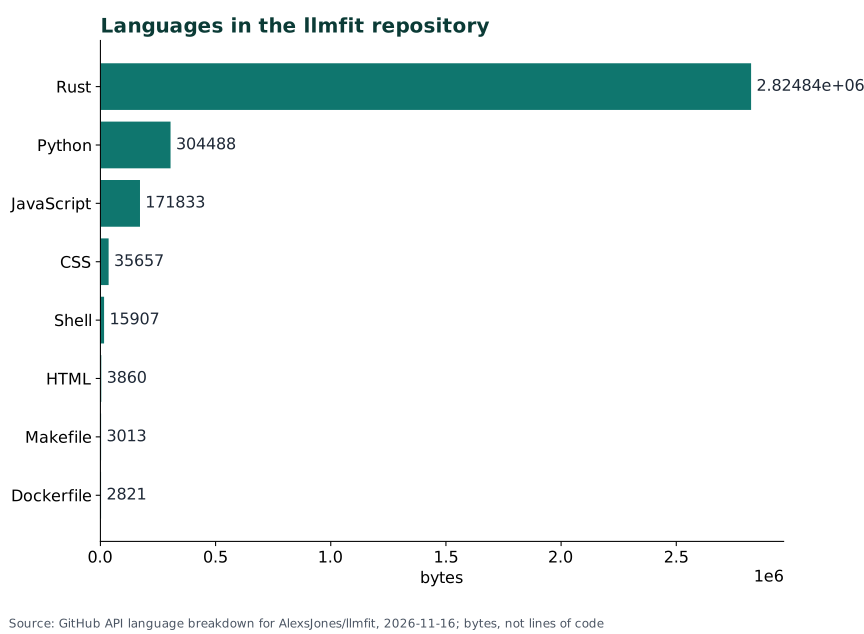
llmfit is a Rust workspace with a large embedded data file; the dashboard is built separately and embedded in the same binary.
llmfit/
├── llmfit-core/                 Rust: detection, scoring, model logic
│   └── data/
│       ├── hf_models.json       catalogue, about 17.3 MB, embedded
│       ├── benchmarks.yaml      benchmark data used in scoring
│       ├── benchmark_cache.json cached benchmark results
│       ├── use_case_benchmarks.json task alignment per family
│       └── docker_models.json   Docker Model Runner catalogue
├── llmfit-tui/                  Rust: CLI and terminal interface
├── llmfit-web/                  JavaScript, CSS and HTML dashboard
├── llmfit-desktop/              Rust desktop shell
├── llmfit-python/               Python packaging
├── docs/                        how-it-works, platform-support, providers, cli
├── tests/                       smoke tests and a Compose test
├── Dockerfile                   multi-stage image build
├── install.sh                   the shell installer
├── API.md                       REST API reference
├── CHANGELOG.md                 release history
└── README.md                    user documentation
| File | Language | What it does | When it runs |
|---|---|---|---|
hf_models.json | JSON | Model catalogue | Every scoring run |
llmfit-core/ | Rust | Detection and scoring | Every run |
llmfit-web/ | JS, HTML | Dashboard | llmfit serve |
The Python is the Hugging Face scraper for contributors, not a runtime dependency.
- Reads: vendor tools, the embedded catalogue and provider endpoints.
- Writes: benchmark results under
~/.local/share/llmfit/benchmarks/pending/on Linux (LLMFIT_BENCH_STOREoverrides), plus profiles. Hugging Face handles downloads; GitHub is used only forbench --share. - No database or account. The image publishes
linux/amd64andlinux/arm64on GHCR asghcr.io/alexsjones/llmfit.
What users say#
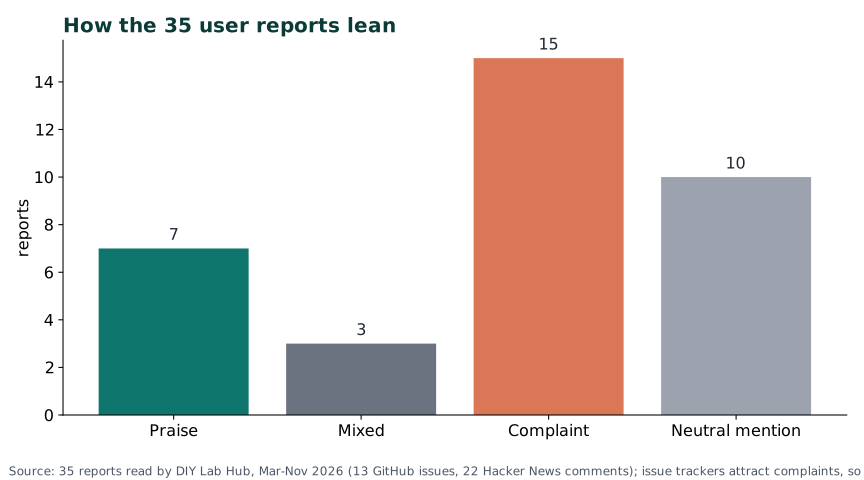
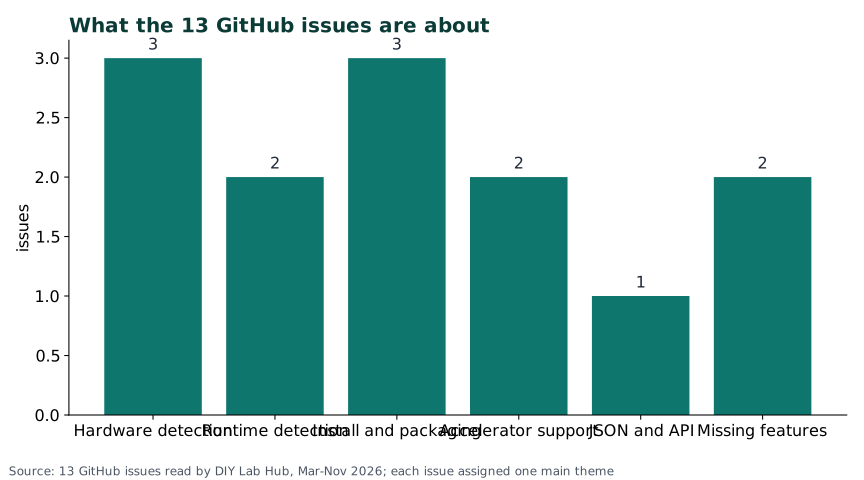
35 reports read: 7 praise, 3 mixed, 15 complaints and 10 neutral. Thirteen are GitHub issues and 22 are Hacker News comments; Reddit was not read.
| Voice | What they say |
|---|---|
| Praise | A Hacker News comment (July 2026) says it shows what models you can run and at what speeds. |
| Complaints | #1180 (October 2026) shows an Arc A770 16 GB as 3.9990234375 GB, hiding 2,006 models; #1232 (November 2026, open) shows a Radeon 780M as 4 GB. #200 reports "No compatible runtime available" despite llama.cpp. |
Pros: why it is useful#
The value is a fast, transparent first shortlist; it does not replace a benchmark.
- A first answer in under a minute. One command ranks hundreds of models; no model download is needed.
- Transparent estimates.
llmfit infoand the API show the bandwidth, efficiency factor and context behind a number. - Overrides and profiles.
--memory,--ram,--cpu-coresand--profilecorrect a bad detection or score a machine you have not bought. - Small, portable and measurable. One binary, no database or account; Linux, macOS and Windows builds with checksums, plus
llmfit benchfor real tokens per second.
Cons: why it is not useful#
Its estimates are only as good as the detected hardware, and Windows AMD/Intel is the weak spot.
- Estimates, not measurements. Speed is a bandwidth formula with a 0.55 factor; a laptop GPU once inherited a desktop card's bandwidth (#919, August 2026).
- Windows AMD/Intel detection. The 32-bit
AdapterRAMtruncation hit an Arc A770 and a Radeon 780M; the maintainer says the registry fix landed in 1.1.18, but the Radeon report was still open at 1.1.20. - The catalogue is frozen at build time. New models arrive with a new binary, and quality scores combine parameter count, family reputation and a curated alignment table rather than a fresh evaluation.
- Open edge-case bugs.
system --jsonmisses three fields (#1257); a missing runtime can appear despite llama.cpp being detected (#200); application control can block a source build (#185).
Should you consider it? When it is useful#
Consider it for a first shortlist on Linux, macOS or Windows with an NVIDIA GPU; skip it for benchmark-grade numbers or a shared multi-user dashboard.

Diagram: DIY Lab Hub, November 2026, based on the platform-support docs and the Windows VRAM reports.
Install and check it#
Install natively on the machine you want to measure; a container sees its own hardware.
Linux#
curl -fsSL https://llmfit.axjns.dev/install.sh | sh
Without sudo, install to ~/.local/bin:
curl -fsSL https://llmfit.axjns.dev/install.sh | sh -s -- --local
Homebrew also works:
brew install AlexsJones/llmfit/llmfit
For a pinned install, download the archive and checksum, then verify:
curl -fLO https://github.com/AlexsJones/llmfit/releases/download/v1.1.20/llmfit-v1.1.20-x86_64-unknown-linux-gnu.tar.gz
curl -fLO https://github.com/AlexsJones/llmfit/releases/download/v1.1.20/llmfit-v1.1.20-x86_64-unknown-linux-gnu.tar.gz.sha256
sha256sum -c llmfit-v1.1.20-x86_64-unknown-linux-gnu.tar.gz.sha256
Windows (PowerShell)#
winget install --exact --id AlexsJones.llmfit
Scoop is the alternative:
scoop install llmfit
The release page also publishes x86-64 and ARM64 ZIPs with .sha256 files. Assets from v1.1.19 onward are held back until the signing job succeeds; check the signature yourself.
Mac (Terminal)#
brew install AlexsJones/llmfit/llmfit
The homebrew-core formula also works, but it builds from source on macOS versions without a bottle:
brew install llmfit
Or use the same installer as Linux:
curl -fsSL https://llmfit.axjns.dev/install.sh | sh
Check it worked#
llmfit system
llmfit doctor
llmfit recommend --limit 5
system prints CPU, RAM, GPU and backend; doctor adds raw vendor output; recommend returns a ranked list. For the dashboard, run llmfit serve, open http://127.0.0.1:8787/, and check health:
curl http://127.0.0.1:8787/health
{
  "status": "ok",
  "node": {
    "name": "worker-1",
    "os": "linux"
  }
}
Your node name will differ; the stable part is "status": "ok".
Things to keep in mind#
- Security. The dashboard and API have no documented login. Keep the
127.0.0.1bind, do not forward port 8787, and do not publish--host 0.0.0.0on an untrusted network. - Privacy. Nothing leaves the PC unless you ask: downloads go to Hugging Face,
bench --shareto GitHub. No telemetry switch is documented. - Updates. The catalogue is embedded, so the update path is a newer binary:
brew upgrade llmfit,scoop update llmfit, or a new release. A self-update command is still open (#930). - Provider settings and policy. Set
OLLAMA_HOST,LLAMA_SERVER_PORT,LLAMA_SERVER_HOSTorLMSTUDIO_API_KEYin your own environment. On a managed Windows PC, application control can block a source build withos error 4551; use the signed release or ask IT.
Tip: Keep the dashboard on
127.0.0.1. If you need it from another device, use a VPN or authenticated proxy; the app has no user accounts.
Common mistakes#
| Mistake | Why it happens | Do this instead |
|---|---|---|
| Trusting a Windows AMD/Intel VRAM number | Win32_VideoController.AdapterRAM is 32-bit and saturates under 4 GiB | Run llmfit system; use --memory=16G as a workaround. |
Setting LLAMA_CPP_HOST from an old issue thread | The name appeared in a fork-specific discussion, not the current docs | Use LLAMA_CPP_PATH and LLAMA_SERVER_PORT. |
Using --runtime ollama | Runtime and provider are different concepts | Runtime values are any, mlx, llamacpp, vllm and bitnetcpp. |
Reading Perfect as "fast and high quality" | The verdict is memory utilisation, capped by run mode | Read estimate_confidence and run llmfit bench before promising speed. |
| AI assistants: adding PostgreSQL, Redis, a worker or an admin account | Generic boilerplate copied from multi-service apps | llmfit is one binary with no database, cache or account system. |
Tip: On Windows with AMD or Intel graphics, compare
llmfit systemwith Task Manager or the vendor panel. If they disagree, pass the verified number with--memory.
Troubleshooting#
| Problem | Solution |
|---|---|
error: failed to run custom build command for 'quote v1.0.45' followed by Eine Anwendungssteuerungsrichtlinie hat diese Datei blockiert. (os error 4551) | A Windows application-control policy blocked the build. Use the signed release or ask IT. |
Windows reports gpu_vram_gb as 3.9990234375 instead of about 16 | The 32-bit AdapterRAM truncation. Update to 1.1.20, run llmfit doctor, and use --memory=16G; report the result on #1232. |
GET /api/v1/models returns HTTP 400 with `{"error": "invalid min_fit value: use perfect | good |
FAQ#
Is llmfit free? Yes: MIT-licensed, no account, no paid edition in the repository or README.
Does llmfit run the model? No. It reads hardware, estimates fit and can start a download; Ollama, llama.cpp, MLX, Docker Model Runner or LM Studio runs inference.
Does it work offline? Basic sizing does, because the catalogue is embedded. Downloads, refreshes, provider queries and benchmark sharing need a network.
Sources#
- Repository and v1.1.20 release: owner, stars, forks, issues, licence, last push, assets and checksums (November 2026).
- README, how-it-works, platform-support, providers, cli, API, LICENSE and GHCR package at v1.1.20 (November 2026).
- User reports: issues #1180, #1232, #200, #185, #919, #930; Hacker News comments 48999097, 48182941, 48148436, 48147908 (May to October 2026).
- Our manual sizing guide: Which local LLM fits your GPU.
Not run by DIY Lab Hub: we read the official files and reports but did not install llmfit. Reddit was not read.
Checked against the official docs on 2026-11-16