qwen-audio-agent review: voice for Claude Code, hands-free (2026)
Before you start
- 9 min read
- 1 file content
Boxes marked Run in terminal are what you type; plain text explains why.
What you get in one minute#
Verdict: Niche. qwen-audio-agent works, but most Claude Code users should use the built-in /voice dictation; install this only for a two-way spoken conversation while Claude works.

Logo: the official QwenAudio GitHub organisation (github.com/QwenAudio)
It is a separate voice runtime, not a Claude Code plugin: you speak, hear short replies, and hand longer tasks to Claude Code. Version 2.0.1 shipped on 26 September 2026; the project is Apache-2.0 and had 3,078 stars on 30 October 2026.
| Verdict | Niche |
| Best for | Two-way voice with Claude Code on macOS |
| Skip it if | You only need to speak prompts, audio must stay local, or you want a plugin |
| Install | npm install -g qwen-audio-agent, or the desktop app |
| Cost | $6.40 per 1M audio input and $24 per 1M audio output tokens; Claude usage separate |
What it does#
You talk to a realtime voice model. When a request needs work, the model hands the task to Claude Code, which reads and edits files in your workspace. The result comes back as speech.
The default voice frontend is qwen-audio-3.1-realtime-plus on Alibaba Cloud DashScope. Local frontends exist as an alternative, and AGENT_PROTOCOL=none runs voice only, which is how you test the voice path before adding a coding agent.
How it works in the background#

Audio to Alibaba Cloud, work to Claude Code, result back to the talk.
Three parts do the work. The frontend agent is the voice model. The orchestration runtime owns tasks, permissions, sessions, and result delivery. The backend agent is Claude Code, reached through the Agent Client Protocol (ACP). The Gateway hosts the runtime and listens on 127.0.0.1:3101 by default.
The voice model calls spawn_thinking when work is needed. The runtime acknowledges and runs the task in the background, so the conversation does not block. The ACP adapter starts Claude Code as a subprocess. Your microphone audio and voice context go to Alibaba Cloud by default; Claude Code keeps its own login and tools.
Under the hood: the dissection#
qwen-audio-agent/
├── cli/bin/qwenaudio.mjs          # the qwenaudio command
├── cli/src/
│   ├── config-command.mjs         # prints and writes config.env
│   ├── launcher.mjs               # starts the Gateway and clients
│   └── gateway-service.mjs        # background service
├── server/src/
│   ├── index.mjs                  # Gateway entry
│   ├── voice/                     # realtime provider and sessions
│   ├── orchestration/             # tasks, permissions, results
│   ├── backend/                   # ACP/A2A adapters
│   └── transport/                 # client WebSocket
├── tui/  web/  desktop/  mobile/  # clients
└── config/                        # templates
| File | Language | What it does | When it runs |
|---|---|---|---|
cli/bin/qwenaudio.mjs | JavaScript (ESM) | Entry point for every command | On startup |
cli/src/launcher.mjs | JavaScript (ESM) | Starts Gateway and clients | qwenaudio, tui, webui |
server/src/index.mjs | JavaScript (ESM) | Starts the Gateway | While it runs |
server/src/voice/ | JavaScript (ESM) | Realtime provider and interruption | During a conversation |
server/src/orchestration/ | JavaScript (ESM) | Tasks, permissions, results | While tasks run |
server/src/backend/ | JavaScript (ESM) | Backend drivers, including ACP | When a task starts |
What users say#
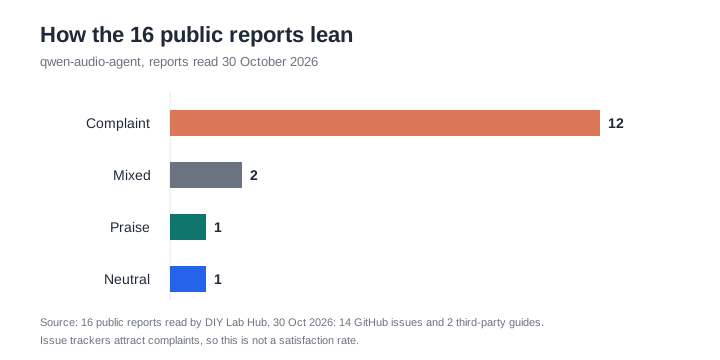
Complaints dominate the 16 reports; issue trackers attract complaints, not a satisfaction rate.
We read 16 reports: 14 GitHub issues and two guides. Twelve lean negative, two are mixed, one is positive, one is neutral. That is not a satisfaction rate; issue trackers collect complaints.
The positive one is a blog review from August 2026. It gives 4/5 and praises the install and background tasks. It calls the Gateway local-only with no authentication, which the privacy document contradicts: pairing, device tokens, Tailscale, and HTTPS are documented.
In the mixed #563, a production user on a phone line ran the 3.1 voice model with a local patch for a week and asked for support; the issue was closed. The Better Stack guide likes the architecture but warns about paid DashScope and documentation gaps. It repeats claims the docs do not support, so we used only its general caveats.
Complaints cluster around frontends and plumbing. #560: Google Live never connects. #557: StepFun cannot reconnect with history. #549 matters most: a task result was announced in another session; it was closed after a fix. Others cover missing voice cloning, discarded usage accounting, and a desktop setting that overwrote AGENT_PROTOCOL.
The gap for this review: none of the 16 reports is about the Claude Code adapter. A GitHub search found two issues mentioning "claude", both opened by the maintainer. The project rates Claude Code 4/5. The exact setup this page reviews has no independent user evidence yet.
Pros: what is genuinely good#
- Two-way voice, not just dictation. You hear the answer, and on macOS you can interrupt it.
- Background work with a spoken result. The conversation continues while Claude Code runs.
- It reuses your Claude Code setup. Login, tools, MCP servers, and skills stay in Claude Code.
- Open source and active. Apache-2.0, created in July 2026, with fixes shipping.
Cons: what to weigh first#
- The Claude Code path is unverified in public. The 4/5 rating is the project's own; no user report was found.
- Audio is paid and metered. Billed per token, Claude usage separate, and no per-session estimate. Audio is $6.40 in and $24 out per 1M tokens (Singapore).
- Audio leaves your machine by default. It goes to Alibaba Cloud DashScope. The privacy document is in Chinese.
- It overlaps with a free built-in.
/voicedictation uses no Claude tokens with a claude.ai account. - Full-duplex is macOS-only. Linux and Windows TUI are half-duplex; the echo-cancelling helper is a macOS build.
Should you consider it? When it is useful#

Dictation first; install only for spoken replies and paid cloud audio.
Use it only for two-way voice with Claude Code, ideally on macOS (full-duplex), with paid cloud audio.
If you only need to speak prompts, use /voice. If audio must stay local, test the unverified local frontends on a spare machine. On Linux or Windows, expect half-duplex.
Install and check it#
Desktop installers include the Gateway; Linux builds from source. The CLI needs Node ^22.22.2, ^24.15.0, or >=26.0.0, and npm 10+.
Linux#
- Check
node --versionandnpm --version; install a supported Node release if needed. npm install -g qwen-audio-agentqwenaudio configprints the path, normally~/.config/qwaudio/config.env.- Add these lines, starting with
AGENT_PROTOCOL=noneto test voice first:
QWEN_AUDIO_REALTIME_PROVIDER=dashscope
QWEN_AUDIO_REALTIME_API_KEY=<YOUR_DASHSCOPE_KEY>
QWEN_AUDIO_REALTIME_MODEL=qwen-audio-3.1-realtime-plus
AGENT_PROTOCOL=none
- Run
qwenaudio, thenqwenaudio webuiin a second terminal; allow the microphone and say hello. For the TUI:python -m pip install sounddevice, thenqwenaudio tui. - Install and sign in to Claude Code separately; add the adapter from the desktop Backend Agent screen, or let the CLI fetch it through
npxwhen missing. SetAGENT_PROTOCOL=claudeand restart.
Tip: Run
qwenaudio --versionandqwenaudio doctorbefore blaming the voice model. They separate a broken install from a provider problem.
Windows (PowerShell)#
- Check
node --versionandnpm --version; the same minimums apply. npm install -g qwen-audio-agent, thenqwenaudio --version.qwenaudio config, editconfig.envwith the four lines above, and start withAGENT_PROTOCOL=none.- Run
qwenaudio, thenqwenaudio webuiin a second window. The TUI needs Python andsounddevice; it is half-duplex. The.exeincludes the Gateway. - Install and sign in to Claude Code, add the adapter, set
AGENT_PROTOCOL=claude, restart.
Tip: If you only want the desktop app, skip npm. The
.exealready contains the Gateway.
Mac (Terminal)#
- For full-duplex TUI voice:
xcode-select --install. The helper is built into~/Library/Caches/qwaudio/tui/macos-voice-io. - Check Node and npm, then
npm install -g qwen-audio-agent, thenqwenaudio configand editconfig.env. - Run
qwenaudio, thenqwenaudio webuiorqwenaudio tui; allow the microphone and say hello. - Install and sign in to Claude Code, add the adapter, set
AGENT_PROTOCOL=claude, restart. The.dmgincludes the Gateway and supports full-duplex.
Tip: Leave
QWEN_AUDIO_AGENT_BACKEND_MODELempty unless you need a specific model; Claude Code then uses its own.
Check it worked#
Run qwenaudio --version, qwenaudio doctor, and qwenaudio setup. Start the Gateway and one client; both should show connected. Say hello, then ask for a small task in a test folder. The transcript should appear and the result should be spoken.
doctor and setup check components, not credentials.
Things to keep in mind#
- Permissions.
nativeasks for approval;fullauto-approves and belongs only in trusted projects. - Privacy. Audio and voice context go to Alibaba Cloud by default; work context goes to Claude. Logs stay under
~/.config/qwaudio. - Remote access. Keep the Gateway on localhost.
--lanis unencrypted; use Tailscale or an HTTPS reverse proxy, and revoke leaked pairing links. - Updates.
npm install -g qwen-audio-agent@latestupdates the CLI. The adapter defaults to0.93.0; newer Claude Code versions may need an update.
Common mistakes#
| Mistake | Why it happens | Do this instead |
|---|---|---|
| An AI assistant says Claude Code has no voice | It misses the built-in /voice dictation | Use /voice for prompts; install this only for spoken replies |
Running qwenaudio and expecting a chat window | The Gateway has no microphone UI | Start qwenaudio tui or qwenaudio webui in a second terminal |
| Expecting the one-click install to log Claude Code in | It installs binaries, not a login | Sign in to Claude Code first, then add the adapter |
| Expecting full-duplex on Linux or Windows | Echo cancellation is macOS-only | Use /interrupt, or headphones with no echo cancellation |
| Putting the key in a shell profile or project file | The tool reads its own config; process env can override it | Edit ~/.config/qwaudio/config.env |
Exposing --lan to the internet | LAN mode is unencrypted HTTP/WebSocket | Use Tailscale or an HTTPS proxy plus pairing |
| Assuming the desktop app includes Claude Code | It includes only the Gateway | Install Claude Code separately |
Tip: If voice works but Claude does not, set
AGENT_PROTOCOL=noneto confirm the voice path, then switch toclaudeand restart.
Troubleshooting#
| Problem | Solution |
|---|---|
QWENAUDIO_GATEWAY_SETUP_REQUIRED, or the model is rejected | Use a supported model/profile and restart; #563 is the same 3.1 gap. |
连接 StepFun Realtime 超时 after the first turn | Known reconnect bug with history (#557). Try another frontend; no fix confirmed in 2.0.1. |
| Gateway is up but there is no voice | Check key, quota, provider status, and model name. doctor checks connectivity, not quota. |
| No microphone in the Linux/Windows TUI | python -m pip install sounddevice, then restart the TUI. |
gateway restart says the service is not installed | You are in the foreground. Stop with Ctrl-C and start again. |
FAQ#
Is this a Claude Code plugin? No. It is a separate Node runtime that reaches Claude Code through an ACP adapter.
Does Claude Code already have voice? Yes, for dictation. /voice turns speech into prompt text and costs no Claude tokens, but it does not read replies aloud.
Does my audio go to the cloud? By default, yes: audio goes to Alibaba Cloud DashScope. Local frontends are unverified here.
How much does a session cost? No estimate is published. Audio is billed per token ($6.40 in, $24 out per 1M), and Claude usage follows your plan or API billing.
Sources#
- npm package: https://registry.npmjs.org/qwen-audio-agent/latest
- Repository: https://github.com/QwenAudio/qwen-audio-agent
- Releases: https://github.com/QwenAudio/qwen-audio-agent/releases/tag/v2.0.1 and https://github.com/QwenAudio/qwen-audio-agent/releases/tag/v2.0.0
- Quickstart: https://qwenaudio.github.io/qwen-audio-agent/getting-started/quickstart
- Install: https://qwenaudio.github.io/qwen-audio-agent/getting-started/install
- Backends: https://qwenaudio.github.io/qwen-audio-agent/backends/overview
- Claude Code backend: https://qwenaudio.github.io/qwen-audio-agent/backends/configuration#claude-code
- Architecture: https://qwenaudio.github.io/qwen-audio-agent/architecture/overview
- Gateway: https://qwenaudio.github.io/qwen-audio-agent/operations/gateway
- Troubleshooting: https://qwenaudio.github.io/qwen-audio-agent/operations/troubleshooting
- TUI: https://qwenaudio.github.io/qwen-audio-agent/getting-started/tui
- CLI: https://qwenaudio.github.io/qwen-audio-agent/reference/cli
- Privacy: https://github.com/QwenAudio/qwen-audio-agent/blob/main/PRIVACY.md
- Pricing: https://www.alibabacloud.com/help/en/model-studio/qwen-audio-3-1-realtime-plus
- Claude Code
/voice: https://code.claude.com/docs/en/voice-dictation - ACP: https://agentclientprotocol.com/protocol/overview
- Adapter: https://github.com/agentclientprotocol/claude-agent-acp
- Blog review: https://aiblog.jasonead.com/blog/2026/08/08/qwen-audio-agent-runtime-voice-ai-agents/
- Better Stack: https://betterstack.com/community/guides/ai/qwen-audio-agent/
- Issues: #580, #563, #560, #557, #550, #549, #532, #530, #475, #474, #436, #431, #334, #333
Checked against the official docs on 2026-10-30. The tool was not installed by DIY Lab Hub; commands come from the official docs, and no output was invented.