Hookify for Claude Code: review, how it works and whether it is worth it (2026)
Before you start
- 10 min read
Boxes marked Run in terminal are what you type; plain text explains why.

What you get in one minute#
Hookify is a free Anthropic plugin that turns a plain-language request ("warn me when you run rm -rf") into a small rule file that blocks or flags Claude's commands and edits, but in its current code several rule types do not work and it can fail silently.

Logo: the official Claude Code logo from Anthropic's press kit (anthropic.com/press-kit)
The marketplace page shows 60,376 installs (October 2026). We found 103 GitHub issues with "hookify" in the title, 76 of them open.
| Verdict | Detail |
|---|---|
| Useful? | Niche. Good idea, handy for simple command and edit guards, but unreliable on Windows and for prompt and stop rules. |
| Best for | Mac or Linux users who want a few regex guards on Bash commands and file edits without writing hook JSON. |
| Skip it if | You are on Windows without python3, want a hard security barrier, or need prompt or stop rules. |
| Made by | Anthropic, in its official marketplace. The README says MIT, the LICENSE file says Apache 2.0. |
| Version + date | No version number in plugin.json or the marketplace entry. Last change to the folder: 20 May 2026 (commit b58bdbf). Read at repository head 41f619d, 27 October 2026. |
| Install command | /plugin install hookify@claude-plugins-official |
| Token cost | No published figure; run claude plugin details hookify. Our rough count: a few hundred tokens at start (one skill, four commands, one agent description). It also starts a Python process on every tool call. |
What it does#
You describe what Claude should not do, Claude writes a rule file, and from then on Python hooks check every action against it.
/hookify <what to stop>writes.claude/hookify.<name>.local.mdin your project. Without text, it reads your recent messages for corrections and proposes rules.- Rules apply on the next tool call. A rule has an
event(bash,file,stop,prompt,all), a regexpatternor a list ofconditions, and anaction:warn(default) orblock. - Adds 4 commands (
/hookify,/hookify:list,/hookify:configure,/hookify:help), 1 skill (writing-rules), 1 agent (conversation-analyzer) and 4 hooks: PreToolUse, PostToolUse, Stop and UserPromptSubmit.
How it works in the background#
The plugin only writes markdown; four tiny Python hooks do the checking every time Claude Code reaches an event. The picture follows one rule.

- No matcher in
hooks.json: the hooks run on every tool call, evenRead. - Warn versus block: a block returns
permissionDecision: deny. A warning returnssystemMessage, which Claude Code's hooks reference describes as shown to the user.
Under the hood: dissection#
Hookify is 64% Markdown prompts and 34% Python (about 850 lines), with no dependencies beyond the Python standard library.
The file tree#
hookify/
├── .claude-plugin/plugin.json     name, description, author (no version)
├── hooks/
│   ├── hooks.json                 4 hooks, 10 s timeout, no matcher
│   ├── pretooluse.py              Bash/Edit/Write/MultiEdit events
│   ├── posttooluse.py             same checks after the tool ran
│   ├── stop.py                    stop rules
│   └── userpromptsubmit.py        prompt rules
├── core/
│   ├── config_loader.py           finds and parses the rule files
│   └── rule_engine.py             matches rules, builds the JSON answer
├── commands/                      hookify.md, list.md, configure.md, help.md
├── skills/writing-rules/SKILL.md  rule syntax, loaded by every command
├── agents/conversation-analyzer.md
├── examples/                      4 sample rules
├── README.md, LICENSE, .gitignore
└── matchers/, utils/              empty packages (only __init__.py)
| File | Language | What it does | When it runs |
|---|---|---|---|
hooks/*.py | Python | Read hook JSON from stdin, load rules, print a JSON answer, always exit 0 | Each event |
core/config_loader.py | Python | Home-made YAML reader for the rule files | Each event |
core/rule_engine.py | Python | Regex and operators; block beats warn | Each event |
commands/*.md | Markdown | Prompts that tell Claude how to create, list or toggle rules | When you type the command |
skills/writing-rules/SKILL.md | Markdown | Rule format reference | Loaded by the commands |
agents/conversation-analyzer.md | Markdown | Finds your corrections in the chat | /hookify without text |
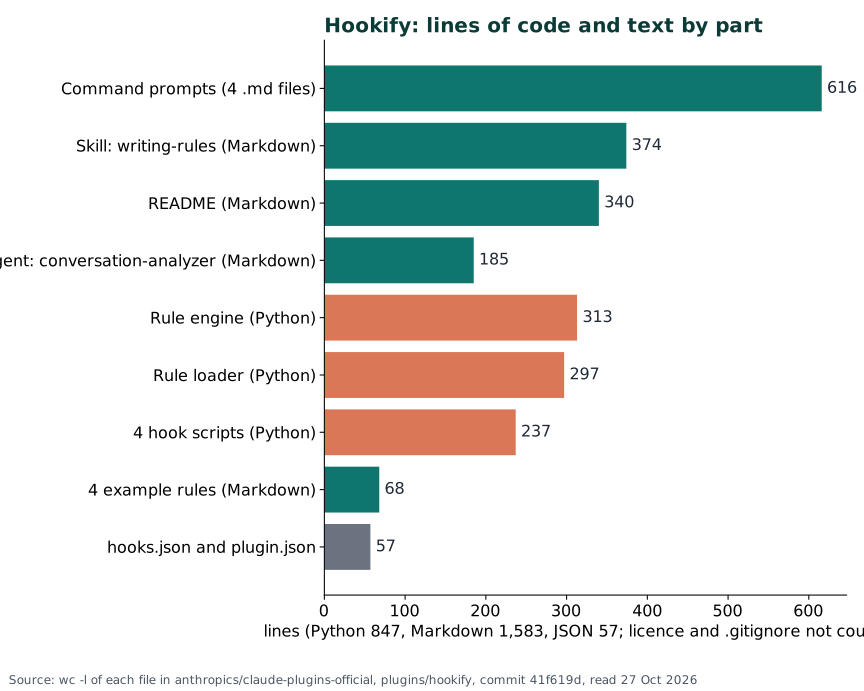
Chart: line counts of each file at commit 41f619d, read 27 October 2026. Teal is Markdown, orange is Python.
Two key excerpts#
hooks/hooks.json, one of four similar entries:
"PreToolUse": [{ "hooks": [{ "type": "command",
  "command": "python3 \"${CLAUDE_PLUGIN_ROOT}/hooks/pretooluse.py\"", "timeout": 10 }] }]
core/rule_engine.py, the block answer:
"hookSpecificOutput": {"hookEventName": hook_event, "permissionDecision": "deny"},
"systemMessage": combined_message
Disk and network#
- Reads:
.claude/hookify.*.local.mdrelative to the folder the hook starts in, and forstoprules the whole transcript file. - Writes: nothing from the hooks; Claude writes the rule files.
- Network: none. Needs:
python3on the PATH. The README says Python 3.7+, but the code needs 3.9 or newer (an open issue reports a crash on 3.8).
What we ran ourselves#
We ran the hook scripts on a Windows PC in a throwaway folder with sample rule files (Python 3.13, run from a shell, not inside Claude Code).
| Test | Result |
|---|---|
bash rule rm\s+-rf, action block, command rm -rf /tmp/x | Denied, but no reason sent to Claude |
Same rule, command rm -r -f /tmp/x | Not caught (regex only sees the text) |
file rule console\.log\( on an Edit | Warning returned |
Same rule on a Write of a new file | No match |
prompt rule with the README's pattern: form | No match |
Run from a sub-folder with no .claude/ | No rules found |
| Start-up cost, 5 runs with no rules | About 0.27 seconds each |
What users say#
We read the first part of 27 reports in detail (24 complaints, 1 mixed, 2 praise) and sorted the titles of all 103 hookify issues into themes. Reddit was not read. The split is skewed: bug trackers hold bug reports, and many read like code audits.
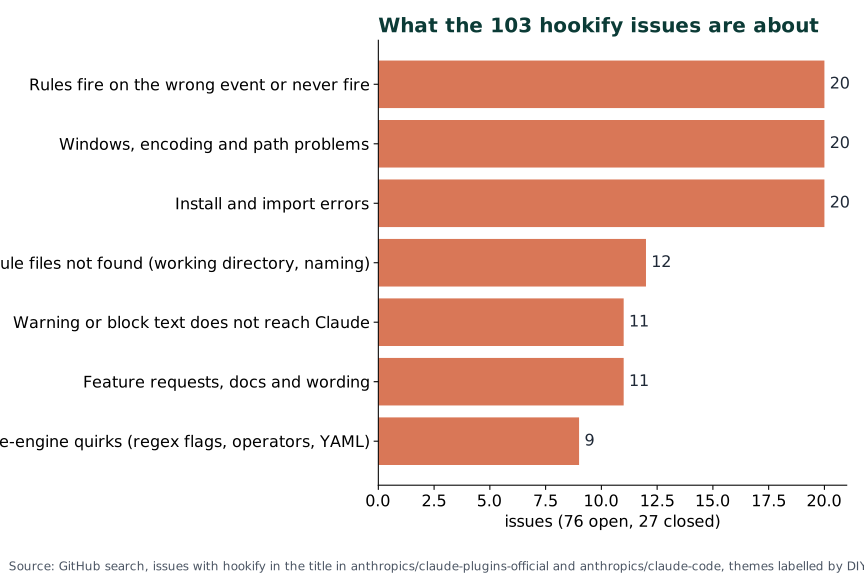
Chart: issues with "hookify" in the title in anthropics/claude-plugins-official and anthropics/claude-code, themes labelled by DIY Lab Hub, 27 October 2026. Many install errors date from 2025.
| Voice | What they say |
|---|---|
| Praise | A Hacker News commenter (February 2026) and another comment (February 2026) recommend it for guardrails and blocking commits. |
| Warnings never reach Claude | Issue 20747 (January 2026, 6 thumbs up) and issue 5290 (August 2026). |
| Block gives no reason | Issue 6314 (September 2026): Claude only sees a generic "Blocked by hook". |
| Prompt rules dead | Issue 2102 (May 2026): the engine reads user_prompt, the docs say prompt. |
| Rules silently not loaded | Issue 6339 (September 2026): search starts in the live folder, not the project root. |
| Windows | Issue 85 (December 2025, 5 thumbs up): python3 not found; issue 6092 (September 2026): non-ASCII rule files fail. |
Pros: why it is useful#
It makes the most common guardrail (never do X) a one-sentence job and keeps the rule in a file you can read.
- No JSON, no code: you can write or edit a rule in a minute; rules apply immediately.
- Learns from corrections:
/hookifyproposes rules from the chat. - Transparent: about 850 lines of Python, no network.
Cons: why it is not useful#
The idea is better than the current code, and a rule that silently does nothing is worse than no rule.
- Silent gaps: we reproduced
Writeignored by simple file rules, and prompt rules do not fire. - Not a barrier: regex on text misses
rm -r -f,/bin/rmand scripts. Claude Code's ownBash(rm *)deny rule also matches inside compound commands and after variable assignments (permissions docs). - Claude may never read your warning, and a block carries no reason.
- Windows is a weak spot:
python3, encoding and backslash-path reports. - Cost: one Python start per tool call (about 0.27 seconds for us); regex ignores case, undocumented.
Should you consider it? When it is useful#
Consider it for a few simple guards on Bash commands and file edits on Mac or Linux, test every rule, and skip it where you need real security.

| Situation | Verdict |
|---|---|
Block git push --force or warn on edits to .env | Install, test the rule |
| One fixed command to forbid | Use a permission deny rule |
| "Run the tests before you stop" | Skip for now; stop rules have open bugs |
Windows without python3 | Skip, or fix Python first |
Install and check it#
You install it from Anthropic's official marketplace with one command. Check that python3 --version prints 3.9 or newer first.
Linux#
claude plugin install hookify@claude-plugins-official
Windows (PowerShell)#
Reports say hookify needs a command called python3; many Windows installs only have python or py. Check first:
python3 --version
claude plugin install hookify@claude-plugins-official
If the first command fails, expect the hooks to do nothing.
Mac (Terminal)#
claude plugin install hookify@claude-plugins-official
Check it worked#
Inside Claude Code, in a scratch project, create a harmless test rule:
/hookify Warn me when a command contains hookify-test
Then ask Claude to run echo hookify-test. The warning should appear on your screen. Then run claude plugin details hookify.
Things to keep in mind#
- Security. The hooks run Python with your user rights on every tool call. Rule files run no code, but a cloned repository can carry some that block your tool calls.
- Not a security boundary. Use permission deny rules, and the sandbox for real isolation.
- Updates. No version number, so you cannot pin one.
Troubleshooting#
| Problem | Solution |
|---|---|
| Rule never fires | The file must be .claude/hookify.<name>.local.md in the project, start Claude Code from the project root, and set enabled: true. |
Hookify error: Invalid \escape: line 1 column 467 (char 466) (Windows) | Known backslash-path bug (issue 5730); no fix in the code we read. |
Hookify import error: No module named 'hookify' | An old bug fixed in current code: update the plugin. |
PreToolUse:Bash hook error: Blocked by hook | Normal for a block rule, but the rule name is not shown: check your .claude/hookify.*.local.md files. |
| Rule with emoji or accents is ignored on Windows | Keep rule files plain ASCII (issue 6092). |
FAQ#
Is hookify made by Anthropic? Yes, with the "Anthropic verified" label.
How do I turn a rule off? Set enabled: false, delete the file, or run /hookify:configure.
Sources#
- anthropics/claude-plugins-official, plugins/hookify: every file read at commit 41f619d (27 October 2026); last folder change b58bdbf (May 2026); marketplace entry in
.claude-plugin/marketplace.json. - Hookify on the Claude marketplace: install count 60,376 and description (October 2026).
- Hooks reference, Configure permissions and Install and manage plugins: official Claude Code docs (October 2026).
- User reports: issues 20747, 99221, 93028, 78490, 79143 (2026) and 85, 292, 1788, 1859, 5368, 5660, 5662, 6144, 6368 (2025 to 2026); two Hacker News comments (February 2026).
Not run inside Claude Code by DIY Lab Hub: we read the files and docs and ran the hook scripts from a shell on sample rules, but did not install the plugin in a live session.
Checked against the official docs on 2026-10-27