claude-code-setup for Claude Code: review, how it works and whether it is worth it (2026)
Before you start
- 8 min read
Boxes marked Run in terminal are what you type; plain text explains why.
What you get in one minute#
claude-code-setup is a free Anthropic plugin with one read-only skill that scans your project and suggests hooks, MCP servers, skills and subagents, and it is useful once, for people who have not set these up yet.

Logo: the official Claude Code logo from Anthropic's press kit (anthropic.com/press-kit)
The marketplace page shows "195,067" installs (October 2026) and no ratings.
| Verdict | Detail |
|---|---|
| Useful? | Niche. A good first read-through for a new setup; little value after you run it once. |
| Best for | People new to hooks, MCP servers and subagents, on a mainstream web or Python repository. |
| Skip it if | You already use these features, or your project is not a typical web stack. |
| Made by | Anthropic (Apache 2.0 licence file), in its official marketplace. |
| Version + date | 1.0.0; last change to the folder 28 May 2026 (we read the repository on 27 October 2026). |
| Install command | /plugin install claude-code-setup@claude-plugins-official |
| Token cost | No published figure. Our estimate: about 100 tokens always on, about 2,700 when the skill runs, up to about 11,000 if it reads every reference list. |
What it does#
You ask Claude for automation advice, and it answers with a short report built from what it found in your project. It never edits files.
- 1 skill:
claude-automation-recommender. Ask "recommend automations for this project" or "what hooks should I use?" - Output: the top 1-2 suggestions per category; ask for one category and you get 3-5.
- 0 hooks, 0 commands, 0 named agents, 0 MCP servers, 0 scripts.
- The README also lists "Slash Commands", but the skill itself no longer has that category.
How it works in the background#
Claude loads one instruction file, reads your project with ordinary shell commands, matches what it finds against built-in lists, and prints the report.

- Always loaded: only the skill's name and description. The 11 KB body loads when the skill runs.
- Nothing runs by itself. There is no hook, so the plugin does nothing until you ask.
Under the hood: dissection#
The plugin is 10 files, all text: Markdown instructions plus a manifest, so there is no code of its own to run or break.
claude-code-setup/
├── .claude-plugin/
│   └── plugin.json            name, version 1.0.0, author Anthropic
├── LICENSE                    Apache 2.0
├── README.md                  what it does, 3 example prompts
├── automation-recommender-example.png     screenshot used by the README
└── skills/claude-automation-recommender/
    ├── SKILL.md               the 3-phase workflow and report template
    └── references/
        ├── hooks-patterns.md        formatters, linters, block rules
        ├── mcp-servers.md           23 MCP servers by project signal
        ├── skills-reference.md      skill ideas and templates
        ├── subagent-templates.md    reviewer agents
        └── plugins-reference.md     plugins worth knowing
| File | Language | What it does | When it runs |
|---|---|---|---|
plugin.json | JSON | Names the plugin | When Claude Code loads plugins |
SKILL.md | Markdown | Phase 1 shell commands, signal tables, report template | When the skill is invoked |
references/*.md | Markdown | Lists the skill points to for each category | Only if Claude opens them |
Key excerpts#
SKILL.md, front matter:
name: claude-automation-recommender
tools: Read, Glob, Grep, Bash
The skill says "read-only", but that is a written instruction. The tools: line is not in the skill fields listed in the official skills docs, which describe allowed-tools (it grants permission, it does not restrict). Issue 6369 (October 2026) reports the same. Bash is available to it.
Phase 1 reads the root of your project:
ls -la package.json pyproject.toml Cargo.toml go.mod pom.xml 2>/dev/null
ls -la .claude/ CLAUDE.md 2>/dev/null
Disk and network#
- Writes: none by design. Reads: manifests,
.claude/,CLAUDE.md, source folders. - Network: none of its own; the skill tells Claude to use web search for tools the lists miss.
- Needs: nothing to install.
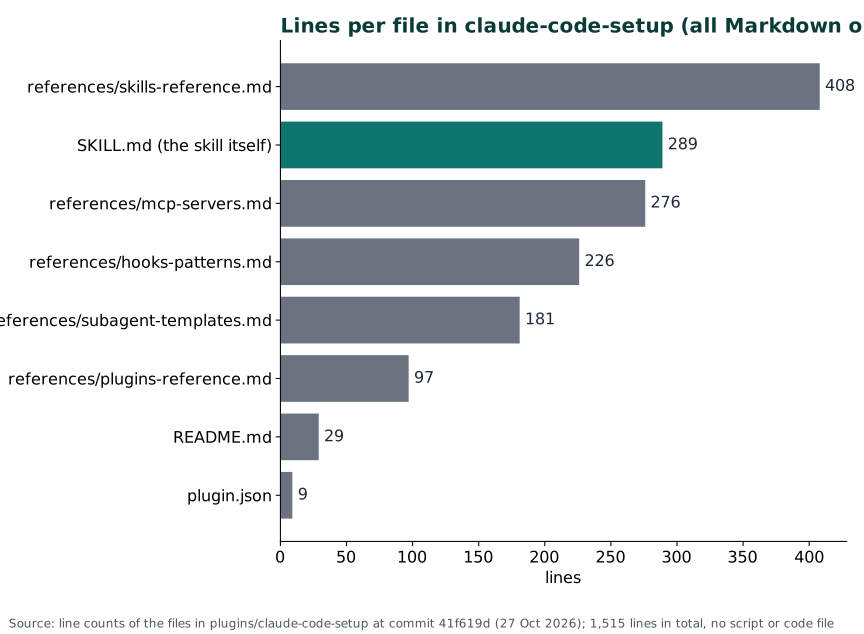
Chart: line counts from the plugin folder at commit 41f619d, 27 October 2026. 1,515 lines, no script.
What users say#
12 user reports read: 1 praise, 3 mixed, 1 plain use, 7 complaints or gaps, but the sample is small and skewed. GitHub issues attract complaints. Reddit was not read.
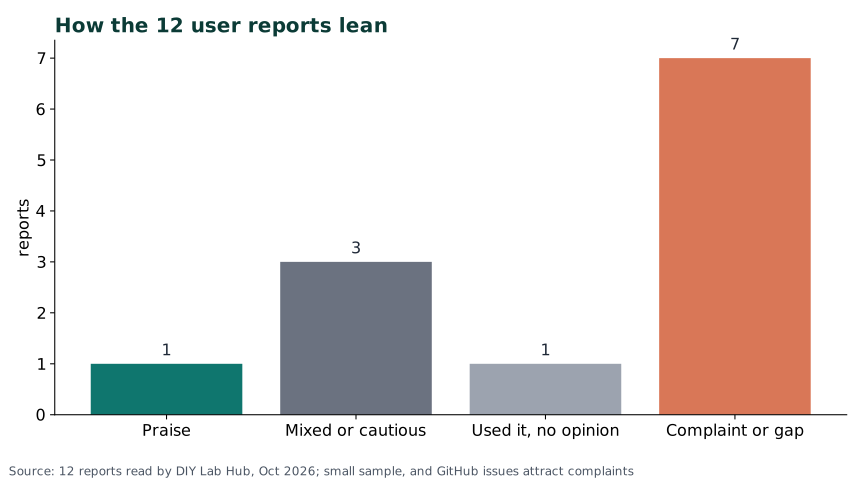
Chart: our count of the 12 reports, 2026. Not a satisfaction rate.
| Voice | What they say |
|---|---|
| Praise | A Zenn post (April 2026): "worth a try" for beginners; it suggested a .env block hook, two MCP servers and a reviewer. |
| Mixed | Three blogs (Aident, July 2026; DEV, August 2026; Unimon, May 2026): useful, but check every suggestion; read-only is not risk-free. Aident sells a related service. |
| Used it | One user filed its output as a to-do list in 4 repositories (May 2026). |
| Gaps | Only the repository root is scanned (#6263); no Swift (#4547); AGENTS.md ignored (#6307); project scan rules ignored (#6029). |
| Staleness | A fixed catalog of plugins (#6341, October 2026); duplicate PRs when scheduled (#5932, September 2026). |
Pros: why it is useful#
It turns a vague "what should I set up?" into a short, project-specific list, without touching your files.
- Safe to try: it writes nothing; you can compare
git statusbefore and after. - Small output: 1-2 items per category, each with a reason and a place to put it.
- A map of the options: hooks, MCP servers, skills, subagents in one report, which the docs spread over many pages.
- Easy to inspect: 10 text files, Apache 2.0 licence file, from Anthropic.
Cons: why it is not useful#
It is a static list with a scanner in front, so advice ages and sometimes misses your project.
- Fixed catalog: its plugin and MCP lists live in the files and can fall behind the marketplace.
- Narrow scan: root manifests only; Swift and nested projects fit poorly.
- One-shot value: once your hooks and servers are set up, there is little left to recommend.
- Not enforced: "read-only" depends on instructions, and the
tools:line does not restrict. - Overlap: plain Claude, with the official docs, can answer "what hooks should I use?" too. We did not test them side by side.
Should you consider it? When it is useful#
Consider it as a one-time helper for a new project or a new Claude Code user; skip it if you already know your hooks and servers. It costs almost nothing while idle.

| Situation | Verdict |
|---|---|
| New to Claude Code, mainstream web or Python repository | Install, run once |
| Experienced, setup done | Skip it |
| Swift, monorepo, manifests in subfolders | Try it, expect gaps |
| Recurring scheduled runs | Avoid until duplicates are fixed |
Install and check it#
You install it from Anthropic's official marketplace with one command. Install it at user scope, or add --scope project to share it.
Linux#
Inside Claude Code:
/plugin install claude-code-setup@claude-plugins-official
Or from your shell:
claude plugin install claude-code-setup@claude-plugins-official
Windows (PowerShell)#
claude plugin install claude-code-setup@claude-plugins-official
The skill's scan uses Unix commands (ls, cat, grep); we did not test how Claude adapts them on Windows.
Mac (Terminal)#
claude plugin install claude-code-setup@claude-plugins-official
Check it worked#
claude plugin list
claude plugin details claude-code-setup
The second prints the always-on token cost. Then ask Claude recommend automations for this project; a report with a "Codebase Profile" should come back. To remove it: claude plugin uninstall claude-code-setup@claude-plugins-official.
Things to keep in mind#
- Security. The plugin has no hooks, MCP servers or scripts, so its own risk is low. The risk is in what you adopt: the report suggests MCP servers and hooks, which run with your user rights. Read each one, and check install commands against the server's own docs.
- Privacy. Read-only still sends file contents to the model; do not run it over secrets.
- Updates: the entry points at the folder inside Anthropic's repository, so it moves with the marketplace.
- Conflicts: none known. Add suggestions one at a time so two formatter hooks do not collide.
- Organisations can limit marketplaces; if install is refused, ask yours.
Troubleshooting#
| Problem | Solution |
|---|---|
/plugin isn't available in this environment. | You are in claude -p; run claude plugin install ... in your shell. |
Plugin "claude-code-setup" not found in any marketplace | Use the full name with @claude-plugins-official. |
| The skill does not start | Run /reload-plugins, check claude plugin list, then use the phrase "recommend automations for this project". |
| Generic or empty recommendations | Say your stack and ask for one category; manifests outside the root are not scanned. |
| Suggested command fails | Check it against the tool's own docs; the lists can be out of date. |
FAQ#
Does it change my files? No. It reads and reports; you or Claude apply the suggestions afterwards.
Is it made by Anthropic? Yes. The author is Anthropic and it sits in Anthropic's own repository.
Do I need to keep it installed? Not really. Run it, apply what you want, then disable it.
Sources#
- anthropics/claude-plugins-official:
plugins/claude-code-setup/(all 10 files) at commit 41f619d and the marketplace entry (27 October 2026). - claude-code-setup on the Claude marketplace: install count and description (October 2026).
- Official docs: Install and manage plugins, Extend Claude with skills (October 2026).
- User reports: issues 6369, 6341, 6263, 6307, 6029, 5932, 4547 (July to October 2026); Zenn (April 2026); Unimon (May 2026); Aident (July 2026); DEV (August 2026); one user's run (May 2026).
Not run by DIY Lab Hub: we read the files and docs but did not install the plugin on a test machine.
Checked against the official docs on 2026-10-27