DockerSelf-HostingAIAI Coding Agents
Activepieces with Docker: Self-Hosted No-Code Automation with MCP and Local AI (Linux, Windows, Mac)
Before you start
- 22 min read
- Updated November 2026
Boxes marked Run in terminal are what you type; plain text explains why. Check what you need first
What you get in one minute#
Activepieces is a free, self-hosted automation builder: you put a trigger and some steps on a canvas and it runs them, like Zapier but on your own server. Its Community Edition is MIT-licensed, and it has a built-in MCP server (a way for AI assistants to build and run flows).

Logo: the official Activepieces project (github.com/activepieces/activepieces, file assets/ap-logo.png at tag 0.93.0)
Typical jobs: react to a webhook (a web address other apps post to), copy rows on a schedule, or ask a language model to summarise text.
| What | Value (official sources, read November 2026) |
|---|---|
| Current version | Activepieces 0.93.0, released 8 November 2026 (previous stable line: 0.92.3) |
| Image to pin | ghcr.io/activepieces/activepieces:0.93.0, also on Docker Hub as activepieces/activepieces:0.93.0 (amd64 and arm64; about 525 MB compressed) |
| Time needed | About 20 minutes (our estimate) |
| CPU and RAM | Docs: at least 2 vCPU and 4 GB RAM. No disk minimum, no measured idle figure |
| Port | 80 in the app container; we publish 127.0.0.1:8080 |
| Licence | MIT for Community. packages/ee/ and packages/server/api/src/app/ee are under a commercial licence |
| Official docs | activepieces.com/docs |
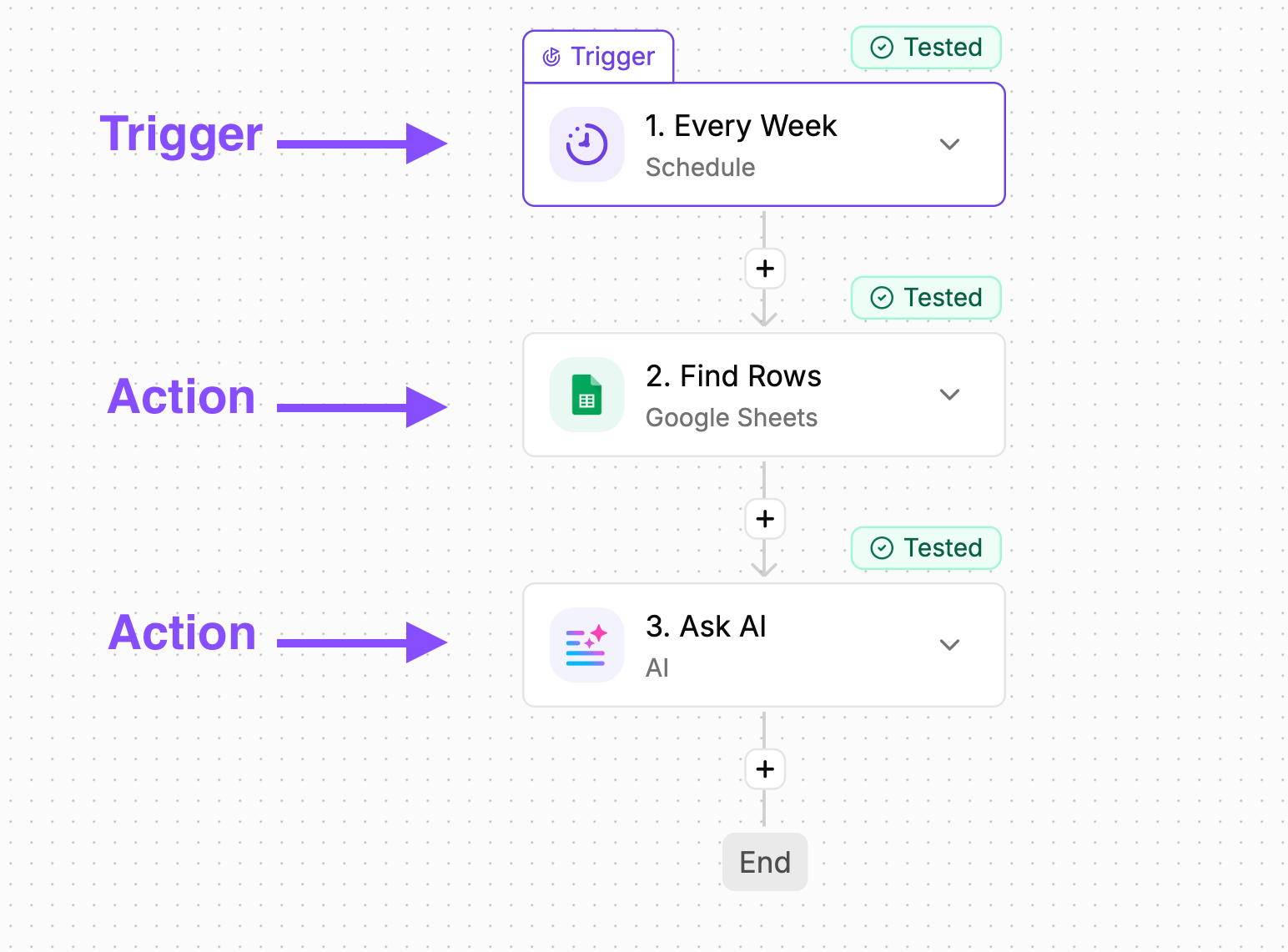
Image: the official Activepieces docs (Building Flows, "Actions And Triggers" picture; live docs, possibly newer than 0.93.0)
At a glance:
- What it is: one image that runs as an app (web page, API, MCP server) and as workers (they run your flows). PostgreSQL stores data, Redis holds the job queue.
- Local AI: possible through the HTTP piece. Agents and Chat depend on the plan.
Which version. We pin 0.93.0, the release GitHub marks as latest, and ignore the release candidate 0.93.0-rc.1. Two changes can surprise you: code steps run on Deno, and background migrations need a Postgres role without a statement timeout (see Common mistakes). In October the maintainers warned that latest lagged behind a security fix, so we never use it.
How it fits together#
One image plays two roles: the app serves the web page, API and MCP server, and a worker takes queued jobs and runs your flow steps. PostgreSQL keeps flows, runs and connections; Redis keeps the queue.

Drawn for this guide from the official compose file and architecture pages. The HTTPS route (dashed) is optional.
Your data lives in the postgres_data Docker volume, not in the install folder. The docs warn that a Redis that loses its data loses queued jobs, so our file keeps Redis in a volume too.
Before you start#
| System | What to have |
|---|---|
| Linux | Docker Engine, the Compose v2 plugin, openssl; x86-64 or arm64 |
| Windows | Docker Desktop (WSL 2 backend) and PowerShell. The official installer script needs WSL 2, so we skip it |
| Mac | Docker Desktop, Intel or Apple Silicon |
| All | At least 2 vCPU and 4 GB RAM, per the docs. No GPU |
Check Docker (same everywhere). The docs say the old docker-compose (v1) does not work.
docker --version
docker compose version
Checklist:
- [ ]
docker compose versionprints a v2 version - [ ] Port 8080 is free on the host
- [ ] For HTTPS and webhooks only: a domain, a DNS record, ports 80 and 443 free
Which edition. This guide installs Community. The official one-command installer (curl -fsSL https://get.activepieces.com | sh) writes AP_EDITION=ee into .env (we read the script). Its comment says Enterprise without a licence key runs the free plan, but the ee code is under the commercial licence. So we write our own Compose file and leave AP_EDITION unset, which the docs say gives Community.
The pricing page says paying adds access control, audit trails, team separation and "running Agents and Chat", and lists your own AI keys, SSO and private pieces as paid. We promise none of those.
Tested by DIY Lab Hub: not yet. Commands and file contents come from the official docs and the files at tag 0.93.0, read in November 2026. We did not run them.
Step 1: Create the folders and the secrets file#
Everything lives in ~/docker_volumes/activepieces. The .env file (plain text read by Compose) holds three secrets:
AP_ENCRYPTION_KEYencrypts saved logins: 32 hex characters (openssl rand -hex 16).AP_JWT_SECRETsigns sign-in tokens (openssl rand -hex 32).AP_POSTGRES_PASSWORDis the database password (openssl rand -hex 32).
We leave out AP_API_KEY (the official example calls it optional for Community). AP_TELEMETRY_ENABLED=false starts analytics off.
Linux#
mkdir -p ~/docker_volumes/activepieces/{cache/app,cache/worker,backups}
cd ~/docker_volumes/activepieces
touch .env && chmod 600 .env
cat > .env << EOF
AP_VERSION=0.93.0
AP_ENVIRONMENT=prod
AP_FRONTEND_URL=http://localhost:8080
AP_ENCRYPTION_KEY=$(openssl rand -hex 16)
AP_JWT_SECRET=$(openssl rand -hex 32)
AP_POSTGRES_DATABASE=activepieces
AP_POSTGRES_HOST=postgres
AP_POSTGRES_PORT=5432
AP_POSTGRES_USERNAME=postgres
AP_POSTGRES_PASSWORD=$(openssl rand -hex 32)
AP_REDIS_HOST=redis
AP_REDIS_PORT=6379
AP_EXECUTION_MODE=UNSANDBOXED
AP_TELEMETRY_ENABLED=false
EOF
No quotes around EOF, so the shell fills in the $(openssl ...) parts.
Windows (PowerShell)#
PowerShell has no openssl, so a helper makes the hex. We write LF line endings, because a hidden carriage return would spoil a key.
New-Item -ItemType Directory -Force "$HOME\docker_volumes\activepieces\cache\app", "$HOME\docker_volumes\activepieces\cache\worker", "$HOME\docker_volumes\activepieces\backups" | Out-Null
Set-Location "$HOME\docker_volumes\activepieces"

function New-HexKey([int]$Bytes) {
  $b = New-Object byte[] $Bytes
  [System.Security.Cryptography.RandomNumberGenerator]::Create().GetBytes($b)
  -join ($b | ForEach-Object { $_.ToString('x2') })
}

$lines = @(
  'AP_VERSION=0.93.0'
  'AP_ENVIRONMENT=prod'
  'AP_FRONTEND_URL=http://localhost:8080'
  "AP_ENCRYPTION_KEY=$(New-HexKey 16)"
  "AP_JWT_SECRET=$(New-HexKey 32)"
  'AP_POSTGRES_DATABASE=activepieces'
  'AP_POSTGRES_HOST=postgres'
  'AP_POSTGRES_PORT=5432'
  'AP_POSTGRES_USERNAME=postgres'
  "AP_POSTGRES_PASSWORD=$(New-HexKey 32)"
  'AP_REDIS_HOST=redis'
  'AP_REDIS_PORT=6379'
  'AP_EXECUTION_MODE=UNSANDBOXED'
  'AP_TELEMETRY_ENABLED=false'
)
[System.IO.File]::WriteAllText((Join-Path (Get-Location).Path '.env'), (($lines -join "`n") + "`n"))
Mac (Terminal)#
Same commands as Linux. macOS ships an openssl that supports rand -hex.
Check it worked. Three lines must print, each with a value after the =. If one is empty, that secret was not made.
grep -E '^(AP_ENCRYPTION_KEY|AP_JWT_SECRET|AP_POSTGRES_PASSWORD)=.+' .env
On Windows use Select-String -Path .env -Pattern '^(AP_ENCRYPTION_KEY|AP_JWT_SECRET|AP_POSTGRES_PASSWORD)=.+'.
Tip: Back up
.envnow, away from this machine. WithoutAP_ENCRYPTION_KEY, the docs say, stored connections cannot be decrypted, even from a full database backup. They also warn that the officialtools/deploy.shleaves values blank whenopensslis missing.
Step 2: Write the Compose file and start Activepieces#
This is the official 0.93.0 file with the changes listed below. Postgres and Redis use named Docker volumes, as the official file does.
Linux#
cd ~/docker_volumes/activepieces
cat > docker-compose.yml << 'EOF'
services:
  app:
    image: ghcr.io/activepieces/activepieces:${AP_VERSION:?Set AP_VERSION in .env}
    container_name: activepieces-app
    restart: unless-stopped
    ports:
      - "127.0.0.1:8080:80"
    depends_on:
      postgres:
        condition: service_healthy
      redis:
        condition: service_started
    env_file: .env
    environment:
      - AP_CONTAINER_TYPE=APP
    volumes:
      - ./cache/app:/usr/src/app/cache
    networks:
      - activepieces

  worker:
    image: ghcr.io/activepieces/activepieces:${AP_VERSION:?Set AP_VERSION in .env}
    container_name: activepieces-worker
    restart: unless-stopped
    depends_on:
      app:
        condition: service_healthy
    env_file: .env
    environment:
      - AP_CONTAINER_TYPE=WORKER
      - AP_FRONTEND_URL=http://app
    stop_grace_period: 705s
    volumes:
      - ./cache/worker:/usr/src/app/cache
    networks:
      - activepieces

  postgres:
    image: pgvector/pgvector:0.8.0-pg14
    container_name: activepieces-postgres
    restart: unless-stopped
    environment:
      - POSTGRES_DB=${AP_POSTGRES_DATABASE}
      - POSTGRES_PASSWORD=${AP_POSTGRES_PASSWORD}
      - POSTGRES_USER=${AP_POSTGRES_USERNAME}
    volumes:
      - postgres_data:/var/lib/postgresql/data
    healthcheck:
      test: ["CMD-SHELL", "pg_isready -U $${POSTGRES_USER} -d $${POSTGRES_DB}"]
      interval: 5s
      timeout: 5s
      retries: 10
    networks:
      - activepieces

  redis:
    image: redis:7.0.7
    container_name: activepieces-redis
    restart: unless-stopped
    volumes:
      - redis_data:/data
    networks:
      - activepieces

volumes:
  postgres_data:
  redis_data:

networks:
  activepieces:
EOF
docker compose config -q && echo "file is valid"
docker compose up -d
Windows (PowerShell)#
The single-quoted here-string keeps ${...} and $$ exactly as written.
Set-Location "$HOME\docker_volumes\activepieces"
@'
services:
  app:
    image: ghcr.io/activepieces/activepieces:${AP_VERSION:?Set AP_VERSION in .env}
    container_name: activepieces-app
    restart: unless-stopped
    ports:
      - "127.0.0.1:8080:80"
    depends_on:
      postgres:
        condition: service_healthy
      redis:
        condition: service_started
    env_file: .env
    environment:
      - AP_CONTAINER_TYPE=APP
    volumes:
      - ./cache/app:/usr/src/app/cache
    networks:
      - activepieces

  worker:
    image: ghcr.io/activepieces/activepieces:${AP_VERSION:?Set AP_VERSION in .env}
    container_name: activepieces-worker
    restart: unless-stopped
    depends_on:
      app:
        condition: service_healthy
    env_file: .env
    environment:
      - AP_CONTAINER_TYPE=WORKER
      - AP_FRONTEND_URL=http://app
    stop_grace_period: 705s
    volumes:
      - ./cache/worker:/usr/src/app/cache
    networks:
      - activepieces

  postgres:
    image: pgvector/pgvector:0.8.0-pg14
    container_name: activepieces-postgres
    restart: unless-stopped
    environment:
      - POSTGRES_DB=${AP_POSTGRES_DATABASE}
      - POSTGRES_PASSWORD=${AP_POSTGRES_PASSWORD}
      - POSTGRES_USER=${AP_POSTGRES_USERNAME}
    volumes:
      - postgres_data:/var/lib/postgresql/data
    healthcheck:
      test: ["CMD-SHELL", "pg_isready -U $${POSTGRES_USER} -d $${POSTGRES_DB}"]
      interval: 5s
      timeout: 5s
      retries: 10
    networks:
      - activepieces

  redis:
    image: redis:7.0.7
    container_name: activepieces-redis
    restart: unless-stopped
    volumes:
      - redis_data:/data
    networks:
      - activepieces

volumes:
  postgres_data:
  redis_data:

networks:
  activepieces:
'@ | Set-Content -Encoding ascii docker-compose.yml
docker compose config -q
if ($?) { "file is valid" }
docker compose up -d
Mac (Terminal)#
Same commands as Linux (Docker Desktop must be running).
What we changed from the official file:
| Change | Why |
|---|---|
One worker, not replicas: 5 | The docs say five is too many for one small machine |
Port bound to 127.0.0.1 | The official '8080:80' listens on every interface |
| A cache folder per container | A shared cache broke code steps (issue 17020) |
AP_FRONTEND_URL=http://app on the worker | Inside the worker, localhost is the worker itself (docs) |
stop_grace_period: 705s | From the main-branch file, not the 0.93.0 tag. Flow timeout 600 s plus 105 s |
Health checks; no env_file on Postgres | Ours: the app waits for the database, the worker waits for the app, and the database gets no other secrets |
${AP_VERSION} | One place for the tag. The official installer does the same |
Check it worked. The first start pulls large images, so wait a few minutes.
docker compose ps
curl http://127.0.0.1:8080/api/v1/health
docker compose logs --tail=50 app worker
On Windows type curl.exe. All four containers should be up, and the app should show healthy after about a minute (the image checks /api/v1/health). The docs show no health answer.
Step 3: Open it and create your admin account#
The first account you create becomes the platform admin (it controls the whole instance). There is no default user name or password.
Linux#
On the server, open http://localhost:8080. For a remote server, tunnel from your computer, then open http://localhost:8080 there:
ssh -L 8080:127.0.0.1:8080 <user>@<server>
Check the worker from the server:
cd ~/docker_volumes/activepieces
docker compose logs worker | grep -i socket
Windows (PowerShell)#
Start-Process "http://localhost:8080"
For a remote server run the same ssh -L command as on Linux (Windows 10 and 11 include ssh). Check the worker:
Set-Location "$HOME\docker_volumes\activepieces"
docker compose logs worker | Select-String socket
Mac (Terminal)#
open http://localhost:8080
The tunnel and worker check work as on Linux.
Check it worked. A sign-up page appears and you create your account. The log search should print nothing: repeated Socket.IO connection error lines mean the worker cannot reach the app. Then open Platform Admin → Operations → Workers (another docs page says Infra → Workers) and look for a worker.
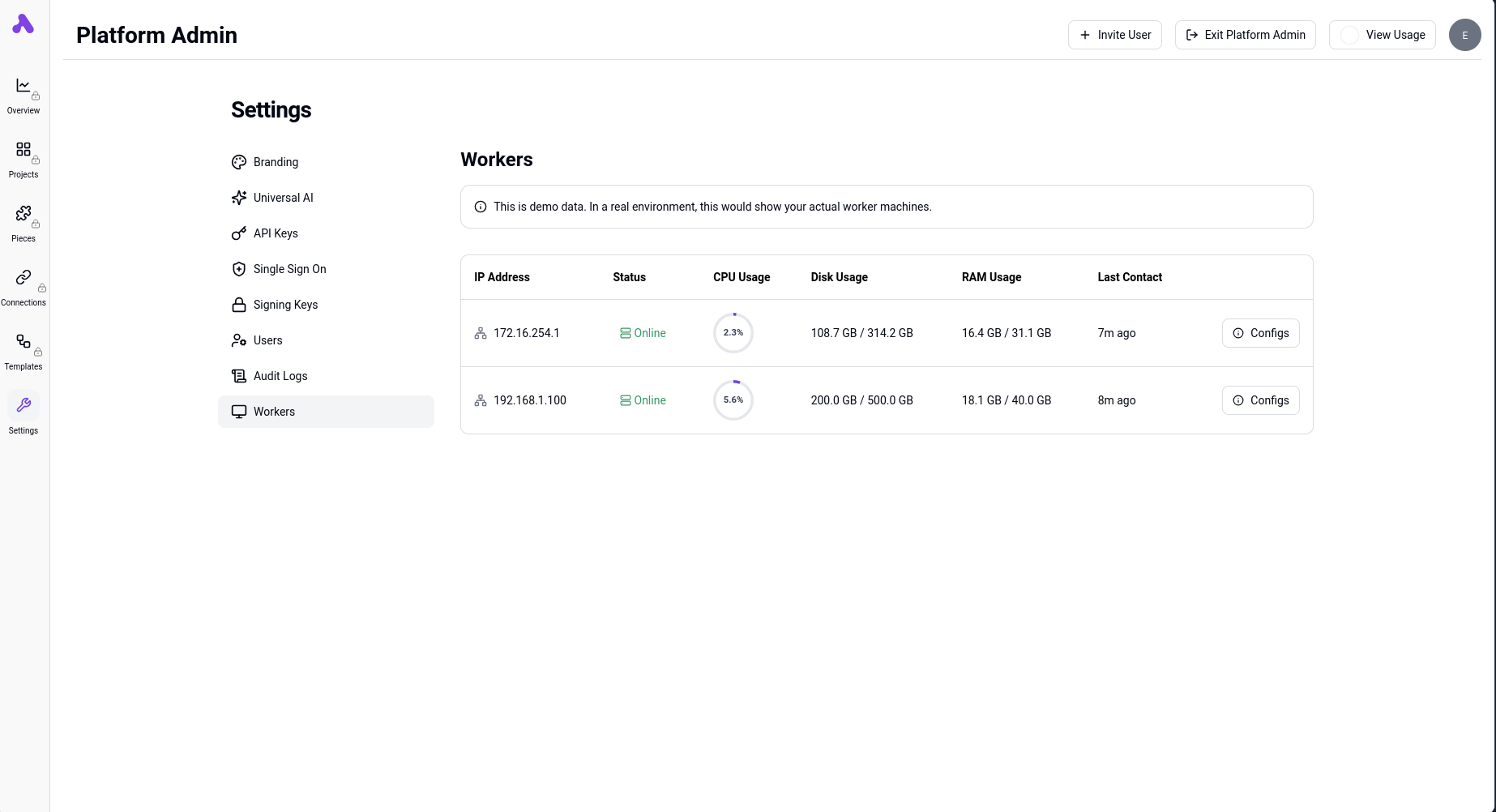
Image: the official Activepieces docs (Separate Workers, "Workers Infrastructure" picture, demo data; older menu layout)
Tip: After the first account, others need an invitation. The docs name
AP_ALLOW_OPEN_SIGN_UP=trueas the open sign-up switch, and a maintainer says uninvited users cannot sign up. Untested by us: try the sign-up page in a private window. Do not set that variable.
Your first flow#
A flow is one trigger (what starts it) plus actions (what it does).
- Create a flow and choose a trigger, such as a schedule.
- Click the + between steps to add an action. The HTTP piece can call any web address.
- Fill in every required field, or Publish stays disabled. Click Publish.
- Open Runs and click your run: each step shows its input and output. After a failure, retry From failed step; earlier steps keep their output.
Tip: After a crash, finished steps do not repeat, but the running step can run twice (docs). Make email steps safe to repeat.
Put it behind HTTPS (with or without Traefik)#
Webhooks and app triggers need an address other services can reach, and AP_FRONTEND_URL builds it. The docs suggest a tunnel for testing, but we teach none: use a domain and open ports 80 and 443. Scheduled flows start from inside and need none of this. Skip this section on your own computer.
For https://automation.<your-domain> you need a DNS record pointing to the server and ports 80 and 443 reachable. Use a host name of its own: the docs describe no sub-path setup.
Both routes use a shared proxy network. Create it once (it may exist):
docker network create proxy
Then change AP_FRONTEND_URL in .env to https://automation.<your-domain>. The worker keeps http://app from the Compose file.
With Traefik#
On a server that already runs Traefik v3 with the Docker provider, add labels to the app service. Our Traefik guide uses entrypoint https, network proxy and resolver le; use your own names if they differ. Every router that uses Let's Encrypt needs its own tls.certresolver label, so keep that line.
In docker-compose.yml, replace the networks: list under app with the lines below and add the labels:
    networks:
      - activepieces
      - proxy
    labels:
      - "traefik.enable=true"
      - "traefik.docker.network=proxy"
      - "traefik.http.routers.activepieces.rule=Host(`automation.<your-domain>`)"
      - "traefik.http.routers.activepieces.entrypoints=https"
      - "traefik.http.routers.activepieces.tls=true"
      - "traefik.http.routers.activepieces.tls.certresolver=le"
      - "traefik.http.services.activepieces.loadbalancer.server.port=80"
At the bottom of the file, extend the top-level networks: block:
networks:
  activepieces:
  proxy:
    external: true
Run docker compose up -d. Check it worked. curl -I https://automation.<your-domain>/ returns an HTTP status line over HTTPS with a valid certificate (curl.exe on Windows).
Without Traefik: Caddy#
Choose this if you have no Traefik. Caddy gets and renews its own certificates. Give the app service the same networks: list as above and add the top-level proxy network (no labels). Run Caddy in its own folder and mount the conf folder, not a single file:
mkdir -p ~/docker_volumes/caddy/{conf,data,config}
cd ~/docker_volumes/caddy
cat > docker-compose.yml << 'EOF'
services:
  caddy:
    image: caddy:2.11.9
    container_name: caddy
    restart: unless-stopped
    ports:
      - "80:80/tcp"
      - "443:443/tcp"
      - "443:443/udp"
    volumes:
      - ./conf:/etc/caddy:ro
      - ./data:/data
      - ./config:/config
    networks:
      - proxy

networks:
  proxy:
    external: true
EOF
Save ~/docker_volumes/caddy/conf/Caddyfile. For a public name:
automation.example.com {
    reverse_proxy app:80
}
For a home-only name use Caddy's own certificate:
automation.home.arpa {
    tls internal
    reverse_proxy app:80
}
Run docker compose up -d in each folder. Caddy reaches the app by container name, so use app:80, never 127.0.0.1. For tls internal, each device must trust Caddy's root once (see our Caddy guide). The Docker commands are the same in PowerShell and Terminal. Check it worked. curl -I https://automation.example.com/ shows an HTTP status line over HTTPS.
Tip: The official HTTPS page uses nginx with
listen 443 ssl http2;. On 19 November 2026 the Activepieces team warned about two critical nginx HTTP/2 flaws (fixed in nginx stable 1.30.7 and mainline 1.31.9). We use Traefik and Caddy and did not check nginx's own page. Update nginx if you use it.
Connect an AI assistant with the MCP server#
MCP (Model Context Protocol) lets an AI assistant use tools. The built-in server lets an assistant list flows, show failed runs and, if you allow it, build and publish flows.
- Open MCP in the sidebar. The Connect tab shows your URL:
https://automation.<your-domain>/mcp/platformfor every project, or.../mcpfor one. - Add the URL to your assistant. The docs' config example:
{
  "mcpServers": {
    "activepieces": {
      "url": "https://automation.<your-domain>/mcp/platform"
    }
  }
}
- On first use the assistant opens a browser for OAuth sign-in. The Connections tab lists each client, and Revoke ends its access.
Tools come in four groups: View (always on), Edit flows, Publish and run, and Delete. A platform admin can switch groups off for every project. Start with View only. No tool returns connection secrets.
Your proxy must forward /mcp, /mcp/platform, /authorize, /token, /register, /revoke, /userinfo and /.well-known/oauth-* without a redirect. A client drops its Authorization header when a redirect leads to another origin, and http to https counts as another origin. Give the client the https URL.
Not confirmed: plan limits for MCP on self-hosted Community (the docs name none), and whether the open sign-in discovery bug in Known bugs affects 0.93.0. We did not test it.
Use a local model with Ollama#
There is no official Ollama piece. For any service with an API, the docs point to the HTTP piece. AI Center → Providers (it has an "Other (OpenAI Compatible)" option for Ollama) and Agents and Chat depend on the plan, so we promise neither. Which local model suits Activepieces agents: not found.
Ollama listens on 127.0.0.1:11434 by default (OLLAMA_HOST changes it). Flow steps run in the worker container, where localhost is the container itself.
- Install Ollama (our guide) and pull a model.
- Docker Desktop (Windows, Mac) gives the worker the name
host.docker.internal. On Linux, add this to theworkerservice and rundocker compose up -d:
    extra_hosts:
      - "host.docker.internal:host-gateway"
- Set
OLLAMA_HOSTso Ollama listens where the container can reach it. That opens the port to your network, so firewall it. - Test from the worker (the image's own health check uses
curl). It should answer with a version:
docker compose exec worker curl -s http://host.docker.internal:11434/api/version
- In a flow, add an HTTP step: method
POST, addresshttp://host.docker.internal:11434/api/chat, and this JSON body:
{
  "model": "<your-model>",
  "messages": [{ "role": "user", "content": "Say hello in five words." }],
  "stream": false
}
The reply holds the text in message.content. Nothing leaves your machine in this flow.
Tip:
AP_NETWORK_MODEdefaults toUNRESTRICTED, so a LAN Ollama works. WithSTRICT, flow code cannot reach private addresses unless you list them inAP_SSRF_ALLOW_LIST.
Security and testing#
| Control | How |
|---|---|
| Secrets | In .env, chmod 600 on Linux and Mac. Back them up |
| Code isolation | UNSANDBOXED is the default: no isolation, fine for one trusted owner. For many authors the docs recommend SANDBOX_CODE_ONLY (untested by us on Community) |
| Outgoing network | UNRESTRICTED by default. STRICT is only "best-effort, in-process protection" |
| Database, Redis, Docker socket | Database and Redis are not published. The socket is not needed: never mount it |
What leaves the machine. Product analytics is on by default. The docs say no personal information is collected, and the event list is in the app. Our AP_TELEMETRY_ENABLED=false is only a starting value: each platform's setting is made from it on first read, then the switch under Platform Admin → Account → Configurations → Product analytics decides. Check it there.
Also outgoing: piece lists from the Activepieces cloud (AP_PIECES_SYNC_MODE), flow templates (AP_TEMPLATES_SOURCE_URL), hosted OAuth apps (AP_CLOUD_AUTH_ENABLED), and every service your flows call. The docs give no full offline recipe.
Quick tests after each change (more in Troubleshooting):
docker compose ps
docker compose logs --tail=100 app worker
curl http://127.0.0.1:8080/api/v1/health
Activepieces or n8n?#
Activepieces has an MIT core. n8n calls itself "fair-code": its README names the Sustainable Use License and an Enterprise License. Pick Activepieces for the MIT core and a simple builder; pick n8n for its ecosystem if its licence suits you (see our n8n guide). Node-RED (Apache 2.0) suits device and message flows. We did not compare them side by side.
Common mistakes#
| Mistake | Why it happens | Do this instead |
|---|---|---|
Empty Workers page, Socket.IO connection error | The worker inherits AP_FRONTEND_URL=http://localhost:8080, and localhost is the worker itself | Give the worker AP_FRONTEND_URL=http://app, as our file does |
Code steps fail with Compilation Error | Several workers share one cache folder and race when a flow is published (issue 17020) | One cache folder per container, one worker. Republish the flow |
| Saved logins fail after a restore | AP_ENCRYPTION_KEY was lost or changed. The database holds only encrypted copies | Back up .env with every database backup |
Empty keys after tools/deploy.sh | It needs openssl and reports success without it | Check the three lines, as in Step 1 |
Pulling latest | In October latest still pointed at a release without a security fix (forum notice) | Pin AP_VERSION. Read the release notes |
Setting AP_PORT to change the port | It is the app's listen port inside the container and breaks the mapping | Change only the left number of 127.0.0.1:8080:80 |
Sign up is restricted after a reinstall | The old database volume still holds the first account | On a throw-away test, docker compose down --volumes. Otherwise invite users |
| A code step cannot read an environment variable | 0.93.0 runs code on Deno, which sees only PATH in the default mode | List names in AP_SANDBOX_PROPAGATED_ENV_VARS on the app, set values on the worker |
| Migrations never finish after the upgrade | A non-zero Postgres statement_timeout cancels the 0.93.0 background migrations | Run SHOW statement_timeout;. If not 0, make the ap_migrator role from the docs |
AI assistants: AP_SIGN_UP_ENABLED, AP_QUEUE_MODE, AP_FLOW_WORKER_CONCURRENCY, AP_CODE_SANDBOX_TYPE | Old names: removed in 0.28.0 or replaced in 0.70.0, 0.69.0 and 0.30.0 | Use AP_REDIS_TYPE, AP_WORKER_CONCURRENCY, AP_EXECUTION_MODE. The last old name stops the server |
| AI assistants: "the app listens on 8080" | The official mapping is host 8080 to container port 80 | Map 127.0.0.1:8080:80 |
| AI assistants: "Community includes Agents, Chat and AI keys" | The pricing page lists them as paid | Treat them as not confirmed free |
Tip: Before you trust a variable name from a blog or chat, search the breaking-changes page. It lists every rename.
Tip: After an upgrade, search the logs for
Code step failedbefore you blame the flow. The line names the flow, the step and whether Deno or the old runtime ran it.
Troubleshooting#
| Problem | Solution |
|---|---|
| Page does not open or app restarts | docker compose ps, then docker compose logs app and the errors below. Remote machines need the SSH tunnel |
| Test flow does nothing | The docs blame the proxy's WebSocket settings, or plain http |
| Webhook never fires | AP_FRONTEND_URL is not a public address the sender can reach |
| Blank page from a LAN address | Reported, cause unconfirmed (thread 11807). Check address, port, console |
| Forgot the admin password | Docs: psql in the Postgres container, connect to activepieces, update public.user_identity with a bcrypt hash (10 rounds) |
Exact error texts#
AP_ENCRYPTION_KEY is missing or invalid. It must be a 32-character hexadecimal string (representing 16 bytes). ...: empty or wrong length. Useopenssl rand -hex 16.AP_JWT_SECRET is undefined, please define it in the environment variables: missing from.env.AP_MCP_URL and AP_FRONTEND_URL share a hostname but are not the same URL ...: giveAP_MCP_URLits own host name, or unset it.Compilation Error Error: Cannot find tsconfig file "tsconfig.json",Compilation Error Error: Importing files outside the step folder is not allowed,Unexpected end of file in JSON: the shared cache race. Use separate caches, then republish.EnvVarError: env-var: "AP_WORKER_TOKEN" is a required variable, but it was not setandHost is required is null or undefined(forum thread 11978): a container started without its variables. The image makes the token fromAP_JWT_SECRET, so check that first.Sign up is restricted. You need an invitation to join. Please contact the administrator.: an account already exists.
Known bugs (open, November 2026)#
- Issue 15230:
TypeError: fetch failedwhen publishing, reported on 0.88.4-hotfix.1 in September. Cause not confirmed. - Issue 16588 (open): on self-hosted Community 0.92.3 (Docker, behind a public URL),
/.well-known/oauth-protected-resource/mcpanswers 200 with an empty body, and Claude Code fails withInvalidHTTPResponse. Reported also on 0.92.3-hotfix.2. We do not know if 0.93.0 is affected. - Issue 17020: closed 5 November. The 0.93.0
code-builder.tsno longer has the folder delete the issue blamed, but we only read it, so we keep separate caches.
Updates and backups#
Update. Read the breaking-changes page for every version you skip, take a backup, then change the AP_VERSION line in .env in a text editor. App and worker must run the same version (enforced since 0.85.4); one variable does that.
cd ~/docker_volumes/activepieces
grep '^AP_VERSION=' .env
docker compose pull
docker compose up -d
docker compose logs --tail=100 app worker
On Windows use Select-String '^AP_VERSION=' .env for the first check. Release notes say when a release cannot be undone; the docs describe a rollback command (npm run rollback -- --to <old>).
Back up the database, .env and the Compose file. We dump inside the container and copy the file out, because > in Windows PowerShell 5.1 can corrupt a binary dump. The dump holds no queued jobs: those live in Redis. The script also deletes archives older than 14 days.
Linux#
cd ~/docker_volumes/activepieces
cat > backup.sh << 'EOF'
#!/bin/sh
set -eu
cd "$HOME/docker_volumes/activepieces"
day=$(date +%F-%H%M)
docker compose exec -T postgres pg_dump -U postgres -Fc -f /tmp/ap.dump activepieces
docker compose cp postgres:/tmp/ap.dump "backups/ap-$day.dump"
docker compose exec -T postgres rm /tmp/ap.dump
tar -czf "backups/activepieces-$day.tar.gz" .env docker-compose.yml "backups/ap-$day.dump"
rm "backups/ap-$day.dump"
chmod 600 "backups/activepieces-$day.tar.gz"
find backups -name 'activepieces-*.tar.gz' -mtime +14 -delete
EOF
chmod 700 backup.sh
./backup.sh
ls -l backups
Run it every night at 03:00 with crontab -e:
0 3 * * * /home/<user>/docker_volumes/activepieces/backup.sh
Windows (PowerShell)#
Set-Location "$HOME\docker_volumes\activepieces"
@'
Set-Location "$HOME\docker_volumes\activepieces"
$day = Get-Date -Format yyyy-MM-dd-HHmm
docker compose exec -T postgres pg_dump -U postgres -Fc -f /tmp/ap.dump activepieces
docker compose cp postgres:/tmp/ap.dump "backups\ap-$day.dump"
docker compose exec -T postgres rm /tmp/ap.dump
tar -czf "backups\activepieces-$day.tar.gz" .env docker-compose.yml "backups\ap-$day.dump"
Remove-Item "backups\ap-$day.dump"
Get-ChildItem backups -Filter 'activepieces-*.tar.gz' | Where-Object LastWriteTime -lt (Get-Date).AddDays(-14) | Remove-Item
'@ | Set-Content -Encoding ascii backup.ps1
.\backup.ps1
Get-ChildItem backups
In Task Scheduler, run powershell.exe daily at 03:00 with the arguments -NoProfile -ExecutionPolicy Bypass -File "%USERPROFILE%\docker_volumes\activepieces\backup.ps1". Docker Desktop must be running.
Mac (Terminal)#
Same as Linux, with /Users/<user>/docker_volumes/activepieces/backup.sh in crontab -e.
The archive holds your .env, so keep copies off this machine, for example with our restic guide.
Restore test. Restore into a new, empty database and never touch the live one. Replace <date> with a real date.
cd ~/docker_volumes/activepieces
mkdir -p ~/ap-restore-test && tar -xzf backups/activepieces-<date>.tar.gz -C ~/ap-restore-test
docker compose cp ~/ap-restore-test/backups/ap-<date>.dump postgres:/tmp/restore.dump
docker compose exec -T postgres createdb -U postgres ap_restore_test
docker compose exec -T postgres pg_restore -U postgres -d ap_restore_test /tmp/restore.dump
docker compose exec -T postgres psql -U postgres -d ap_restore_test -c "\dt"
docker compose exec -T postgres dropdb -U postgres ap_restore_test
docker compose exec -T postgres rm /tmp/restore.dump
\dt should list tables. On Windows use the same docker compose lines with PowerShell paths, after extracting with tar -xzf into a new folder.
Performance and resources#
The docs publish no idle RAM for a home server and we measured none. Use docker stats.
| Setting | Default | What it does |
|---|---|---|
AP_WORKER_CONCURRENCY | 5 | Jobs one worker container runs at once, so our single worker runs up to five. The docs prefer 1 and more workers |
AP_FLOW_TIMEOUT_SECONDS | 600 | Longest time for one run. Raise it with stop_grace_period |
The docs' production sizing is for fleets, not homes: per worker 0.5 vCPU and 1 GB, per app 1 vCPU and 1 GB, PostgreSQL 2 vCPU and 4 GB, Redis 1 vCPU and 1 GB.
FAQ#
Is Activepieces free to self-host? The Community Edition is MIT-licensed. The pricing page lists access control, audit trails, team separation, and Agents and Chat as paid.
Can I skip PostgreSQL and Redis? Yes, with the docs' single-container "hobbyist" install. It cannot scale, and you cannot move off it without starting over.
Why can't another computer reach it? We publish port 8080 on 127.0.0.1 on purpose. Use the SSH tunnel or the HTTPS route.
Sources#
- Activepieces release 0.93.0 and, at that tag, the README, LICENSE, docker-compose.yml, .env.example, Dockerfile, docker-entrypoint.sh and system-validator.ts - read 25 November 2026
- Docker Hub tags: activepieces, pgvector, redis, caddy
- Activepieces docs: Compose install, Hobbyist, Environment variables, Production setup, Separate workers, HTTPS, Telemetry, Rollback, Breaking changes, Sandboxing, Network security, Crash recovery, Reset password, Websocket issues, MCP, Providers, Debugging runs, pricing, installer script - read 25 November 2026
- Forum: latest tag notice, nginx advisory, sign-up restricted, 11978, 11807; issues 15230, 16588, 17020 - read 25 November 2026
- Ollama FAQ, chat API, version API; n8n README; Node-RED LICENSE
Checked against the official docs on 2026-11-25.