AI Coding AgentsDocker SetupSelf-Hosting
AnythingMCP with Docker: self-host an MCP gateway for your APIs (Linux, Windows, Mac)
Before you start
- 20 min read
Boxes marked Run in terminal are what you type; plain text explains why. Check what you need first
What you get in one minute#
AnythingMCP is an open-source gateway you host yourself. It exposes your existing REST, SOAP, GraphQL, OData or SQL systems as MCP tools for Claude, ChatGPT and Copilot, so you do not have to write an MCP server.

Logo: the official AnythingMCP project (github.com/HelpCode-ai/anythingmcp)
You run one Docker Compose stack, add a connector from the adapter catalog or point it at your own API, choose the fields and tools the model may see, and hand one MCP endpoint to the AI client. The project is made by helpcode.ai GmbH and licensed AGPL-3.0-only; the Community edition is free for up to 3 active users.
- 561 ready connectors and 2,400+ tools. 27 connectors need no API key. You can also import OpenAPI, WSDL, GraphQL, OData, a Postman collection or a database.
- One endpoint per MCP server. A server exposes only the connectors and tools assigned to it, with per-connector access and per-tool permissions.
- Credentials encrypted at rest with AES-256-GCM, an audit log for every tool call, and native admin, developer and viewer roles.
- amd64 only. The published image is
linux/amd64; Apple Silicon runs it under emulation.
| At a glance | Detail |
|---|---|
| Current version | v0.51.7, published 2026-10-28 (GitHub release) |
| Time needed | About 5 minutes from clone to endpoint (Community page); on amd64 the README reports about 30 s to pull and 24 s more to a healthy API |
| Image size | 251,140,357 bytes, about 251 MB compressed (Docker Hub, v0.51.7) |
| RAM | Not measured by us and no official figure for the app. The optional MOTIS service uses about 100 MB at rest, but that is not AnythingMCP itself. |
| Ports | 3000 for the dashboard, 4000 for the API and MCP endpoint; both bound to 127.0.0.1 by the quickstart |
| Official docs | Deployment guide and Community edition |
The official compose files use the latest tag. This guide pins v0.51.7 where it matters, because the project ships often: eight releases from v0.51.0 to v0.51.7 arrived on 27 and 28 October 2026.
How it fits together#
One MCP endpoint sits in front of every system you connect, and the gateway does four jobs: authenticate the client, choose the tool, call your system, and map the response back.

Diagram: the main parts and request path in v0.51.7, October 2026. The quickstart serves the dashboard on port 3000 and the API and MCP endpoint on port 4000.
- Endpoints: each MCP server has its own
/mcp/<server-id>. The shared/mcpendpoint asks at sign-in which servers and workspace the connection may reach. - Connectors: an adapter is a single JSON file; the catalog has 561. For your own system, point at an OpenAPI document, WSDL, GraphQL endpoint, OData service, Postman collection or database.
- Response mapping: a tool declares which fields reach the model, so a large upstream response can become a small tool result. The audit log still keeps the full response the model never saw.
Before you start#
AnythingMCP needs Docker 24 or newer and openssl for the quickstart. The published image is amd64 only; Apple Silicon uses emulation.
| System | What you need |
|---|---|
| Linux | Docker Engine or Docker Desktop 24+, openssl, and ports 3000 and 4000 free on loopback |
| Windows | Docker Desktop with a Linux container backend, and a bash environment for the quickstart because it uses openssl, printf and curl; ports 3000 and 4000 free |
| Mac | Docker Desktop started first, openssl, and ports 3000 and 4000 free; Apple Silicon runs the amd64 image under emulation |
Check the tools before you download anything:
docker --version
docker compose version
openssl version
The README asks for Docker 24 or newer. Expect a Docker version line, a Compose v2 line and an OpenSSL version line.
- [ ] Docker 24+ is running
- [ ]
opensslis available - [ ] ports 3000 and 4000 are free
- [ ] at least 251 MB for the image download, plus space for the extracted image and PostgreSQL data
- [ ] a safe place for
.envand its two generated secrets - [ ] for public HTTPS: a domain, DNS pointing at the host, and ports 80 and 443 open
Tested on 2026-10-29: not test-run by DIY Lab Hub. Commands are checked against the official docs and compose files read that day; the Windows route, the Traefik labels and the backup commands are our own and are marked.
Step 1: Start the stack with the official quickstart#
The quickstart downloads one compose file, generates two secrets and starts the app and PostgreSQL. It binds both ports to 127.0.0.1 on purpose, because nothing terminates TLS in front of it.
Linux#
mkdir anythingmcp && cd anythingmcp
curl -fsSLo docker-compose.yml \
  https://raw.githubusercontent.com/HelpCode-ai/anythingmcp/main/docker-compose.quickstart.yml
printf 'JWT_SECRET=%s\nENCRYPTION_KEY=%s\n' "$(openssl rand -hex 32)" "$(openssl rand -hex 32)" > .env
docker compose up -d
Tip: Copy
.envto your password manager before you add connectors; withoutENCRYPTION_KEY, every stored credential has to be entered again.
Optional but recommended: open docker-compose.yml and change helpcodeai/anythingmcp:latest to helpcodeai/anythingmcp:v0.51.7. Docker Hub has that tag, pushed on 2026-10-28.
Windows (PowerShell)#
The quickstart is written for a bash shell: it needs openssl, printf and a bash-style curl, and Windows PowerShell's curl is an alias with different arguments. Run the Linux block in a bash environment on Windows that provides those tools, then check from PowerShell:
docker compose ps
curl.exe http://localhost:4000/health
Mac (Terminal)#
Start Docker Desktop first, then run the same commands as Linux:
mkdir anythingmcp && cd anythingmcp
curl -fsSLo docker-compose.yml \
  https://raw.githubusercontent.com/HelpCode-ai/anythingmcp/main/docker-compose.quickstart.yml
printf 'JWT_SECRET=%s\nENCRYPTION_KEY=%s\n' "$(openssl rand -hex 32)" "$(openssl rand -hex 32)" > .env
docker compose up -d
Check it worked#
docker compose ps
curl http://localhost:4000/health
The README reports that on amd64 the image pulls in about 30 seconds and the API is healthy 24 seconds later. docker compose ps should show the app and PostgreSQL running, and the health endpoint should answer. If it does not, see Troubleshooting.
Step 2: Create the admin account and add a connector#
The first account you register becomes the admin.
Linux#
Open http://localhost:3000 in your browser and register the first account.
Windows (PowerShell)#
Open http://localhost:3000 in your browser and register the first account.
Mac (Terminal)#
Open http://localhost:3000 in your browser and register the first account.
Then add a connector: Connectors > New Connector > Database for a SQL system, or choose an adapter from the catalog. For your own API, point at an OpenAPI document, WSDL, GraphQL endpoint, OData service or Postman collection. Each operation becomes an MCP tool. Rename it, describe it, drop fields the model should not see, and choose which roles may call it.
Database query tools are read-only by default: a single SELECT (or WITH ... SELECT) runs, while writes and stacked statements are blocked. Pair that with a read-only database user; connector.config.deniedTables blocks named tables with glob patterns. The statement timeout is 60 seconds on PostgreSQL, MySQL, MariaDB, Oracle and SAP HANA; SQL Server keeps its 30-second request timeout. MongoDB tools also support CRUD, so a read-only user still matters.
One open security issue matters here. Issue #1245, created 2026-10-24 and still open on 2026-10-29, says a database connector created with the password inside the connection string stores that password in plaintext in connectors.base_url, while auth_config is encrypted, and the connector read returns baseUrl to the browser. The secret guard deliberately skips DATABASE. A contributor is working on it (#1253), and the v0.51.7 release notes do not mention a fix. Use a read-only user with a narrow grant, and do not put a privileged password in a connection string.
Check it worked#
The connector appears in the list, and the MCP server's tool list shows the tools you enabled. A test call should leave an audit row with a status and a duration.
Step 3: Connect Claude or Claude Code#
Every MCP server has its own endpoint. Copy it from MCP Servers -> your server -> MCP endpoint. The shared /mcp endpoint asks at sign-in which servers and workspace the connection may use.
For Claude's custom connector, open Customize -> Connectors -> + -> Add custom connector, give it a name and the URL, choose Add, then Connect, sign in to AnythingMCP and approve. Claude's custom connectors are cloud-side: the service you add must be reachable over public HTTPS. An address such as localhost is not.
Tip: Claude's custom connectors run in Anthropic's cloud, so use a public HTTPS URL;
localhostworks only for local clients such as Claude Code and Cursor.
For Claude Code, the endpoint can be the same URL, or the per-server URL:
Linux#
claude mcp add --transport http anythingmcp https://<your-host>/mcp/<server-id>
Then run /mcp in Claude Code and sign in. With a per-user API key:
claude mcp add --transport http anythingmcp https://<your-host>/mcp/<server-id> \
  --header "X-API-Key: mcp_your_key"
Windows (PowerShell)#
The command is the same, written on one line so PowerShell does not treat the backslash as a continuation:
claude mcp add --transport http anythingmcp https://<your-host>/mcp/<server-id>
With a per-user API key:
claude mcp add --transport http anythingmcp https://<your-host>/mcp/<server-id> --header "X-API-Key: mcp_your_key"
Mac (Terminal)#
Same as Linux:
claude mcp add --transport http anythingmcp https://<your-host>/mcp/<server-id>
Per-user API keys start with mcp_ and go in X-API-Key or Authorization: Bearer mcp_.... The prefix is how AnythingMCP tells them apart from OAuth access tokens.
Check it worked#
claude mcp list
Claude Code should list the server, and /mcp should show its tools. If you use the Inspector instead:
npx @modelcontextprotocol/inspector --server-url https://<your-host>/mcp/<server-id> --transport http
The Inspector needs Node 22.19 or newer and opens at http://localhost:6274.
Step 4: Prepare a production instance#
The quickstart is a local setup. For a team, clone the repository and use the setup script. The deployment guide says the script writes .env (JWT and encryption keys, database password), asks for a domain, creates a Caddyfile, turns on Caddy with automatic HTTPS, starts the services and waits for the health check. The first user to register is Admin.
Linux#
git clone https://github.com/HelpCode-ai/anythingmcp.git
cd anythingmcp
./setup.sh
Windows (PowerShell)#
The setup script is run from a Unix shell (./setup.sh). Run it from a bash environment on Windows, or use the manual route:
git clone https://github.com/HelpCode-ai/anythingmcp.git
cd anythingmcp
Copy-Item .env.example .env
notepad .env
Copy-Item is the PowerShell equivalent of the docs' cp. Set JWT_SECRET, ENCRYPTION_KEY, POSTGRES_PASSWORD and NEXTAUTH_SECRET, and set MCP_BEARER_TOKEN or MCP_API_KEY. Then start the stack:
docker compose up -d --build
curl.exe http://localhost:4000/health
Mac (Terminal)#
Start Docker Desktop, then use the same steps as Linux. If you prefer the manual route, the deployment guide gives cp .env.example .env; set the same four secrets, then run docker compose up -d --build and curl http://localhost:4000/health.
The deployment table calls JWT_SECRET at least 32 characters and ENCRYPTION_KEY exactly 32; the quickstart creates 64 hex characters with openssl rand -hex 32. Keep whichever value you generate.
Check it worked#
docker compose ps
curl http://localhost:4000/health
Both services should be running and the health endpoint should answer. If you used the setup script with a domain, continue with the HTTPS checks below.
Put it behind HTTPS with Traefik#
The quickstart is loopback-only by design, so a cloud AI client needs a public HTTPS URL. The project documents Caddy; if you already run Traefik, the label set below is our translation of the same path split as its Caddyfile.
With Traefik#
Put the app on the external proxy network, route the API paths to port 4000 and everything else to port 3000, and keep APP_BIND_IP=127.0.0.1: Traefik reaches the container over the Docker network, not through the published host port.
services:
  app:
    networks:
      - default
      - proxy
    labels:
      - "traefik.enable=true"
      - "traefik.http.routers.amcp-ui.rule=Host(`<your-domain>`)"
      - "traefik.http.routers.amcp-ui.entrypoints=https"
      - "traefik.http.routers.amcp-ui.tls=true"
      - "traefik.http.routers.amcp-ui.service=amcp-ui"
      - "traefik.http.services.amcp-ui.loadbalancer.server.port=3000"
      - "traefik.http.routers.amcp-api.rule=Host(`<your-domain>`) && (PathPrefix(`/api`) || PathPrefix(`/mcp`) || PathPrefix(`/health`) || PathPrefix(`/.well-known`) || PathPrefix(`/auth`) || PathPrefix(`/authorize`) || PathPrefix(`/token`) || PathPrefix(`/register`))"
      - "traefik.http.routers.amcp-api.entrypoints=https"
      - "traefik.http.routers.amcp-api.tls=true"
      - "traefik.http.routers.amcp-api.service=amcp-api"
      - "traefik.http.services.amcp-api.loadbalancer.server.port=4000"
networks:
  proxy:
    external: true
Create the network once if it does not exist, then start the stack:
docker network create proxy
docker compose up -d
Without Traefik: Caddy#
The repository ships a Caddy profile. Set these values in .env:
COMPOSE_PROFILES=proxy
DOMAIN=<your-domain>
ACME_EMAIL=<your-email>
APP_BIND_IP=127.0.0.1
The deployment guide's Caddyfile splits the same paths:
yourdomain.com {
    tls [email protected]
    reverse_proxy /api/*          app:4000
    reverse_proxy /mcp/*          app:4000
    reverse_proxy /health/*       app:4000
    reverse_proxy /.well-known/*  app:4000
    reverse_proxy /authorize      app:4000
    reverse_proxy /token          app:4000
    reverse_proxy /register       app:4000
    reverse_proxy /auth/*         app:4000
    reverse_proxy app:3000
}
Replace yourdomain.com and [email protected] with your domain and email. Start it and open ports 80 and 443:
docker compose up -d
curl -I https://<your-domain>
Tip: Keep
APP_BIND_IP=127.0.0.1and let Caddy or Traefik reach the app over the Docker network; open it to0.0.0.0only behind a firewall.
Home-only: the quickstart's loopback binding is enough and no TLS is involved. If another device on your LAN must use HTTPS, Caddy's tls internal option issues a local certificate, and each device has to trust Caddy's root certificate.
Security and testing#
- Secrets.
.envholds the JWT and encryption keys and the database password. Keep it out of git, back it up, and runchmod 600 .envon Linux and Mac. - MCP auth. The quickstart sets
MCP_AUTH_MODE=legacyandMCP_ALLOW_ANONYMOUS=false, so/mcpneedsMCP_API_KEYorMCP_BEARER_TOKEN, or a per-usermcp_...key; without one the request is refused with 401. The deployment docs listoauth2as the default mode;bothandnonealso exist, andnoneis for development only. - Credentials. AES-256-GCM at rest, an audit log for every call with input, output, duration and status, native admin/developer/viewer roles, per-connector access and per-tool permissions.
- Database. Use a read-only user, keep
deniedTablestight, prefer static queries, and remember issue #1245 for connection-string passwords. - Limits.
MCP_RATE_LIMIT_PER_MINUTEdefaults to 60;TOOL_MAX_RESPONSE_BYTESdefaults to 10 MB and also applies to the text sent to the MCP client. - Private hosts. Set
SSRF_ALLOWED_HOSTSfor private hosts on the same Docker network. - External calls. The deployment docs describe two outbound cases: licence verification when a licence key is active, and email when SMTP is missing. Your API credentials, connector configs, tool definitions, user data and audit logs are not sent. For a fully offline instance, skip licence activation and configure SMTP.
- Test. Run
docker compose ps, check the health endpoint, checkcurl -I https://<your-domain>, make one tool call, and confirm the audit row.
Tip: Do not set
MCP_AUTH_MODE=noneorMCP_ALLOW_ANONYMOUS=trueto silence a 401; give the client a per-usermcp_...key instead.
What the numbers mean#
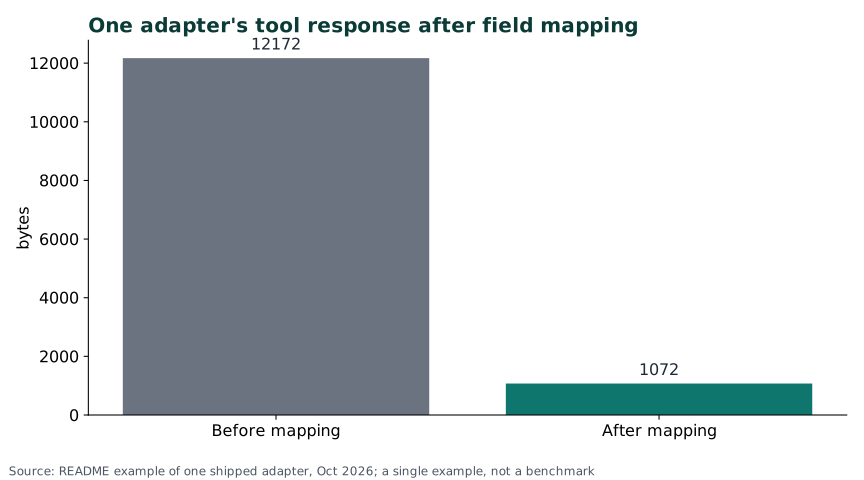
Chart: the README's example of one shipped adapter, October 2026: 12,172 B before mapping, 1,072 B after (-91%). One example, not a benchmark.
Response mapping is the feature that changes the token bill. A tool declares which fields reach the model, so a 12 KB upstream response can become about 1 KB. That is one shipped adapter, not a promise for your API. When a mapping breaks, the default is to return the raw response; set "fallbackToRaw": false to make the call fail instead.
The rest of the numbers describe the project rather than the tool's quality: 561 adapters, 2,400+ tools and 27 keyless adapters at v0.51.7; 758 stars, 109 forks and 28 open issues including pull requests on 2026-10-29; 77 issues in total with 25 open. Three issues carry the bug label and all three are closed. Stars and issue counts are popularity and maintenance signals, not a satisfaction score.
Common mistakes#
Most of these come from the docs' own warnings, the compose comments and the issue tracker. Each one costs time or exposes data.
| Mistake | Why it happens | Do this instead |
|---|---|---|
Deleting or losing .env after the first start | It looks like a temporary file, but ENCRYPTION_KEY decrypts every stored connector credential; lose it and every connector has to be re-credentialed | Copy .env to your password manager before you add connectors; if the key is gone, re-enter every credential |
| Putting the database password in the connection string | The connector form asks for a connection string, so the password goes into the URL; issue #1245 shows it is stored in plaintext in connectors.base_url and returned to the browser | Use a dedicated read-only user with a narrow grant, treat the connection string as a secret, and restrict who can open the connector until #1245 is fixed |
Setting APP_BIND_IP=0.0.0.0 to reach the dashboard from another machine | Publishing the ports seems the quick fix, but the full compose comment says to do it only behind Caddy or a firewall | Keep the loopback bind and put Caddy or Traefik in front; open the ports only with a firewall rule |
Using MCP_AUTH_MODE=none or MCP_ALLOW_ANONYMOUS=true to stop 401s | Both remove the auth step, so the client connects at once; the docs call none development-only and the compose file calls anonymous access local/dev-only | Stay on oauth2 (docs default) or legacy (quickstart) and give the client an OAuth sign-in or a per-user mcp_... key |
| Adding a database connector with the app's own write-capable user | It is the account you already have, but MongoDB tools do CRUD, and the database user's grants remain the boundary | Create a read-only user with SELECT-only grants, set deniedTables, and prefer static queries |
Expecting localhost in Claude's custom connector | Claude connects from Anthropic's cloud, so the address is resolved there, not on your machine | Use a public HTTPS URL for claude.ai and Claude Desktop; localhost works only for local clients such as Claude Code and Cursor |
| Expecting a native arm64 image | The README says the image is amd64 only; the quickstart pins platform: linux/amd64 and runs under emulation on Apple Silicon | Plan for emulation on Apple Silicon; older hardware emulating amd64 is slower |
AI assistant: putting the remote URL in claude_desktop_config.json | The file only launches local stdio commands; the Claude docs say a remote URL entry is skipped as "not a valid MCP server configuration" | Use Customize -> Connectors, or bridge the URL through mcp-remote as the docs show |
AI assistant: setting MCP_API_KEY while the instance runs MCP_AUTH_MODE=oauth2 | MCP_API_KEY appears in the compose env list, so it looks universal; the deployment docs tie it to legacy mode, and oauth2 uses OAuth sign-in | Check MCP_AUTH_MODE first: oauth2 -> OAuth sign-in or a per-user mcp_... key in X-API-Key; legacy -> MCP_API_KEY or MCP_BEARER_TOKEN |
AI assistant: giving http://localhost:3000/mcp as the MCP endpoint | 3000 is the dashboard URL you open first, so it looks like the whole app; the docs put the MCP endpoint on port 4000 | Use http://localhost:4000/mcp or https://<your-host>/mcp/<server-id> |
Troubleshooting#
| Problem | Solution |
|---|---|
401 on /mcp | Sign in again, check the mcp_... key and the MCP_AUTH_MODE value. |
No tools available | Assign connectors to the MCP server, enable the tools, then refresh the client's tool list. |
| Connection refused on port 4000 | The backend is not up; check docker compose ps and the app logs. |
Claude custom connector cannot reach localhost | Claude connects from its cloud; use a public HTTPS URL. |
TOOL_RESPONSE_TOO_LARGE | Raise TOOL_MAX_RESPONSE_BYTES or map fewer fields. |
| Database password visible in the dashboard | Issue #1245; use a read-only user and restrict who can open the connector. |
| Apple Silicon is slow | The image is amd64 only and runs under emulation; arm64 is blocked upstream by a Prisma bug. |
403 Forbidden {"error": "Shared secret is required in x-api-key header"}#
This was an Etsy connector bug in 2026: it sent x-api-key: ${ETSY_CLIENT_ID} without the shared secret. The issue was closed on 2026-09-17. Update first; this guide does not confirm which release contains the fix.
No tools available#
The client connected but the server has no tools it may call. Open the MCP server, assign the connectors, enable the tools, then refresh the tool list in the client.
Known bugs#
- #1296: two or more database connectors on one MCP server exposed only the first connector's tools. Fixed in v0.51.4 by #1309; the issue is closed.
- #1245: the database connection-string password issue is open on 2026-10-29, with a contributor working on it.
Diagnostics#
docker compose ps
docker compose logs app --tail 100
docker compose logs postgres --tail 100
Updates and backups#
Updates are one pull. Both services have restart: unless-stopped.
docker compose pull
docker compose up -d
Read the release notes first. The project shipped eight releases between v0.51.0 and v0.51.7 on 27 and 28 October 2026, so pin v0.51.7 if you want a stable target and update on your own schedule.
Back up PostgreSQL and the .env file. Without ENCRYPTION_KEY, the database credentials cannot be decrypted. The official compose keeps PostgreSQL data in the named volume postgres_data; the commands below take a logical dump, so you do not need a host data folder. These backup commands are ours, built from the compose service name postgres and the database values in DATABASE_URL.
On Linux and Mac:
mkdir -p backups
docker compose exec -T postgres pg_dump -U amcp -d anythingmcp > "backups/anythingmcp-$(date +%F).sql"
On Windows:
New-Item -ItemType Directory -Force backups | Out-Null
docker compose exec -T postgres pg_dump -U amcp -d anythingmcp -f /tmp/anythingmcp.sql
docker compose cp postgres:/tmp/anythingmcp.sql "backups\anythingmcp-$(Get-Date -Format yyyy-MM-dd).sql"
Restore on any system:
docker compose cp "backups/anythingmcp-<date>.sql" postgres:/tmp/restore.sql
docker compose exec postgres psql -U amcp -d anythingmcp -f /tmp/restore.sql
Test the restore on a second instance, or after stopping the stack, then check the login and one tool call. We did not test this restore.
Schedule the dump at 03:00. On Linux or Mac, add this to cron (the % in date is escaped):
0 3 * * * cd /path/to/anythingmcp && docker compose exec -T postgres pg_dump -U amcp -d anythingmcp > "backups/anythingmcp-$(date +\%F).sql"
On Windows, create a Task Scheduler job that runs the two PowerShell commands above.
Performance and resources#
- Image: 251,140,357 bytes, about 251 MB compressed,
linux/amd64only. Docker Hub lists 472 tags for the repository. - Startup: the README reports about 30 seconds for the pull and a healthy API 24 seconds later on amd64.
- RAM: no official figure for the app, and we did not measure it; the optional MOTIS engine uses about 100 MB at rest but is a separate service.
- Watch it:
docker statsshows the app and PostgreSQL usage;docker compose logs app --tail 100shows the app log. - Defaults: 10 MB response limit, 60 requests per minute, metrics off. If you enable metrics, set
METRICS_TOKEN; the port is 9464. - Scaling: the knowledge graph skips connectors with more than 5,000 tools. v0.51.4 lists a tool response cache keyed by tool id.
FAQ#
Is AnythingMCP free? The Community edition is free and open source under AGPL-3.0-only, for personal use, education and evaluation, with up to 3 active users. Starter, Team and Enterprise are commercial; Enterprise adds SSO, SCIM and per-user sign-in for OAuth2 connectors. Releases before the AGPL adoption stay BSL 1.1 until 2030-03-04.
Do I have to write an MCP server? No. You add an adapter from the catalog, or point AnythingMCP at an OpenAPI document, WSDL, GraphQL endpoint, OData service, Postman collection or database. Each operation becomes an MCP tool.
Does it run on Apple Silicon? Only under emulation. The published image is amd64, and the compose file pins platform: linux/amd64; arm64 builds are blocked upstream by a Prisma bug.
Can Claude Desktop connect to my local instance? For claude.ai and Claude Desktop, no: they connect from Anthropic's cloud, so the instance needs a public HTTPS URL. Local clients such as Claude Code and Cursor can use a local endpoint.
Will it write to my database? SQL tools run a single SELECT or WITH ... SELECT and block writes by default. MongoDB tools support CRUD, so use a read-only user.
Where are my credentials stored? Encrypted with AES-256-GCM in your own PostgreSQL. The exception is the open issue #1245: a database password inside a connection string is stored in plaintext in base_url and returned to the browser.
Sources#
- AnythingMCP website and Community edition (read 2026-10-29): features, 3-user Community limit, quickstart claims.
- README at v0.51.7 (read 2026-10-29): 561 connectors, response mapping, auth schemes, audit log, amd64 note.
- Repository metadata and issue search (read 2026-10-29): stars, forks, issue counts.
- Latest release and release list (read 2026-10-29): v0.51.7 and the October releases.
- Quickstart compose and full compose (read 2026-10-29): ports, env, health checks.
- Deployment guide (read 2026-10-29): setup script, manual env, Caddyfile, auth modes, env table.
- Licence FAQ (read 2026-10-29): AGPL, Community users, BSL dates.
- Claude integration (read 2026-10-29): endpoints, custom connector, Claude Code commands, Inspector.
- Database connector docs (read 2026-10-29): read-only queries, denied tables, timeouts.
- Docker Hub tags (read 2026-10-29): v0.51.7 digest, image size, amd64 only.
- User reports: #1296, #634, #501, #1321 (August to October 2026); open security issue #1245 (created 2026-10-24).
Not run by DIY Lab Hub: we read the official docs and compose files but did not install AnythingMCP on a test machine.
Checked against the official docs on 2026-10-29.